Keychron K1 Pro vs Leopold FC750R OEWireless Custom vs Wired Classic
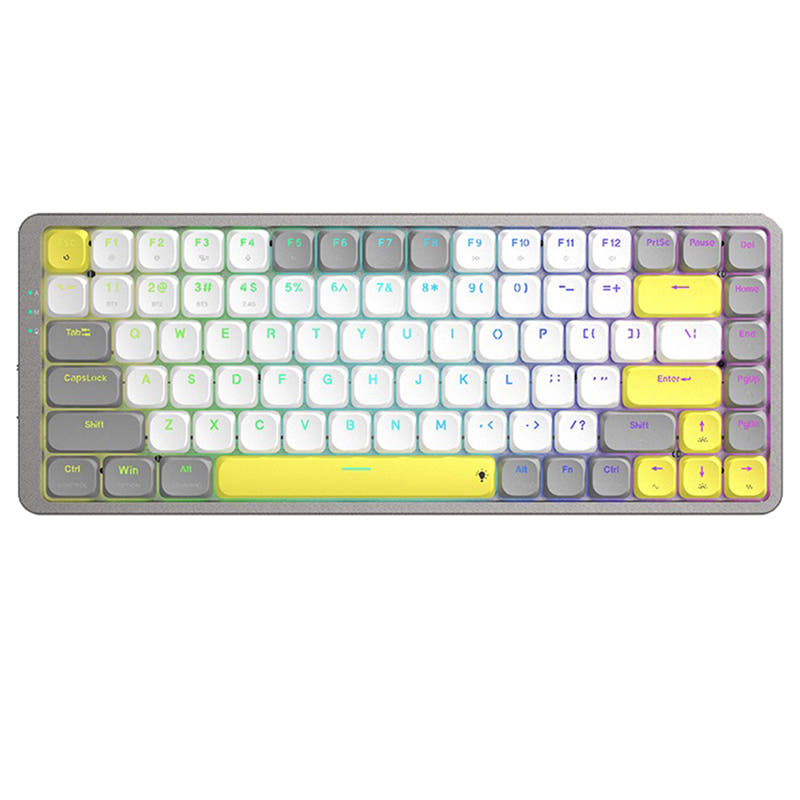
Choose the Keychron K1 Pro for wireless flexibility and deep customization, or the Leopold FC750R for a straightforward, pre-built wired experience.
KeebFinder may earn a commission when you buy through these links, at no extra cost to you.

5.0 (5)5.0 · 5 reviews
from$67at Keychron

No reviews
from$119at MK
90-day lowLowest price in 90 days
Which one should you get?
Get the
Keychron K1 Pro
Wireless Custom
Build quality in the top 15% of 80% boards under $100.
- Triple-mode connectivity with Bluetooth 5.1 and wired USB-C.
- Hot-swappable PCB option for solder-free switch customization.
- Extensive programmability via open-source QMK and VIA firmware.
- Low-profile switches and keycaps only. Standard MX keycaps will not fit.
- North-facing LEDs. Cherry-profile keycaps can hit the switch housing.
Get the
Leopold FC750R OE
Wired Classic
Build quality in the bottom 15% of 80% boards under $150.
- Features genuine Cherry MX switches in a variety of types including silent options.
- Built with double-shot PBT keycaps for durability.
- Includes DIP switches for basic layout customization.
- Switches are soldered. Swapping them means soldering.
- No ISO layout. ISO-DE, UK, and other ISO variants are not offered.
For most buyers, the Keychron K1 Pro presents a stronger value proposition with its wireless freedom, high customizability, and modern feature set. It is the clear choice for users who value flexibility, plan to mod, or work across multiple devices. Only consider the Leopold FC750R if you specifically want a straightforward, wired keyboard with Cherry MX switches and have no intention of modifying it after purchase.
The differences that matter
Skip the 40-row spec sheet. These are the specs that change how each board feels, sounds, and fits your desk.
Keychron K1 Pro
Leopold FC750R OE
Connection
Bluetooth, Wired
Wired
Wireless for several devices and wired for lower latency
Hot-swappable
Yes
No
Switch changes without soldering
Low profile
Yes
No
Case material
ABS, Aluminum, Plastic
Plastic
Switch options
Clicky, Linear, Tactile
Clicky, Linear, Silent, Tactile
- Keychron K1 Pro
- Leopold FC750R OE
- Performance
- 8160
- Build quality
- 8046
- Productivity
- 8052
- Customizability
- 8848
- Portability
- 7355
- Layout size: 80%
What will you mostly use it for?
The Keychron K1 Pro is the more versatile choice across all defined use cases. Its advantages in connectivity, customizability, and modern features like a high polling rate and programmability make it suitable for dynamic environments. The Leopold FC750R, as a wired-only, pre-built board without hot-swap or advanced firmware, serves a narrower niche for users who prefer a traditional, set-and-forget keyboard.
Pick the Keychron K1 Pro
- The K1 Pro has a specified 1000 Hz polling rate in wired mode for lower latency.
- Its wireless Bluetooth connectivity allows for a cleaner desk setup.
- North-facing RGB lighting is listed as a feature for the K1 Pro.
Keychron K1 Pro vs Leopold FC750R OE specs
Every tracked spec, side by side. Rows marked with a dot differ between the boards.
13 of 24 specs differ
Keychron K1 Pro
Leopold FC750R OE
Switch options
Hot-swappable
Mount style
Low profile
Layout size
Layout standard
Ergonomics
Display
Media keys
Connection
Max polling rate
Battery
USB-C
Case material
Keycaps
Weight
Dimensions
Typing angle
Backlight
QMK
VIA
N-key rollover
Mac & Windows
Released
ISO layouts by store
Which stores sell ISO-DE, UK, and the other regional layouts.
Keychron K1 Pro
Keychron
ISO-DE, ISO-UK, ISO-Nordic, ISO-FR, ISO-ES, ISO-SW
In stockShips to you
Keychron (DE)
ISO-DE, ISO-UK, ISO-Nordic, ISO-FR, ISO-ES, ISO-SW
In stockDoes not ship to you
Leopold FC750R OE
No ISO layout at the stores we track.
Compare prices
Live prices from the stores we track, cheapest in-stock offer first.
Prices in USD are converted to your currency and can change at any time. KeebFinder may earn a commission when you buy through these links, at no extra cost to you.
Lowest price across stores, Amazon excluded.



Keychron K1 Pro vs Leopold FC750R OE: your questions
The Keychron K1 Pro is suitable for gaming, particularly in its wired mode. The manufacturer states it offers a 1000 Hz polling rate when connected via USB-C, which is engineered for competitive play. It also features N-key rollover in both wireless and wired modes to prevent ghosting.
No, the Leopold FC750R OE is not hot-swappable. Its product listing confirms the hotswap field is 'No'. Changing the switches would require desoldering the existing Cherry MX switches and soldering in new ones, which is a more involved process.
Yes, the Keychron K1 Pro is fully compatible with Mac. The vendor description states it offers a Mac layout with matching multimedia and function key functions, and it includes keycaps for both macOS and Windows. Its configuration software is also compatible with macOS.
The Leopold FC750R OE uses genuine Cherry MX mechanical switches. The vendor listing shows available options including Cherry MX Red, Brown, Blue, Black, Silver, Clear, and Silent Red switches.
Yes, the Keychron K1 Pro is a wireless keyboard. It connects via Bluetooth 5.1 and can pair with up to three devices. It also has a USB-C wired mode and contains a 2000mAh rechargeable battery for wireless use.
The Keychron K1 Pro is significantly more customizable. It offers a hot-swappable version, full QMK and VIA firmware support for remapping every key, and RGB lighting control. The Leopold FC750R only offers basic layout changes via DIP switches and is not hot-swappable.
The Keychron K1 Pro comes with low-profile, double-shot PBT keycaps. The vendor description states they are made of durable, oil-resistant PBT material and are designed for a premium typing feel. The set includes keycaps for both macOS and Windows layouts.
No, the Leopold FC750R OE does not have any backlighting. The product metadata explicitly lists 'RGB: No', and the vendor description does not mention any lighting features, focusing instead on its double-shot PBT keycaps and Cherry MX switches.
Compatibility with game consoles is not specified in the provided information for the Keychron K1 Pro. The keyboard supports Bluetooth and wired USB connections, but official support for consoles would need to be verified from other sources or the manufacturer.
The Keychron K1 Pro uses an ABS and aluminum frame construction, while the Leopold FC750R has an all-plastic case. The K1 Pro also features redesigned stabilizers for less wobble, according to its vendor page. Both keyboards use PBT keycaps, with Leopold's being double-shot and Keychron's being low-profile double-shot.
The Keychron K1 Pro is programmed using the Keychron Launcher web app or the open-source QMK/VIA firmware. The manufacturer notes you need to connect the keyboard via wired mode and use a compatible browser like Chrome, Opera, or Edge to use the Launcher app for key remapping and macros.
Not sold on either?




Still torn?
Answer a few quick questions and the keyboard finder ranks 2,000+ boards by how you will actually use yours.