Keychron Q0 Max Numpad vs Q1 V2Numpad vs 75% Keyboard
The Keychron Q0 Max is the clear choice if you need a separate wireless numpad, but the Q1 V2 is the better choice for a complete typing experience.
KeebFinder may earn a commission when you buy through these links, at no extra cost to you.

No reviews
from$115at MK
4.9 (318)4.9 · 318 reviews
from$59at Keychron
Which one should you get?
Get the
Keychron Q0 Max Numpad
Numpad
Build quality in the top 10% of Numpad boards under $150.
- Wireless connectivity via Bluetooth 5.1 and 2.4 GHz, plus wired USB-C mode.
- Dedicated numpad and macro keys with a rotary encoder for data entry tasks.
- Higher portability score due to smaller footprint and wireless freedom.
- South-facing LEDs. Shine-through legends stay dark, and some sculpted keycaps can clip the LED.
- Numpad only. This is not a full keyboard.
Get the
Keychron Q1 V2
75% Keyboard
Build quality in the top 5% of 75% boards under $100.
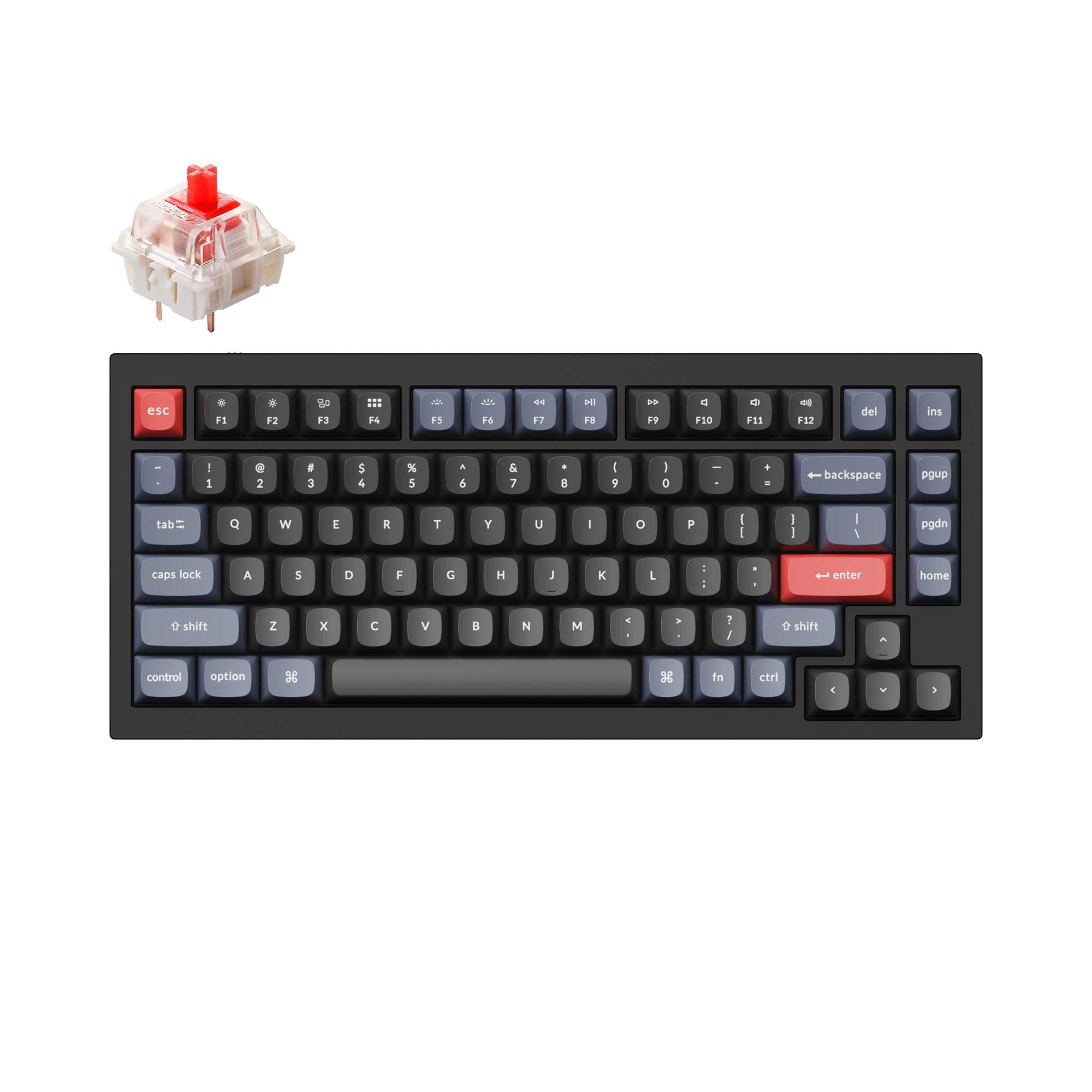
- Full 75% layout with dedicated multi-media keys and a programmable knob.
- Double-gasket mount design, noted in the vendor description as an industry innovative structure.
- Exceptional modding potential with multiple color variants, barebones kits, and support for third-party stabilizers.
- South-facing LEDs. Shine-through legends stay dark, and some sculpted keycaps can clip the LED.
- No numpad.
Choose the Keychron Q0 Max if you need a wireless, high-quality numpad to complement a primary keyboard, especially for office work or travel where Bluetooth and 2.4 GHz are valuable. Pick the Keychron Q1 V2 if you want a complete, wired 75% keyboard with excellent modding potential, a knob, and multi-media keys across gaming, programming, and content creation. The Q1 V2's versatility makes it the better choice for most users who want a single keyboard solution.
The differences that matter
Skip the 40-row spec sheet. These are the specs that change how each board feels, sounds, and fits your desk.
Keychron Q0 Max Numpad
Keychron Q1 V2
Layout size
Numpad
75%
Connection
Bluetooth, 2.4 GHz, Wired
Wired
Wireless for several devices and wired for lower latency
Switch options
Linear, Tactile
Clicky, Linear, Tactile
Mount style
Plate Mount
Gasket Mount, Plate Mount
Keycaps
PBT
ABS, PBT
- Keychron Q0 Max Numpad
- Keychron Q1 V2
- Performance
- 7772
- Build quality
- 8489
- Productivity
- 9498
- Customizability
- 9198
- Portability
- 8762
- Hot-swappable
- Max polling rate: 1,000 Hz
- Case material: Aluminum
- Knob
- QMK
- VIA
What will you mostly use it for?
The Keychron Q1 V2 wins most use cases because it is a complete keyboard rather than a dedicated accessory. It takes the lead for gaming, programming, modding, and content creation by offering a full 75% layout with multi-media keys, a knob, and a broader modding ecosystem. The Q0 Max wins in office and travel categories, where its wireless connectivity and portable numpad form factor provide a clear advantage for data entry or a clutter-free mobile setup. Office users who frequently work with numbers may find the Q0 Max indispensable.
Pick the Keychron Q1 V2
- The Q1 V2 offers a 75% layout with multi-media keys, leaving more room for a mouse on the desk.
- It has a 5 degree typing angle which some gamers prefer for a more ergonomic hand position.
- The Q1 V2 is wired-only, eliminating any potential for wireless latency in competitive play.
- Both have 1000 Hz polling, but the Q0 Max's numpad form factor is less suited for gaming controls.
Keychron Q0 Max Numpad vs Q1 V2 specs
Every tracked spec, side by side. Rows marked with a dot differ between the boards.
8 of 26 specs differ
Keychron Q0 Max Numpad
Keychron Q1 V2
Switch options
Hot-swappable
Mount style
Sound dampening
Screw-in stabilizers
Layout size
Layout standard
Ergonomics
Knob
Display
Media keys
Connection
Max polling rate
USB-C
Case material
Plate material
Keycaps
Weight
Dimensions
Typing angle
Backlight
QMK
VIA
N-key rollover
Mac & Windows
Released
Compare prices
Live prices from the stores we track, cheapest in-stock offer first.
Prices in USD are converted to your currency and can change at any time. KeebFinder may earn a commission when you buy through these links, at no extra cost to you.
Lowest price across stores, Amazon excluded.
- Check on Amazon
Amazon
Check price



Keychron Q0 Max Numpad vs Q1 V2: your questions
The Keychron Q0 Max is better for dedicated data entry because it is a standalone numpad with a rotary encoder and macro keys. The Q1 V2 is a 75% keyboard without a numpad, making it less efficient for heavy number input.
The Keychron Q1 V2 is a wired-only mechanical keyboard with a USB-C connection. It does not offer Bluetooth or 2.4 GHz wireless connectivity, unlike the Q0 Max which supports all three.
No, the Q0 Max is designed as a numpad with 26 keys and macro keys, not a full keyboard. It is intended to be used alongside a primary keyboard for data entry and macros.
The Q1 V2 offers more modding options due to its double-gasket mount design, availability as a barebones kit, multiple color variants, and support for third-party stabilizers. The Q0 Max also supports hot-swapping and has acoustic foam, but the Q1 V2 has a larger ecosystem.
Yes, the Q0 Max is fully programmable with QMK and VIA firmware. It has macro keys on the left side that can be remapped to various functions or shortcuts.
The Q1 V2 is better for gaming because its 75% layout includes F-keys and multi-media keys, and it is wired for lower latency. The Q0 Max is a numpad and not designed for gaming controls.
Yes, the fully assembled version of the Q1 V2 includes double-shot PBT keycaps in an OSA profile. The barebones version does not include keycaps.
The Q0 Max is more portable due to its compact numpad size and wireless capabilities (Bluetooth 5.1 and 2.4 GHz). The Q1 V2 weighs 1825g and requires a wired connection.
The Q0 Max offers three connectivity modes: wired via USB-C, Bluetooth 5.1, and 2.4 GHz wireless using the included dongle. This makes it versatile for different setups.
Yes, the Q1 V2 includes a programmable rotary encoder knob in the top right corner. It can be customized for functions like volume, zoom, or screen brightness.
The Q1 V2 is more suitable for programming because it has a full 75% layout with F-keys, navigation keys, and multi-media keys. The Q0 Max lacks these essential keys for efficient coding without a separate keyboard.
Yes, both the Keychron Q0 Max and the Q1 V2 feature hot-swappable PCBs that support both 3-pin and 5-pin MX-style mechanical switches. This allows for easy switch changes without soldering.
Not sold on either?


Still torn?
Answer a few quick questions and the keyboard finder ranks 2,000+ boards by how you will actually use yours.