Keychron Q0 vs Q1 V2Numpad or 75% Board?
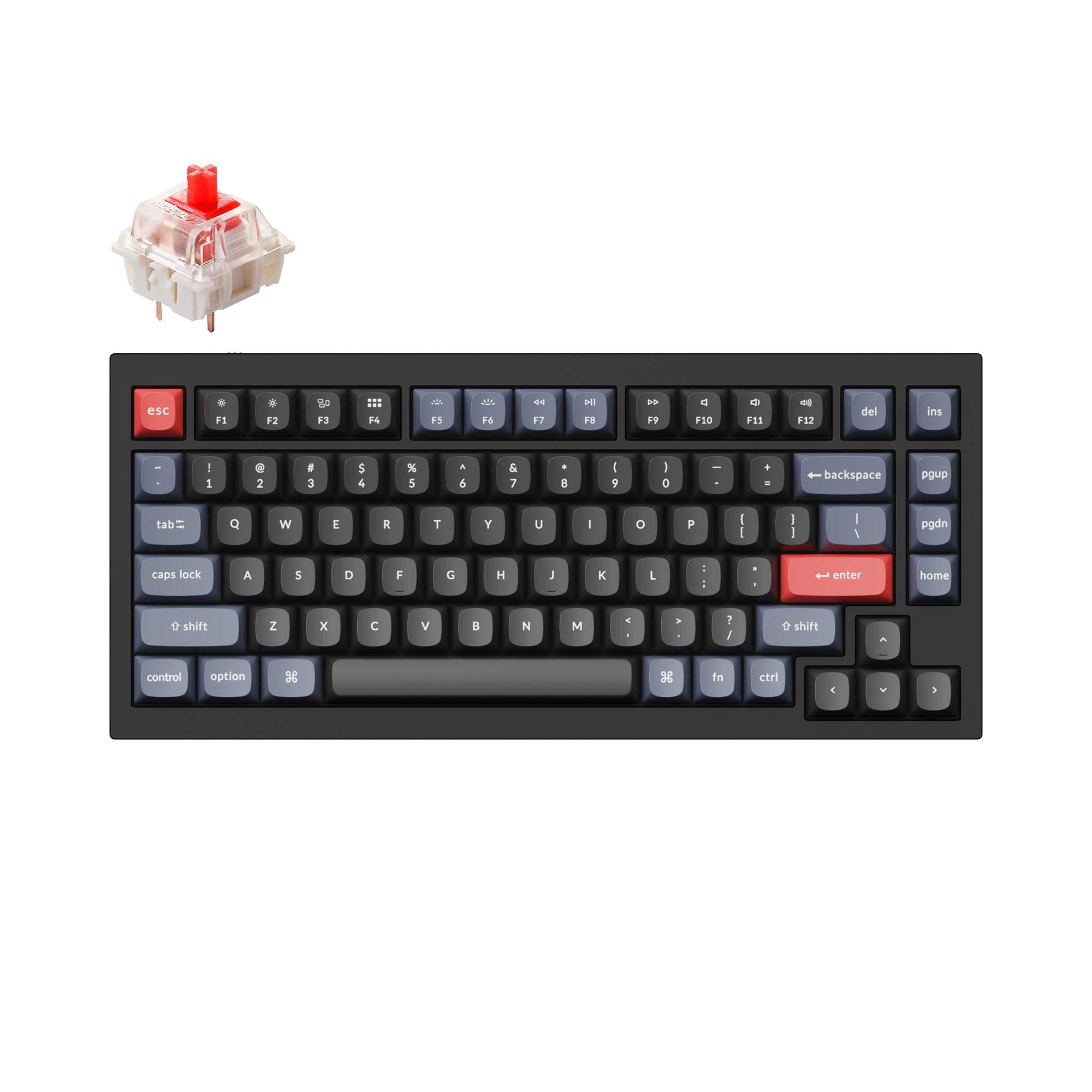
Choose the Keychron Q0 if you need a dedicated numpad or macro pad, or choose the Keychron Q1 V2 if you need a full 75% keyboard with a more advanced gasket mount.
KeebFinder may earn a commission when you buy through these links, at no extra cost to you.

5.0 (3)5.0 · 3 reviews
from$59at Keychron
90-day lowLowest price in 90 days
4.9 (318)4.9 · 318 reviews
from$59at Keychron
Which one should you get?
Get the
Keychron Q0
Build quality in the top 10% of 60% boards under $100.
- Dedicated numpad that can also be programmed as a macro pad with QMK/VIA support.
- Compact and lightweight dimensions (20 x 129 x 89 mm, ~500g fully assembled) for easy transport.
- Fully CNC machined 6063 aluminum case with polished, anodized, and sandblasted finish.
- South-facing LEDs. Shine-through legends stay dark, and some sculpted keycaps can clip the LED.
- Compact layout only. No function row, dedicated arrow keys, or numpad.
Get the
Keychron Q1 V2
Knob
Build quality in the top 5% of 75% boards under $100.
- Full 75% layout with a row of function keys and arrow keys for versatile daily use.
- Double-gasket design uses silicone pads between top and bottom cases to reduce metal resonance.
- Includes a programmable rotary encoder knob for custom macros and shortcuts.
- South-facing LEDs. Shine-through legends stay dark, and some sculpted keycaps can clip the LED.
- No numpad.
The Keychron Q1 V2 is the clear choice if you need a complete, premium typing experience for your desk. Its 75% layout, double-gasket design, and programmable knob make it a versatile daily driver for work and play. However, if you already have a main keyboard and need a dedicated numpad or a highly portable macro pad, the Keychron Q0 is a purpose-built companion. In short, buy the Q1 V2 for a full keyboard, and buy the Q0 for a specialized pad.
The differences that matter
Skip the 40-row spec sheet. These are the specs that change how each board feels, sounds, and fits your desk.
Keychron Q0
Keychron Q1 V2
Layout size
60%
75%
Mount style
Tray Mount
Gasket Mount, Plate Mount
Knob
No
Yes
Weight
2,200 g
1,825 g
Heavier boards stay planted and lighter ones travel
Sound dampening
No
Yes
- Keychron Q0
- Keychron Q1 V2
- Performance
- 6472
- Build quality
- 8589
- Productivity
- 7298
- Customizability
- 9298
- Portability
- 6962
- Connection: Wired
- Hot-swappable
- Max polling rate: 1,000 Hz
- Case material: Aluminum
- Switch options: Clicky, Linear, Tactile
- QMK
What will you mostly use it for?
The Keychron Q1 V2 wins in gaming, office, and programming use cases because it is a full keyboard with a 75% layout and a double-gasket mount. The Keychron Q0 wins for travel and content creation due to its extremely compact size and utility as a dedicated macro or numpad. For modding, both keyboards are equally compelling, offering similar high-quality materials and open-source firmware, but with different mounting styles to explore.
Pick the Keychron Q1 V2
- The Q1 V2 is a full 75% keyboard with essential keys for gaming, including a row of function keys.
- The Q1 V2 offers a more advanced double-gasket mount which can provide a different typing feel during gameplay.
- The Q1 V2 supports a programmable knob for quick volume or macro adjustments in-game.
What owners say
Ratings and quotes collected from verified store reviews, including the critical ones.
Keychron Q0
3 owner reviews
“It's great to have the option to add a numpad for productivity, then move it off to the side when you need more desk space for gaming. This thing is built with quality materials and has very satisfying sound with each keystroke. I've used both Keychron banana…”
Keychron Q1 V2
318 owner reviews
“Exactly what I wanted. Swapped out the switches for some Gateron Zero degree fully silent switches. Mechanical but almost completely silent, works a dream!”
Keychron Q0 vs Q1 V2 specs
Every tracked spec, side by side. Rows marked with a dot differ between the boards.
9 of 25 specs differ
Keychron Q0
Keychron Q1 V2
Switch options
Hot-swappable
Mount style
Sound dampening
Screw-in stabilizers
Layout size
Layout standard
Ergonomics
Knob
Display
Media keys
Connection
Max polling rate
USB-C
Case material
Plate material
Keycaps
Weight
Dimensions
Typing angle
Backlight
QMK
VIA
Mac & Windows
Released
Compare prices
Live prices from the stores we track, cheapest in-stock offer first.
Prices in USD are converted to your currency and can change at any time. KeebFinder may earn a commission when you buy through these links, at no extra cost to you.
Lowest price across stores, Amazon excluded.



Keychron Q0 vs Q1 V2: your questions
No, the Keychron Q0 is a dedicated numpad, not a full keyboard. It has only 22 keys and is designed to be used alongside a main keyboard for number entry or as a macro pad.
Yes, both keyboards support QMK firmware and VIA software for key remapping, macros, and shortcuts. They can be customized using the Keychron Launcher web app in a Chrome, Opera, or Edge browser.
Both are highly moddable with hot-swappable sockets, screw-in stabilizers, and aluminum cases. The Q1 V2 uses a double-gasket mount, while the Q0 uses a tray mount, so they offer different modding experiences.
The Q0's top case has sharper corners for better compatibility with third-party keycaps. The Q1 V2 is noted to be compatible with profiles like MT3, SA, and XDA. Both ship with OSA profile (OEM height, SA shape) keycaps.
Both offere Linear, Tactile, and Clicky switch options. For the Q0, options include Gateron G Pro Red (Linear), Blue (Clicky), Brown (Tactile), and Keychron K Pro Banana. The Q1 V2 also offers Gateron Phantom Yellow and Silver, and Keychron K Pro Red and Brown.
It can be used as a macro pad for programming shortcuts, but it does not replace a full keyboard. The Q1 V2 is better for programming due to its full 75% layout.
Yes, the Q1 V2 is available in several versions including 'Fully Assembled Knob' and 'Barebone Knob' variants. The knob is programmable via VIA software.
Both keyboards support Mac layouts. The Q1 V2 is specifically described as being built with Mac users in mind, and it includes both Mac and Windows keycaps in the box.
Both use screw-in PCB stabilizers, which the vendor describes as increasing stability and making big keys like space bar and enter more stable and smooth. They also support third-party stabilizers like Cherry or Durock.
The fully assembled Q0 weighs approximately 500g, while the fully assembled Q1 V2 weighs about 1825g. The Q0 is significantly lighter and more portable.
Yes, the Q0 can be programmed with QMK/VIA to act as a dedicated macro pad for gaming, allowing you to assign complex key combinations or actions to its 22 keys.
Not sold on either?


Still torn?
Answer a few quick questions and the keyboard finder ranks 2,000+ boards by how you will actually use yours.