Keychron Q1 HE vs Q11Wireless Gaming vs Split Ergonomic Design
Choose the Q1 HE for high-performance wireless gaming with magnetic switches, or the Q11 for ergonomic split typing comfort.

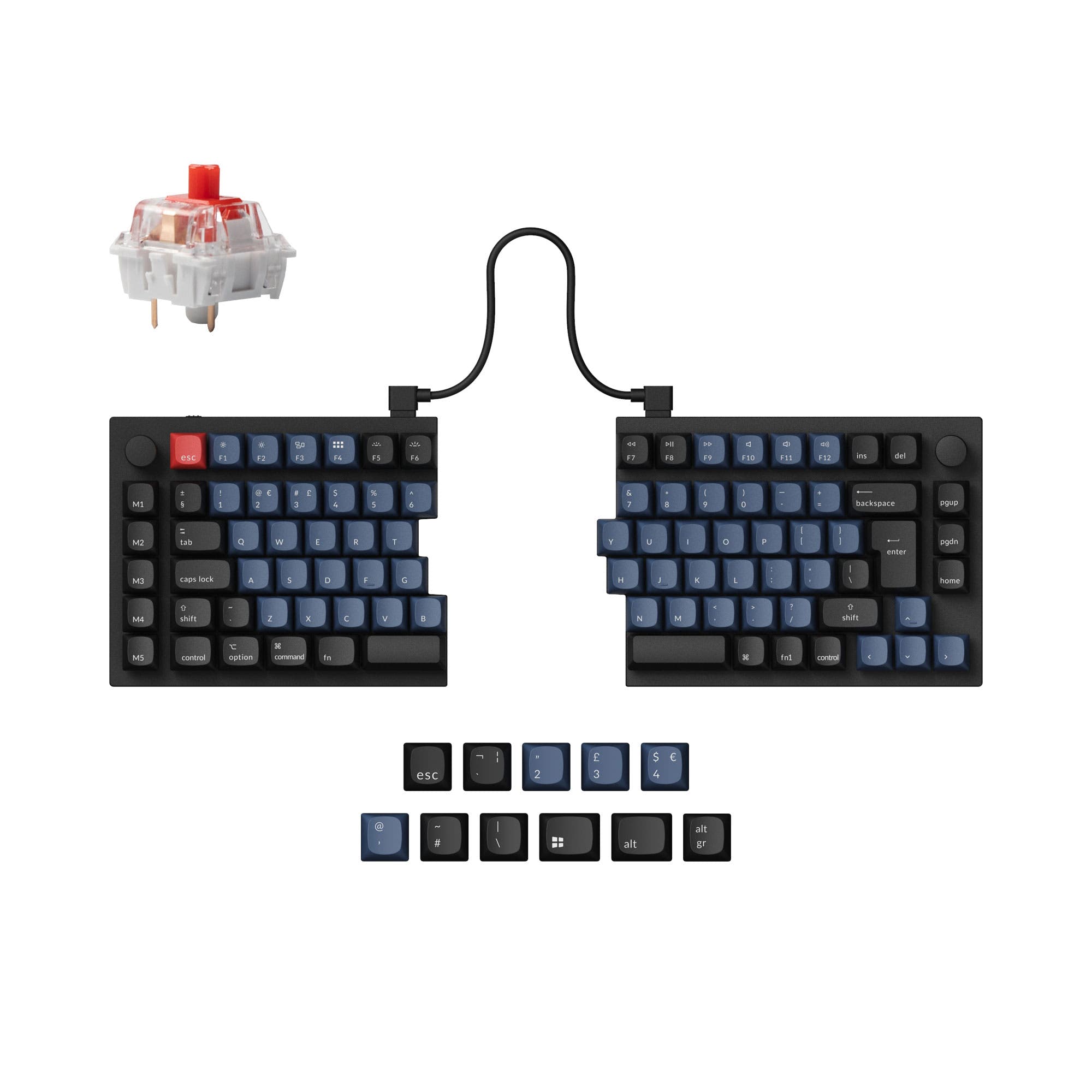
Which one should you get?
Get the
Keychron Q1 HE
Wireless Gaming
- Advanced Gateron double-rail magnetic switches with adjustable actuation points (0.2-3.8mm) and rapid trigger.
- Triple connectivity with 2.4 GHz (1000Hz), Bluetooth 5.2, and wired operation.
- Includes a 4000mAh rechargeable battery for wireless use.
- Hot-swap sockets are compatible only with specific Gateron magnetic switches, limiting switch choices.
- Heavy weight (listed as ~1735g assembled) reduces portability despite wireless features.
- No dedicated tenting or angle adjustment beyond the fixed 5.2-degree typing angle.
Get the
Keychron Q11
Split Ergonomic Design
- Unique split 75% layout allows for ergonomic positioning to reduce strain.
- Includes a programmable aluminum knob for media control or creative macros.
- Hot-swappable PCB supports both 3-pin and 5-pin standard MX mechanical switches.
- Wired-only connectivity requires two cables (bridge and host PC).
- The split design inherently has a larger desk footprint and is more complex to transport.
- Some user reviews note the included bridge cable can be too short for wider shoulder placements.
Your primary need dictates the choice. For competitive gaming features, wireless freedom, and the latest magnetic switch technology, the Keychron Q1 HE is the focused tool. If your priority is long-term typing comfort, ergonomic posture, and a unique split layout for work or creation, the Keychron Q11 is the more suitable investment. Both represent the high end of Keychron's custom lineup with excellent build quality.
The differences that matter
Skip the 40-row spec sheet. These are the specs that change how each board feels, sounds, and fits your desk.
Keychron Q1 HE
Keychron Q11
Hall effect (magnetic)
Yes
No
Rapid trigger
Yes
No
Connection
Bluetooth, 2.4 GHz, Wired
Wired
Ergonomics
Standard
Split
Max polling rate
8,000 Hz
1,000 Hz
- Keychron Q1 HE
- Keychron Q11
- Performance
- 10068
- Build quality
- 9088
- Productivity
- 9797
- Customizability
- 9898
- Portability
- 8173
- Hot-swappable
- Case material: Aluminum
- Knob
- QMK
- VIA
- Sound dampening
What will you mostly use it for?
The Q1 HE is the clear choice for gamers and those needing wireless flexibility, thanks to its magnetic switches and high-performance wireless modes. The Q11 wins for ergonomics-focused users like programmers and content creators who prioritize a split layout for comfort. For office use and modding, both keyboards are equally capable, sharing core customization features and build quality.
Pick the Keychron Q1 HE
- Features adjustable actuation point magnetic switches with 0.1mm sensitivity for rapid trigger functionality.
- Offers a 1000Hz polling rate over a 2.4 GHz wireless connection for low-latency gameplay.
- Supports assigning multiple actions to a single key based on press depth.
What owners say
Ratings and quotes collected from verified store reviews, including the critical ones.
Keychron Q1 HE
20 owner reviews
“Neither big legs nor small legs. No legs at all 🤣 For me, this is not what I've expected from keychron, because every keyboard has legs.”
“I love this thing. I wish there were these changes: Cable mode was switch in position closest to the outer edge of keyboard. Extra usb-c which is another port, I'd like to plug my 2fa device in there. Sort out why the programmer doesn't work under arch linux…”
Keychron Q11
13 owner reviews
“I wish that the "launcher" app had more layer options and more layer options for the RGB, but that's ok. I have a Moonlander as well and I recommend the Q11 to almost everyone, the ortholinear boards take a lot of relearning for most people to type on.”
Keychron Q1 HE vs Q11 specs
Every tracked spec, side by side. Rows marked with a dot differ between the boards.
13 of 29 specs differ
Keychron Q1 HE
Keychron Q11
Switch options
Hall effect (magnetic)
Rapid trigger
Hot-swappable
Mount style
Sound dampening
Screw-in stabilizers
Layout size
Layout standard
Ergonomics
Knob
Display
Media keys
Connection
Max polling rate
Battery
USB-C
Case material
Plate material
Keycaps
Weight
Dimensions
Typing angle
Backlight
QMK
VIA
N-key rollover
Mac & Windows
Released
Compare prices
Live prices from the stores we track, cheapest in-stock offer first.
Lowest price across stores, Amazon excluded.




Prices in USD are converted to your currency and can change at any time. KeebFinder may earn a commission when you buy through these links, at no extra cost to you.
Keychron Q1 HE vs Q11: your questions
Yes. According to the vendor description, the Q11 can function as a non-split keyboard by linking the two halves together with the included bridge cable. This offers flexibility if you want to try the split layout but retain a traditional option.
The Q1 HE is compatible exclusively with Gateron double-rail magnetic switches. The manufacturer states it does not support other magnetic switches like Gateron Magnetic Jade or KS-20, and it is not compatible with standard mechanical MX switches.
The Keychron Q11 is designed to address ergonomics. Its split layout allows you to position each half to align with your natural shoulder width and arm angle, which can reduce strain. The Q1 HE has a fixed, traditional layout.
Yes. The Q1 HE features Bluetooth 5.2 connectivity, allowing you to connect to up to three devices. The vendor lists a 90Hz polling rate in Bluetooth mode, compared to 1000Hz in its 2.4 GHz and wired modes.
Yes. Both keyboards support the open-source QMK firmware and the VIA/Keychron Launcher web app for extensive key remapping, macro creation, and layer configuration without installing dedicated software.
Both the Q1 HE and Q11 (fully assembled versions) come with OSA profile double-shot PBT keycaps. These are non-shine-through and include additional keycaps for both macOS and Windows layouts.
No. The Keychron Q11 is a wired-only keyboard. It requires a USB-C cable to connect to your computer and a separate bridge cable to connect the two halves of the split keyboard together.
Rapid trigger is a feature of the Q1 HE's magnetic switches. It allows keys to activate or deactivate based on travel distance rather than a fixed point, enabling faster keystroke repetition which is beneficial for gaming techniques like strafing or tapping.
Yes, both keyboards feature south-facing RGB LED backlighting. This orientation is chosen to prevent interference with Cherry-profile aftermarket keycaps and to better illuminate the keyboard from the typist's angle.
The Keychron Q1 HE is significantly heavier. The vendor lists its assembled weight at approximately 1735 grams, while the Q11 is listed at 1186 grams. The Q1 HE's weight contributes to its stable, premium feel.
Both have fixed typing angles. The Q1 HE has a 5.2-degree angle, and the Q11 has a 2.8-degree angle. Neither includes adjustable feet for changing the angle, though the Q11's split design lets you tilt each half independently if placed on risers.
Not sold on either?





Still torn?
Answer a few quick questions and the keyboard finder ranks 2,000+ boards by how you will actually use yours.