Keychron Q1 Pro vs Q10Wireless 75% vs Ergonomic Layout
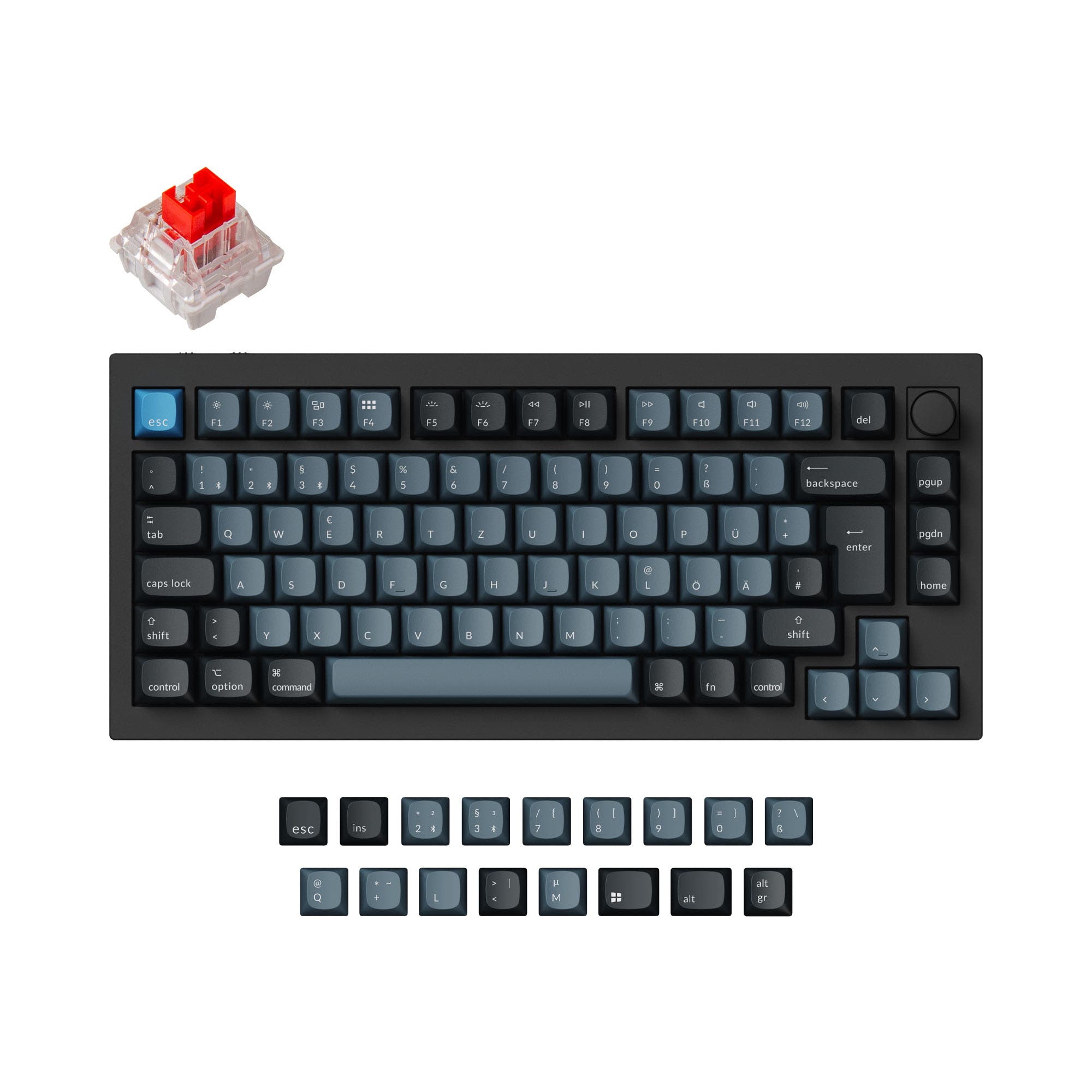
Choose the Q1 Pro for wireless flexibility or the Q10 Alice for ergonomic comfort and a unique layout.
KeebFinder may earn a commission when you buy through these links, at no extra cost to you.
5.0 (15)5.0 · 15 reviews
from$149at Keychron

4.5 (29)4.5 · 29 reviews
from$79at Keychron
Which one should you get?
Get the
Keychron Q1 Pro
Wireless 75%
Build quality in the top 5% of 75% boards under $150.
- Tri-mode connectivity with Bluetooth 5.1, 2.4 GHz, and wired USB-C.
- Includes a 4000mAh rechargeable battery for extended wireless use.
- Polycarbonate plate and double-gasket design for a flexible, damped typing feel.
- South-facing LEDs. Shine-through legends stay dark, and some sculpted keycaps can clip the LED.
Get the
Keychron Q10
Ergonomic Layout
Build quality in the top 5% of 75% boards under $100.
- Unique Alice ergonomic layout designed to promote a more natural typing posture.
- Includes extra programmable macro keys on the left side of the board.
- Steel plate provides a firmer, more consistent typing feel compared to polycarbonate.
- South-facing LEDs. Shine-through legends stay dark, and some sculpted keycaps can clip the LED.
Your primary need dictates the choice. If wireless functionality and easy portability are critical, the Keychron Q1 Pro is the obvious selection. If you work at a single desk, prioritize ergonomic comfort for long typing sessions, and value unique macro keys, the Keychron Q10 Alice's distinctive layout is worth the trade-off of being tethered by a cable. Both share excellent build quality and modding potential.
The differences that matter
Skip the 40-row spec sheet. These are the specs that change how each board feels, sounds, and fits your desk.
Keychron Q1 Pro
Keychron Q10
Connection
Bluetooth, Wired, 2.4 GHz
Wired
Wireless for several devices and wired for lower latency
Ergonomics
Standard
Alice
Weight
1,825 g
2,460 g
Heavier boards stay planted and lighter ones travel
Layout standard
ANSI, ISO, ISO-DE, ISO-ES, ISO-FR, ISO-SW, ISO-UK
ANSI, ISO, ISO-DE, ISO-ES, ISO-FR, ISO-SW, ISO-UK, JIS
ISO and JIS exist so regional layouts fit
Plate material
Polycarbonate
Steel
- Keychron Q1 Pro
- Keychron Q10
- Performance
- 8272
- Build quality
- 9089
- Productivity
- 98100
- Customizability
- 9898
- Portability
- 8262
- Layout size: 75%
- Hot-swappable
- Max polling rate: 1,000 Hz
- Case material: Aluminum
- Switch options: Clicky, Linear, Tactile
- Mount style: Gasket Mount, Plate Mount
What will you mostly use it for?
The Q1 Pro is the clear choice for mobile and office use due to its wireless features and lighter weight. For stationary, long-duration typing or creative work, the Q10 Alice's ergonomic design offers a compelling advantage. Gamers and travelers will prefer the Q1 Pro, while modders have an equally capable platform in either board. Programmers face a true trade-off between wireless convenience and ergonomic layout.
Pick the Keychron Q1 Pro
- The Q1 Pro offers a 1000 Hz polling rate in both wired and wireless modes, with the vendor noting a 90 Hz rate in wireless mode.
- Its traditional 75% layout is more familiar for gaming keybinds and muscle memory.
- Wireless connectivity via Bluetooth 5.1 and 2.4 GHz provides cable-free flexibility.
What owners say
Ratings and quotes collected from verified store reviews, including the critical ones.
Keychron Q1 Pro
15 owner reviews
“The Q1 Pro is the second keyboard I bought from Keychron. The basic materials are very good and she looks amazing. The only thing that is not perfect is the sound. I think she will be perfect with a simple adaption of foam and lubed switches. But the Q1 is…”
Keychron Q10
29 owner reviews
“For this kind of layout, having an option around 200usd is great, and even better when it is at this level of build quality and customization”
Keychron Q1 Pro vs Q10 specs
Every tracked spec, side by side. Rows marked with a dot differ between the boards.
8 of 27 specs differ
Keychron Q1 Pro
Keychron Q10
Switch options
Hot-swappable
Mount style
Sound dampening
Screw-in stabilizers
Layout size
Layout standard
Ergonomics
Knob
Display
Media keys
Connection
Max polling rate
Battery
USB-C
Case material
Plate material
Keycaps
Weight
Dimensions
Typing angle
Backlight
QMK
VIA
N-key rollover
Mac & Windows
Released
ISO layouts by store
Which stores sell ISO-DE, UK, and the other regional layouts.
Keychron Q1 Pro
Keychron
ISO-DE, ISO-UK, ISO-FR, ISO-ES, ISO-SW
In stockShips to you
Keychron (DE)
ISO-DE, ISO-UK, ISO-FR, ISO-ES, ISO-SW
Out of stockDoes not ship to you
Keychron Q10
Keychron
ISO-DE, ISO-UK, ISO-FR, ISO-ES, ISO-SW
In stockShips to you
Keychron (DE)
ISO-DE, ISO-UK, ISO-FR, ISO-ES, ISO-SW
In stockDoes not ship to you
Compare prices
Live prices from the stores we track, cheapest in-stock offer first.
Prices in USD are converted to your currency and can change at any time. KeebFinder may earn a commission when you buy through these links, at no extra cost to you.
Lowest price across stores, Amazon excluded.



Keychron Q1 Pro vs Q10: your questions
The Keychron Q10 Alice is specifically designed with an ergonomic Alice layout that splits the keyboard to align with a more natural hand position. This can help reduce strain during long typing sessions. The Q1 Pro uses a traditional straight layout.
No. According to the specifications, the Keychron Q10 Alice is a wired-only keyboard. It connects via a USB Type-C cable. The Q1 Pro is the model that offers Bluetooth and 2.4 GHz wireless connectivity.
Both the Q1 Pro and Q10 Alice are available in 'Fully Assembled' versions that include keycaps and switches. They are also sold as 'Barebone' kits without keycaps and switches for those who want to customize from the start.
The Q1 Pro uses a polycarbonate plate, which the vendor states offers more flexibility for a softer typing feel. The Q10 Alice uses a steel plate, which provides a firmer, more rigid response. This is a key factor in the sound and feel of each keyboard.
Yes. Both keyboards support open-source QMK firmware and the VIA/Keychron Launcher web app for remapping every key, creating macros, and customizing the function of the programmable aluminum knob.
The Keychron Q1 Pro is more portable. It is lighter (1825g vs 2460g), shorter in length (328mm vs 385mm), and its wireless functionality means you don't need to manage a cable when using it on the go.
No. The vendor descriptions specify that the included PBT keycaps for both the Q1 Pro (KSA profile) and Q10 Alice (OSA profile) are not shine-through. The south-facing RGB LEDs provide underglow lighting.
The fully assembled Q1 Pro comes with Keychron K Pro switches (Red, Brown, or Banana). The fully assembled Q10 Alice comes with Gateron G Pro switches (Red, Blue, or Brown). Both are hot-swappable, allowing you to change them easily.
No. Both are 75% layout keyboards, which include the function row and navigation cluster but omit the number pad to save space. You would need to purchase a separate numpad accessory.
Choose the standard 75% layout of the Q1 Pro if you want a familiar typing experience, easy keycap replacement, and use many different computers. Choose the Alice layout of the Q10 if you type for long periods, want to reduce wrist pronation, and primarily use a single workstation.
Yes. Both the Keychron Q1 Pro and Q10 Alice are compatible with macOS and Windows. They include a system toggle switch and extra keycaps for both operating systems, allowing you to save separate layouts for each.
Not sold on either?


Still torn?
Answer a few quick questions and the keyboard finder ranks 2,000+ boards by how you will actually use yours.