Not sure which keyboard to choose? Try the Keyboard Finder now!

Compare Keychron Q1 V2 vs Q3 Differences Side by Side

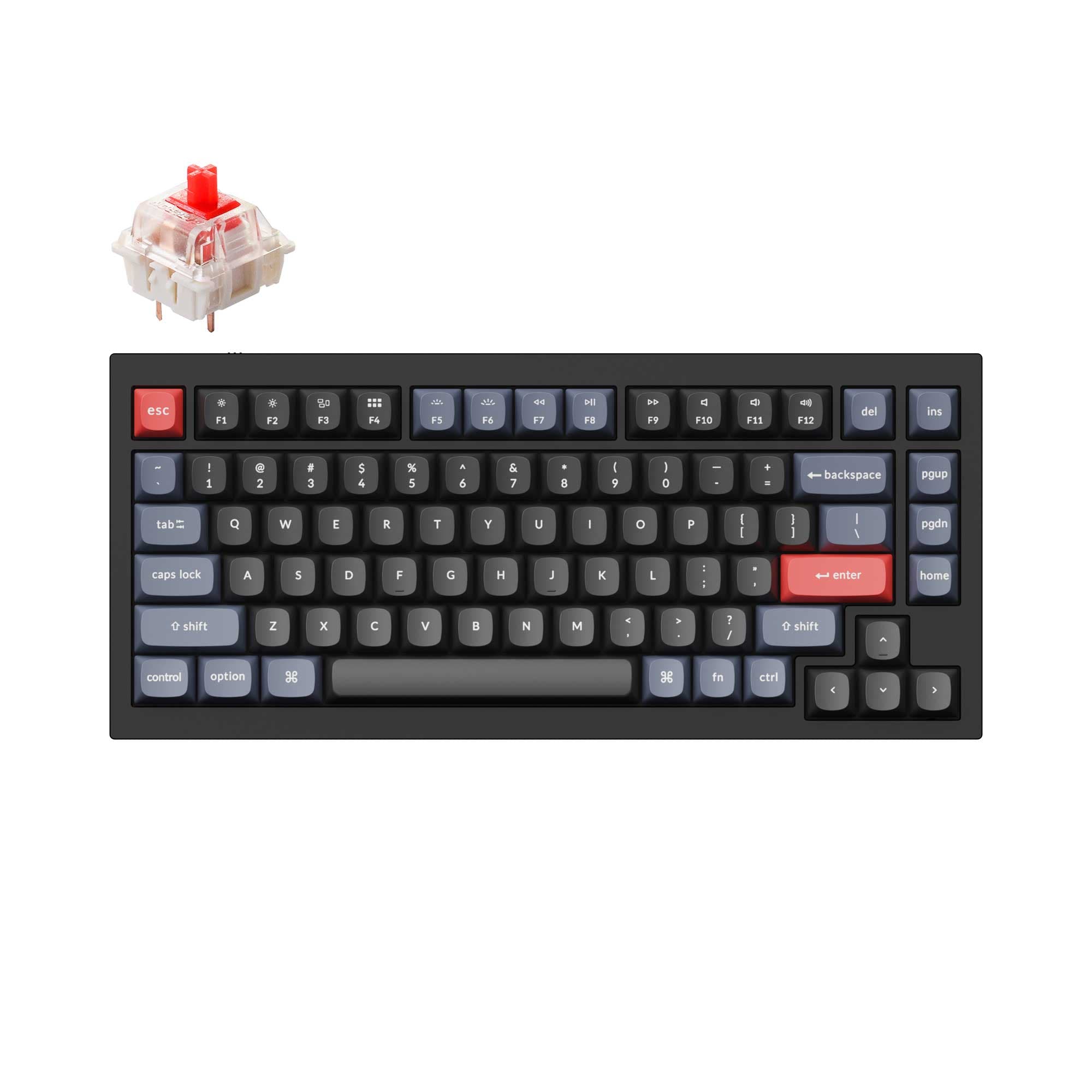
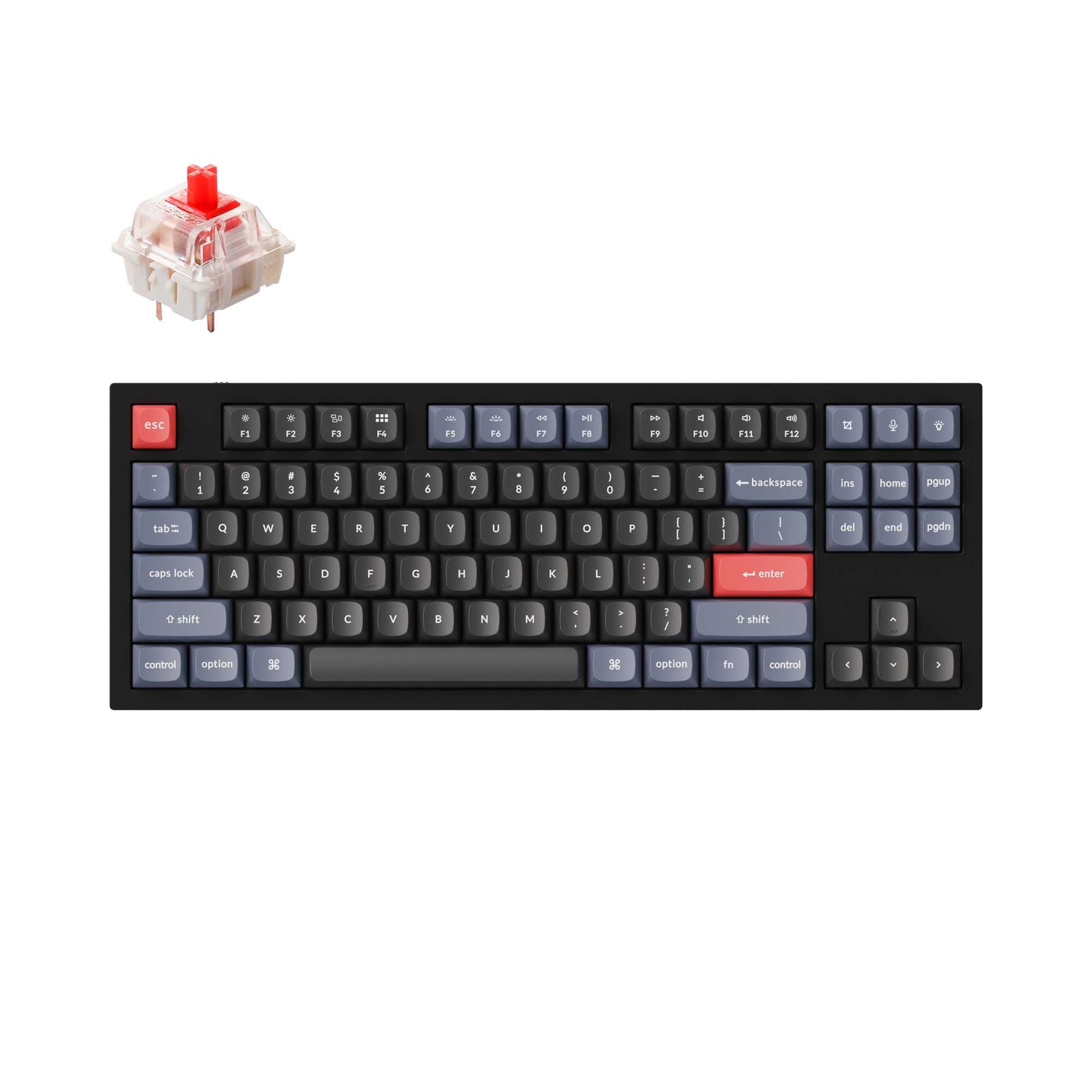
This comparison is for buyers deciding between two premium all-metal wired keyboards from Keychron. The Q1 V2 uses a compact 75% layout while the Q3 offers a full tenkeyless (TKL or 80%) layout with dedicated navigation keys. Both share the same double-gasket design, aluminum CNC machined body, QMK/VIA support, and south-facing RGB, making the decision primarily about layout preference and workspace needs. The Q1 V2 includes a built-in knob by default, while the Q3 offers a knob version as well as a wider range of ISO layout options.

96
Keychron Q1 QMK Custom Mechanical Keyboard - Version 2
97
Keychron Q3 QMK Custom Mechanical Keyboard

Select a keyboard to compare

4.9 (616)
4.7 (319)
  • Has Linear, Tactile, Clicky switch options
  • Available in a 75% layout
  • Built with the ANSI layout standard
  • Supports Wired, Wired only connectivity
  • Weighs about 1825 g
  • Sized at 23 x 145 x 328 mm
  • Has Linear, Tactile, Clicky, Silent switch options
  • Available in a 80% layout
  • Built with the ANSI, ISO, JIS, ISO-DE, ISO-ES, ISO-FR, ISO-SW, ISO-UK layout standard
  • Supports Wired, Wired only, connectivity
  • Weighs about 2000 g
  • Sized at 20 x 137 x 365 mm
Scores
  • Performance: 72.1
  • Build Quality: 89.4
  • Productivity: 97.6
  • Customizability: 99.7
  • Portability: 62.4
Scores
  • Performance: 72.1
  • Build Quality: 91
  • Productivity: 97.6
  • Customizability: 99.6
  • Portability: 57.5
Name
Keychron Q1 V2
Name
Keychron Q3
Release year
2022
Release year
2022
Switch Options
Linear, Tactile, Clicky
Switch Options
Linear, Tactile, Clicky, Silent
Profile
Normal Profile
Profile
Normal Profile
Hot Swappable
 
Hot Swappable
 
Layout Size
75%
Layout Size
80%
Layout Standard
ANSI
Layout Standard
ANSI, ISO, JIS, ISO-DE, ISO-ES, ISO-FR, ISO-SW, ISO-UK
Layout Ergonomics
Normal
Layout Ergonomics
Normal
Knob Support
 
Knob Support
 
Display Support
 
Display Support
 
Mac/Win Support
 
Mac/Win Support
 
Multi-Media Keys
 
Multi-Media Keys
 
USB-C
 
USB-C
 
USB passthrough
 
USB passthrough
 
Connection
Wired, Wired only
Connection
Wired, Wired only,
Polling Rate
1000 Hz
Polling Rate
1000 Hz
Battery capacity
-
Battery capacity
-
Hall Effect Support
 
Hall Effect Support
 
QMK Support
 
QMK Support
 
VIA Support
 
VIA Support
 
VIAL Support
 
VIAL Support
 
N-Key Rollover
 
N-Key Rollover
 
Rapid Trigger
 
Rapid Trigger
 
Mount Style
Gasket Mount
Mount Style
Gasket Mount
Screw in Stabilizers
 
Screw in Stabilizers
 
Sound Dampening
 
Sound Dampening
 
Backlight
 
Rgb, South-face
Backlight
 
Rgb, South-face
Case Colors
Case Colors
Case Material
Aluminum
Case Material
Aluminum
Keycaps Material
PBT, ABS
Keycaps Material
PBT, ABS
Dimensions
23 x 145 x 328 mm
Dimensions
20 x 137 x 365 mm
Weight
1825g
Weight
2000g
*Something incorrect or missing? Please
let me know
!

Pros and Trade-offs

Opt for the Keychron Q1 V2 if desk space is at a premium and you want a compact board with a built-in knob. Choose the Keychron Q3 if you need a full TKL layout, dedicated navigation keys, or require an ISO-compatible keyboard. Both deliver an identical typing foundation with the same double-gasket aluminum design and QMK/VIA flexibility, so your layout preference is the deciding factor.

Keychron Q1 V2

  • +Compact 75% layout saves desk space and offers a built-in knob for volume or shortcuts.
  • +Lighter at 1825g and narrower at 328mm, making it more portable.
  • +Higher review average of 4.9/5 from 616 reviews.
  • +Includes multi-media keys and sound dampening from the manufacturer.

  • No dedicated navigation keys (Home, End, etc.) due to the compact layout.
  • Limited to ANSI layout standard with no ISO layout options available.

Keychron Q3

  • +Full TKL (80%) layout with dedicated navigation keys for efficient editing.
  • +Available in six ISO layouts (UK, DE, Nordic, FR, ES, Swiss) for regional preferences.
  • +Slightly higher build quality score due to additional PCB mount support and silent switch option.
  • +Offers a wider variety of switch types, including silent options.

  • Larger footprint at 365mm wide and heavier at 2000g, less portable.
  • Knob is only available on select versions, not a default feature on all models.
  • Uses ABS keycaps from the vendor, which may wear faster than PBT alternatives.

Which Keyboard Is Better for Your Needs?

For gaming, programming, and modding, both keyboards are essentially tied due to identical core features like QMK/VIA support, 1000 Hz polling, and hot-swappable PCBs. The Q1 V2 takes the lead for office, travel, and content creation due to its more compact 75% layout and the inclusion of a default knob, which saves desk space and offers quick access to controls. The Q3 edges ahead only for those who specifically need a dedicated row of navigation keys or an ISO layout, as it provides a full TKL experience with six ISO regional options.

GamingTie
  • Both have a 1000 Hz polling rate and hot-swappable sockets.
  • Both are wired only, ensuring a stable connection.
  • Both support QMK/VIA for custom key bindings.
  • Both use a steel plate, which is sturdy for gaming.
OfficeKeychron Q1 V2
  • The Q1 V2's 75% layout saves desk space.
  • The Q1 V2 comes with a knob for volume or zoom control out of the box.
  • The Q1 V2's sound dampening and screw-in stabilizers contribute to a quieter typing experience.
ProgrammingTie
  • Both feature QMK/VIA support for full key remapping and macros.
  • Both have an aluminum case for a solid, stable typing platform.
  • Both use screw-in PCB stabilizers for consistent key feel on large keys.
TravelKeychron Q1 V2
  • The Q1 V2 is narrower at 328mm vs 365mm for the Q3, making it easier to pack.
  • The Q1 V2 weighs 1825g, which is lighter than the Q3's 2000g.
  • The Q1 V2's 75% layout is more compact overall.
ModdingTie
  • Both offer hot-swappable PCBs supporting 3-pin and 5-pin switches.
  • Both are sold as barebones kits (without switches/keycaps) for custom builds.
  • Both have a gasket mount and a steel plate that can be swapped or modded.
  • The Q3 supports PCB mount in addition to plate and gasket mount.
Content CreationKeychron Q1 V2
  • The Q1 V2's default knob is useful for scrubbing timelines or adjusting brush size.
  • The Q1 V2's compact layout puts more mouse space closer to the keyboard.
  • The Q1 V2 supports multi-media keys out of the box.

Frequently Asked Questions (FAQ)


Discover similar products

You might also like similar products in that price range:

98
$186
Keychron Q1 Max QMK/VIA Wireless Custom Mechanical Keyboard
Keychron Q1 Max
75%,
Hotswap,
Wireless,
Wired,
RGB,
Knob,
VIA,
QMK,
Alu case,
Gasket Mount

96
$149
Keychron Q3 Pro QMK/VIA Wireless Custom Mechanical Keyboard ISO Layout Collection
Keychron Q3 Pro
80%,
Hotswap,
Wireless,
Wired,
RGB,
Knob,
VIA,
QMK,
Alu case,
Gasket Mount

95
$149
Keychron Q1 Pro QMK/VIA Wireless Custom Mechanical Keyboard ISO Layout Collection
Keychron Q1 Pro
75%,
Hotswap,
Wireless,
Wired,
RGB,
Knob,
VIA,
QMK,
Alu case,
Gasket Mount

97
$54
Keychron V3 QMK Custom Mechanical Keyboard ISO Layout Collection
Keychron V3
80%,
Hotswap,
Wired,
RGB/ White LEDs,
Knob,
VIA,
QMK,
Tray Mount

94
$109
Keychron Q1 QMK Custom Mechanical Keyboard - Version 1
Keychron Q1
75%,
Hotswap,
Wired,
RGB,
Knob,
VIA,
QMK,
Alu case,
Gasket Mount

93
$59
Keychron Q2 QMK Custom Mechanical Keyboard
Keychron Q2
65%,
Hotswap,
Wired,
RGB,
Knob,
VIA,
QMK,
Alu case,
Gasket Mount

92
$59
Keychron Q7 QMK Custom Mechanical Keyboard
Keychron Q7
70%,
Hotswap,
Wired,
RGB,
Knob,
VIA,
QMK,
Alu case,
Gasket Mount

92
$59
Keychron Q4 QMK Custom Mechanical Keyboard
Keychron Q4
60%,
Hotswap,
Wired,
RGB,
Knob,
VIA,
QMK,
Alu case,
Gasket Mount

94
$59
Keychron K8 Pro QMK/VIA Wireless Mechanical Keyboard
Keychron K8 Pro
80%,
Hotswap,
Wireless,
Wired,
RGB/ White LEDs,
VIA,
QMK,
Alu case,
Tray Mount

96
$49
Keychron V5 QMK Custom Mechanical Keyboard
Keychron V5
96%,
Hotswap,
Wired,
RGB/ White LEDs,
Knob,
VIA,
QMK,
Tray Mount