Keychron Q10 Pro vs Q11Wireless Alice vs Wired Split
Choose the Q10 Pro Alice for wireless convenience and a unified ergonomic form, or the Q11 for a fully customizable split layout that requires a wired connection.

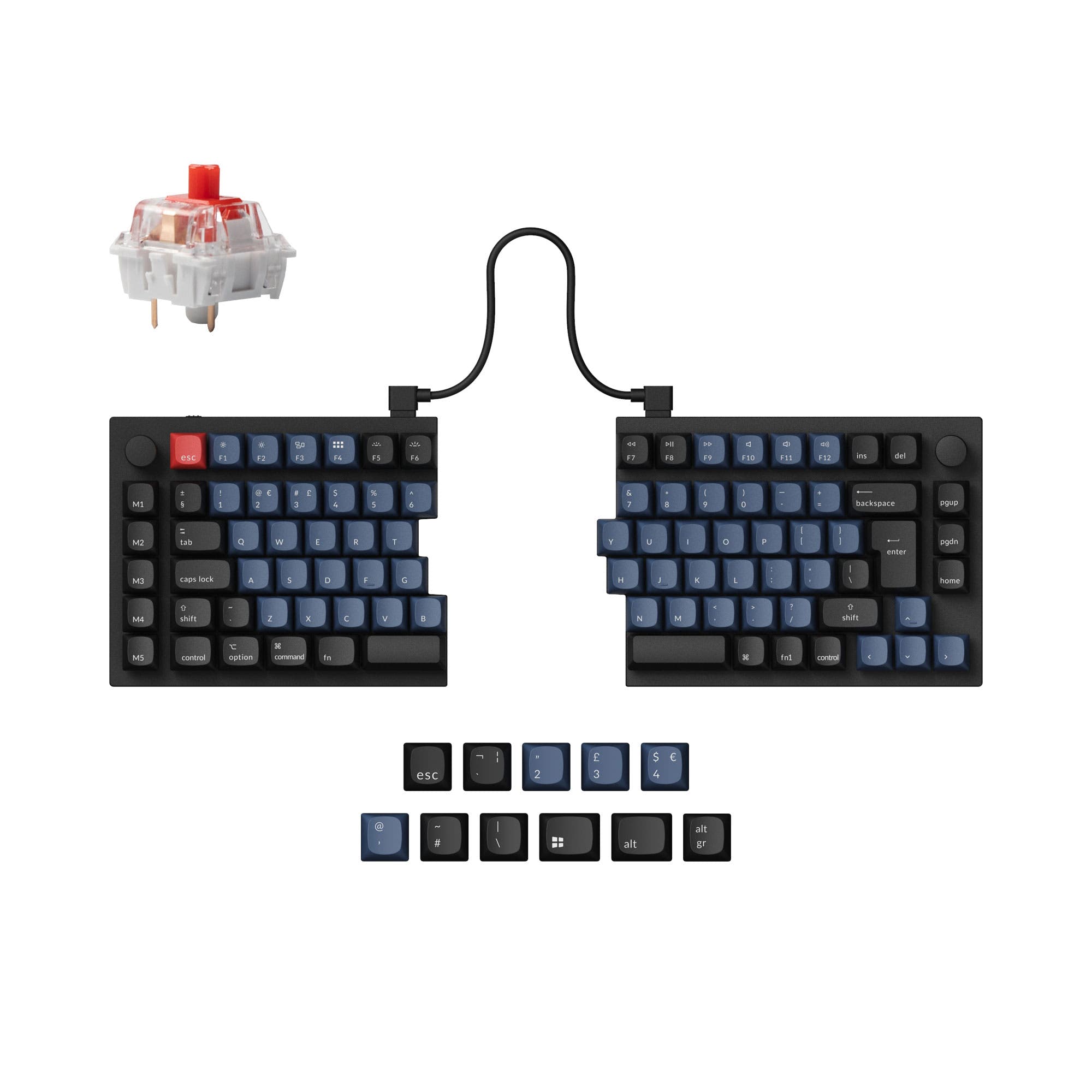
Which one should you get?
Get the
Keychron Q10 Pro
Wireless Alice
- Wireless connectivity via Bluetooth 5.1 with a 4000mAh battery.
- Double-gasket mount design with a polycarbonate plate for a flexible typing feel.
- Includes KSA double-shot PBT keycaps in the assembled version.
- Heavier at 2096g, partly due to the battery.
- Limited to ANSI and ISO layouts, unlike the Q11's broader options.
- Ergonomics are fixed to the Alice curve, not adjustable like a split keyboard.
Get the
Keychron Q11
Wired Split
- Fully split design allows for independent positioning of each half to reduce strain.
- Extensive ISO layout support including UK, German, Nordic, Swiss, French, and Spanish.
- Available with either Keychron Super or Gateron G Pro switches in assembled versions.
- Wired-only connectivity, requiring a cable between halves and to the PC.
- Uses a tray/plate mount instead of a gasket mount.
- Some user reviews mention the desire for an End key and longer bridge cable.
Your primary need dictates the choice. If wireless operation and a specific, curved ergonomic layout are crucial, the Keychron Q10 Pro Alice is the clear option. If you require maximum ergonomic adjustability through a split design, need specific ISO layouts, and don't mind a wired connection, the Keychron Q11 is the more versatile tool. Both deliver excellent build quality and customization via QMK/VIA.
The differences that matter
Skip the 40-row spec sheet. These are the specs that change how each board feels, sounds, and fits your desk.
Keychron Q10 Pro
Keychron Q11
Connection
Bluetooth, Wired
Wired
Ergonomics
Alice
Split
Mount style
Gasket Mount
Plate Mount, Tray Mount
Weight
2,096 g
1,186 g
Layout standard
ANSI, ISO
ANSI, ISO, ISO-DE, ISO-Nordic, ISO-UK, JIS
- Keychron Q10 Pro
- Keychron Q11
- Performance
- 8268
- Build quality
- 8888
- Productivity
- 10097
- Customizability
- 9698
- Portability
- 8173
- Hot-swappable
- Max polling rate: 1,000 Hz
- Case material: Aluminum
- Switch options: Clicky, Linear, Tactile
- Knob
- QMK
What will you mostly use it for?
The Q10 Pro Alice wins for gaming and travel due to its wireless connectivity and single-piece form. The Q11 is the stronger pick for programming and modding, thanks to its fully split, customizable design and broad ISO layout support. For office work and content creation, the decision hinges on whether you value wireless freedom (Q10 Pro) or ergonomic adjustability (Q11) more.
Pick the Keychron Q10 Pro
- The Q10 Pro offers a 1000 Hz wired polling rate and a 90 Hz wireless polling rate for flexibility.
- Its unified Alice layout may be easier to adapt to for gaming than a fully split design.
- Wireless connectivity via Bluetooth 5.1 allows for a cleaner desk setup.
What owners say
Ratings and quotes collected from verified store reviews, including the critical ones.
Keychron Q10 Pro
No owner reviews collected yet.
Keychron Q11
13 owner reviews
“I wish that the "launcher" app had more layer options and more layer options for the RGB, but that's ok. I have a Moonlander as well and I recommend the Q11 to almost everyone, the ortholinear boards take a lot of relearning for most people to type on.”
Keychron Q10 Pro vs Q11 specs
Every tracked spec, side by side. Rows marked with a dot differ between the boards.
11 of 27 specs differ
Keychron Q10 Pro
Keychron Q11
Switch options
Hot-swappable
Mount style
Sound dampening
Screw-in stabilizers
Layout size
Layout standard
Ergonomics
Knob
Display
Media keys
Connection
Max polling rate
Battery
USB-C
Case material
Plate material
Keycaps
Weight
Dimensions
Typing angle
Backlight
QMK
VIA
N-key rollover
Mac & Windows
Released
Compare prices
Live prices from the stores we track, cheapest in-stock offer first.
Lowest price across stores, Amazon excluded.




Prices in USD are converted to your currency and can change at any time. KeebFinder may earn a commission when you buy through these links, at no extra cost to you.
Keychron Q10 Pro vs Q11: your questions
No, the Keychron Q11 is a wired-only keyboard. It requires a USB-C cable to connect to your computer and a separate cable to link its two halves together.
According to Keychron, the Q10 Pro has a 4000mAh battery. The manufacturer states it can last up to 300 hours with the backlight off and up to 100 hours with RGB on at its lowest brightness, though actual use may vary.
Yes. The Keychron Q11 product description states you can use it as a non-split keyboard by connecting the two halves with the included bridge cable, effectively joining them together.
They offer different ergonomic benefits. The Q10 Pro's Alice layout provides a pre-curved, unified design. The Q11's split design allows you to physically separate and angle each half independently, which can be more customizable for shoulder width and wrist posture.
Yes. Both the Keychron Q10 Pro and Q11 are listed as compatible with Mac and Windows. They include a system toggle and extra keycaps for both operating systems.
No. For both keyboards, the included PBT keycaps in the assembled versions are listed as non-shine-through or non-backlight. The south-facing RGB LEDs will glow around the keys, not through the legends.
The Keychron Q10 Pro uses a gasket mount design, specifically a double-gasket design with silicone pads. The Keychron Q11 uses a tray mount (also listed as plate mount) system.
Yes, both keyboards are hot-swappable. Their PCBs support both 3-pin and 5-pin MX-style mechanical switches, allowing you to change switches without soldering.
Yes, the listed model for the Keychron Q10 Pro is the 'Knob' version, which includes a programmable aluminum rotary encoder.
The Keychron Q10 Pro uses a polycarbonate (PC) plate. The Keychron Q11 offers a choice between a steel plate or an aluminum plate, according to its specifications.
The Keychron Q11 has significantly more layout options. It supports ANSI, ISO, ISO-DE, ISO-Nordic, ISO-UK, and JIS layouts, with fully assembled versions available for specific European languages.
Not sold on either?


Still torn?
Answer a few quick questions and the keyboard finder ranks 2,000+ boards by how you will actually use yours.