Keychron Q12 Max vs Q13 ProSouthpaw vs Alice
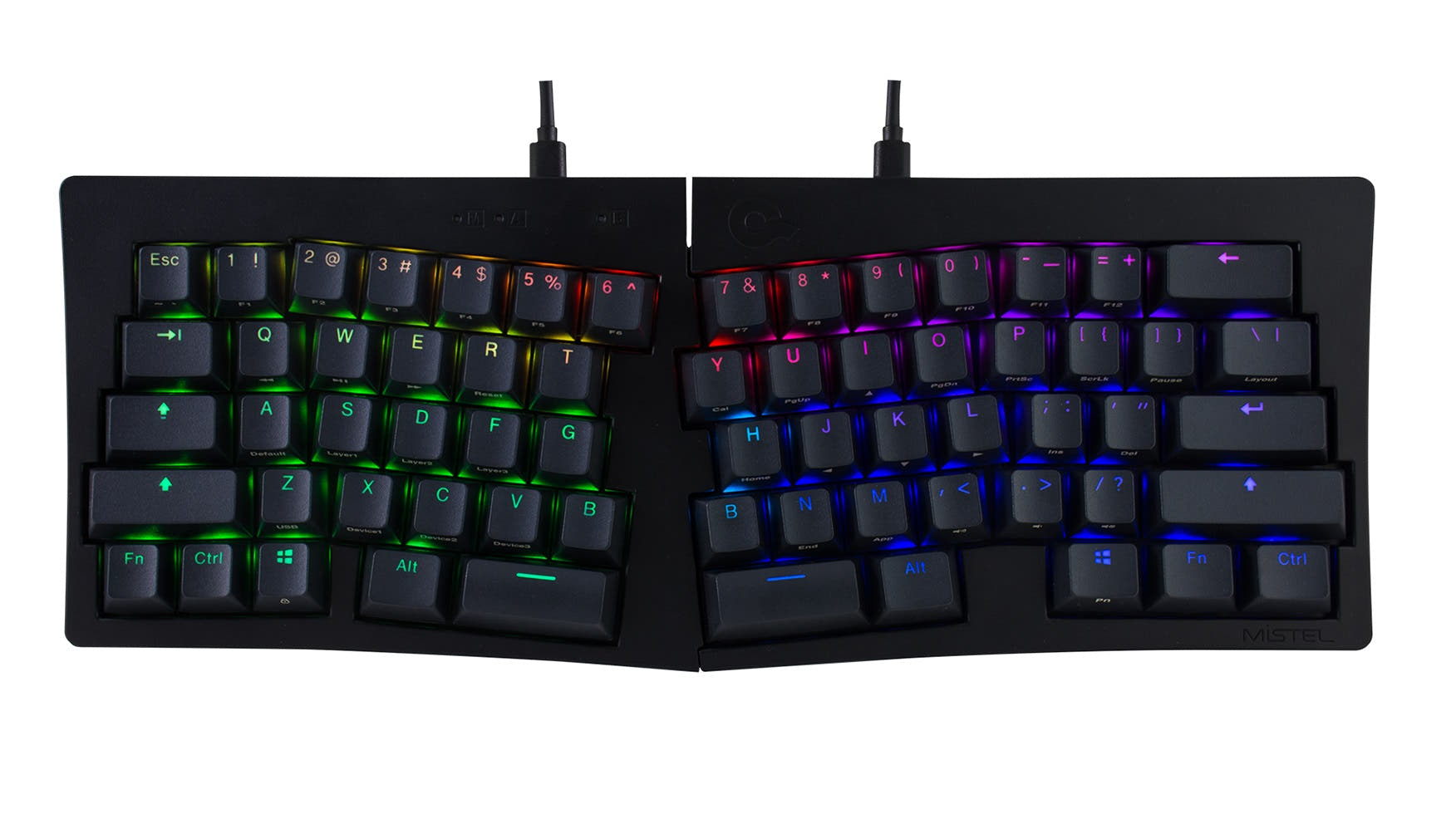
Choose the Q12 Max if you want a numpad on the left for mouse access, or the Q13 Pro if you need an ergonomic Alice split layout for typing comfort.
KeebFinder may earn a commission when you buy through these links, at no extra cost to you.

4.8 (12)4.8 · 12 reviews
from$219at MK

4.7 (12)4.7 · 12 reviews
from$167at Keychron
Which one should you get?
Get the
Keychron Q12 Max
Southpaw
Build quality in the top 5% of 96% boards under $300.
- Southpaw layout with left-side numpad frees mouse space for right-handed users
- 2.4 GHz wireless at 1000 Hz polling for low-latency gaming, not available on Q13 Pro
- Double-gasket design with IXPE, PET, and Latex acoustic foam layers for refined sound
- South-facing LEDs. Shine-through legends stay dark, and some sculpted keycaps can clip the LED.
- No ISO layout. ISO-DE, UK, and other ISO variants are not offered.
Get the
Keychron Q13 Pro
Alice
Build quality in the top 10% of 96% boards under $200.
- Alice layout reduces wrist strain for comfortable long typing sessions
- Both ANSI and ISO layout options available for international users
- Slighly larger footprint (447mm width) provides stable platform and matches standard Alice keycap sets
- South-facing LEDs. Shine-through legends stay dark, and some sculpted keycaps can clip the LED.
If your priority is keeping the mouse close while retaining a numpad for data-heavy workflows, the Q12 Max southpaw is the clear pick. If you type for hours and want a split ergonomic angle that reduces wrist fatigue, the Q13 Pro Alice is the better investment. Both are premium CNC aluminum boards with gasket mount and QMK support, but the layout difference should drive your final decision based on whether you value left-hand numpad access or right-hand ergonomic relief.
The differences that matter
Skip the 40-row spec sheet. These are the specs that change how each board feels, sounds, and fits your desk.
Keychron Q12 Max
Keychron Q13 Pro
Connection
Bluetooth, 2.4 GHz, Wired
Bluetooth, Wired
Wireless for several devices and wired for lower latency
Ergonomics
Southpaw
Alice
Mount style
Gasket Mount, PCB Mount
Gasket Mount
Weight
2,195 g
2,392 g
Heavier boards stay planted and lighter ones travel
Layout standard
ANSI
ANSI, ISO
ISO and JIS exist so regional layouts fit
- Keychron Q12 Max
- Keychron Q13 Pro
- Performance
- 8182
- Build quality
- 9088
- Productivity
- 98100
- Customizability
- 9896
- Portability
- 5657
- Layout size: 96%
- Hot-swappable
- Battery: 4,000 mAh
- Max polling rate: 1,000 Hz
- Case material: Aluminum
- Switch options: Clicky, Linear, Tactile
What will you mostly use it for?
The Q12 Max wins four categories due to its southpaw layout and 2.4 GHz connectivity, making it stronger for gaming, travel, modding, and content creation. The Q13 Pro claims the office category with its ergonomic Alice design, while programming is a tie because both keyboards share identical firmware and hot-swap capabilities. Overall, the Q12 Max's left numpad and wireless options give it broader use-case appeal, but the Q13 Pro remains the better choice for typists who prioritize wrist health.
Pick the Keychron Q12 Max
- 2.4 GHz wireless at 1000 Hz polling is explicitly supported for lower latency gaming
- Southpaw numpad allows simultaneous mouse and number input without moving the right hand
- Same 1000 Hz wired and wireless polling rate as Q13 Pro but with added 2.4 GHz option not available on Q13 Pro
What owners say
Ratings and quotes collected from verified store reviews, including the critical ones.
Keychron Q12 Max
12 owner reviews
“I bought this with the Banana switches, then bought a Mode Sonnet, and to be totally honest, I prefer the Q12 Max by far. Extremely functional and feels great to actually type on. I'd love to see a Southpaw Fullsize layout from Keychron in the future or…”
Keychron Q13 Pro
12 owner reviews
“I was looking for a good ergonomic, programmable, mechanical keyboard and this is it. It would be nice to have a proper case to carry it.”
“So, me,being dumb, didn't pay too much attention to the iso vs not iso (?) layout. The enter key doesn't bother me much, but left shift.... Being smoll is an issue. I did rekey the additional key to be L-shift, but it's too... Janky? For my mucked up brain…”
Keychron Q12 Max vs Q13 Pro specs
Every tracked spec, side by side. Rows marked with a dot differ between the boards.
8 of 27 specs differ
Keychron Q12 Max
Keychron Q13 Pro
Switch options
Hot-swappable
Mount style
Sound dampening
Screw-in stabilizers
Layout size
Layout standard
Ergonomics
Knob
Display
Media keys
Connection
Max polling rate
Battery
USB-C
Case material
Plate material
Keycaps
Weight
Dimensions
Typing angle
Backlight
QMK
VIA
N-key rollover
Mac & Windows
Released
ISO layouts by store
Which stores sell ISO-DE, UK, and the other regional layouts.
Keychron Q12 Max
No ISO layout at the stores we track.
Keychron Q13 Pro
Keychron
ISO
Out of stockShips to you
Keychron (DE)
ISO
Out of stockDoes not ship to you
Compare prices
Live prices from the stores we track, cheapest in-stock offer first.
Prices in USD are converted to your currency and can change at any time. KeebFinder may earn a commission when you buy through these links, at no extra cost to you.
Lowest price across stores, Amazon excluded.



Keychron Q12 Max vs Q13 Pro: your questions
The primary difference is layout. The Q12 Max uses a southpaw 96% layout with the numpad on the left, while the Q13 Pro uses an Alice ergonomic layout with a split, angled key arrangement. Both are full-metal wireless keyboards with gasket mounts and QMK/VIA support.
The Q12 Max is better for gaming because it supports 2.4 GHz wireless at 1000 Hz polling, which the Q13 Pro does not offer. Its southpaw design also lets you use the numpad and mouse simultaneously without moving your right hand.
No, the Q13 Pro does not have a southpaw numpad. It uses an Alice layout, which splits the alphanumeric keys into two angled halves for ergonomic typing but does not include a dedicated numpad column on either side.
Yes, both the Q12 Max and Q13 Pro support QMK firmware and VIA software for remapping keys, creating macros, and adjusting backlight settings. The Q12 Max has 256KB of flash memory, double the 128KB on the Q13 Pro, but this difference rarely limits typical keymap storage.
The Q12 Max is lighter at 2195g compared to the Q13 Pro's 2392g, and it is narrower (409mm vs 447mm). It also has 2.4 GHz connectivity for reliable wireless without Bluetooth pairing, making it the more travel-friendly option.
Both keyboards ship with KSA double-shot PBT keycaps in a non-shine-through finish. The Q12 Max uses a standard ANSI layout, while the Q13 Pro is available in both ANSI and ISO versions. Neither set supports shine-through legends for RGB backlighting.
Yes, both boards have hot-swappable PCBs that accept 3-pin and 5-pin MX-style switches from brands like Cherry, Gateron, and Kailh. The Q12 Max comes with Gateron Jupiter switches in the fully assembled version, while the Q13 Pro uses Keychron K Pro switches.
The Q13 Pro is better for office typing due to its Alice split layout, which reduces wrist strain according to customer reviews. It also offers up to 300 hours of Bluetooth battery life (backlight off) and a stable, heavy frame that does not shift during use.
Yes, the Q12 Max uses a standard ANSI layout with a southpaw numpad, meaning the alpha keys and modifiers are in their usual positions. However, some navigation keys like Ins, End, and PgUp/PgDn are moved, which may require an adjustment period as noted in user reviews.
Both the Q12 Max and Q13 Pro feature a 4000mAh rechargeable lithium-polymer battery. The Q12 Max offers up to 180 hours of use with backlight off (100 hours with RGB at lowest brightness), while the Q13 Pro claims up to 300 hours with backlight off (100 hours with RGB).
Yes, both keyboards come with a system toggle switch and include additional keycaps for macOS and Windows. They support macOS, Windows, and Linux operating systems out of the box.
The Q12 Max uses a more advanced sound dampening package including IXPE foam, PET film, and Latex bottom pad in addition to standard sound absorbing foam. The Q13 Pro includes sound absorbing foam and bottom case acoustic foam, but does not specify IXPE or Latex layers.
Not sold on either?





Still torn?
Answer a few quick questions and the keyboard finder ranks 2,000+ boards by how you will actually use yours.