Keychron Q13 Pro vs Q5 HEErgonomic Layout vs Hall Effect Gaming
Choose the Q13 Pro for ergonomic comfort and broad switch compatibility, or the Q5 HE for advanced gaming features like adjustable actuation and rapid trigger.
KeebFinder may earn a commission when you buy through these links, at no extra cost to you.

4.7 (12)4.7 · 12 reviews
from$167at Keychron

5.0 (2)5.0 · 2 reviews
from$212at MK
Which one should you get?
Get the
Keychron Q13 Pro
Ergonomic Layout
Build quality in the top 10% of 96% boards under $200.
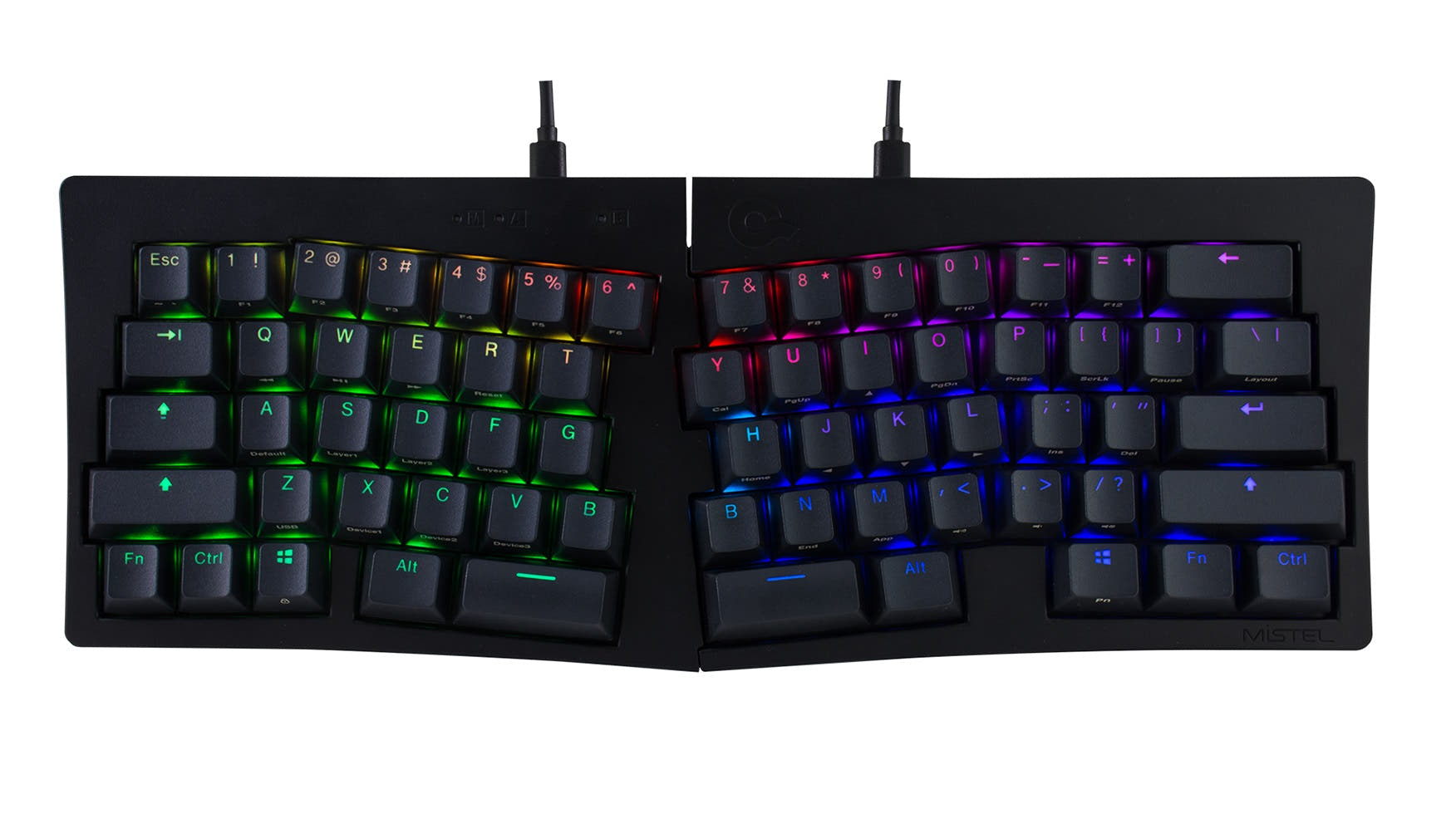
- Ergonomic Alice layout designed to promote a more natural typing posture.
- Hot-swappable PCB compatible with a wide range of 3-pin and 5-pin MX-style mechanical switches.
- Features a polycarbonate plate for a potentially more flexible typing feel.
- South-facing LEDs. Shine-through legends stay dark, and some sculpted keycaps can clip the LED.
- Missing ISO-DE, ISO-UK, ISO-CH. The other board is sold in those layouts.
Get the
Keychron Q5 HE
Hall Effect Gaming
Build quality in the top 10% of 96% boards under $300.
- Equipped with Gateron Double-Rail Magnetic Hall Effect switches featuring adjustable actuation points (0.2-3.8mm) and rapid trigger.
- Includes a 2.4 GHz wireless connection with a 1000 Hz polling rate for low-latency gaming.
- Vendor description highlights dynamic keystrokes allowing for four actions on a single key based on press depth.
- Magnetic switches only. Standard MX switches will not fit.
- South-facing LEDs. Shine-through legends stay dark, and some sculpted keycaps can clip the LED.
Your primary need dictates the choice. If preventing wrist strain during long typing sessions is paramount, the Keychron Q13 Pro Alice's ergonomic layout is the decisive feature. If you are a gamer seeking every competitive advantage through customizable actuation, rapid trigger, and low-latency 2.4 GHz wireless, the Keychron Q5 HE is the specialized tool. For all other uses, both are exceptionally capable premium keyboards.
The differences that matter
Skip the 40-row spec sheet. These are the specs that change how each board feels, sounds, and fits your desk.
Keychron Q13 Pro
Keychron Q5 HE
Hall effect (magnetic)
No
Yes
Adjustable actuation helps in games and not in normal typing
Rapid trigger
No
Yes
Faster resets help in games and not in normal typing
Connection
Bluetooth, Wired
Bluetooth, 2.4 GHz, Wired
Wireless for several devices and wired for lower latency
Ergonomics
Alice
Standard
Max polling rate
1,000 Hz
8,000 Hz
Higher polling helps competitive FPS and does nothing for typing
- Keychron Q13 Pro
- Keychron Q5 HE
- Performance
- 82100
- Build quality
- 8889
- Productivity
- 10097
- Customizability
- 9695
- Portability
- 5755
- Layout size: 96%
- Hot-swappable
- Battery: 4,000 mAh
- Case material: Aluminum
- Knob
- QMK
What will you mostly use it for?
The Q5 HE is the clear choice for competitive gaming due to its Hall Effect switches and 2.4 GHz wireless. For programming and general modding, the Q13 Pro wins with its ergonomic Alice layout and broader mechanical switch compatibility. Office use, travel, and content creation are ties, as both keyboards offer similar core productivity features, high weight, and extensive programmability, leaving the decision to layout preference versus advanced input tech.
Pick the Keychron Q5 HE
- The Q5 HE features Hall Effect magnetic switches with adjustable actuation points from 0.2 to 3.8 mm and rapid trigger functionality.
- It includes a dedicated 2.4 GHz wireless connection with a 1000 Hz polling rate for low-latency gaming.
- Its vendor description highlights dynamic keystrokes allowing four actions on a single key based on press depth.
What owners say
Ratings and quotes collected from verified store reviews, including the critical ones.
Keychron Q13 Pro
12 owner reviews
“I was looking for a good ergonomic, programmable, mechanical keyboard and this is it. It would be nice to have a proper case to carry it.”
“So, me,being dumb, didn't pay too much attention to the iso vs not iso (?) layout. The enter key doesn't bother me much, but left shift.... Being smoll is an issue. I did rekey the additional key to be L-shift, but it's too... Janky? For my mucked up brain…”
Keychron Q5 HE
2 owner reviews
“This keyboard is so unbelievably premium. I was extremely hesitant at first to buy a keyboard in this price range but I guarantee you, you can absolutely tell that you are using an expensive, premium, top of the line product. Definitely recommend.”
Keychron Q13 Pro vs Q5 HE specs
Every tracked spec, side by side. Rows marked with a dot differ between the boards.
12 of 28 specs differ
Keychron Q13 Pro
Keychron Q5 HE
Switch options
Hall effect (magnetic)
Rapid trigger
Hot-swappable
Mount style
Sound dampening
Screw-in stabilizers
Layout size
Layout standard
Ergonomics
Knob
Display
Connection
Max polling rate
Battery
USB-C
Case material
Plate material
Keycaps
Weight
Dimensions
Typing angle
Backlight
QMK
VIA
N-key rollover
Mac & Windows
Released
ISO layouts by store
Which stores sell ISO-DE, UK, and the other regional layouts.
Keychron Q13 Pro
Keychron
ISO
Out of stockShips to you
Keychron (DE)
ISO
Out of stockDoes not ship to you
Keychron Q5 HE
Keychron
ISO-DE, ISO-UK, ISO-CH
In stockShips to you
Keychron (DE)
ISO-DE, ISO-UK, ISO-CH
In stockDoes not ship to you
Compare prices
Live prices from the stores we track, cheapest in-stock offer first.
Prices in USD are converted to your currency and can change at any time. KeebFinder may earn a commission when you buy through these links, at no extra cost to you.
Lowest price across stores, Amazon excluded.



Keychron Q13 Pro vs Q5 HE: your questions
The core difference is the layout and switch technology. The Q13 Pro uses an ergonomic Alice layout and is compatible with standard mechanical switches. The Q5 HE uses a standard 96% layout and features Hall Effect magnetic switches with gaming-centric features like adjustable actuation and rapid trigger.
No. According to the manufacturer, the Q5 HE's hot-swap sockets are compatible exclusively with Gateron Double-Rail Magnetic switches. It does not support standard mechanical switches like Cherry MX, Gateron, or Kailh.
The Keychron Q13 Pro Alice is designed for ergonomics. Its split Alice layout promotes a more natural shoulder-width hand position, which can reduce strain during extended typing compared to a standard straight layout like the Q5 HE.
No. The Q13 Pro connectivity includes Bluetooth 5.1 and wired USB-C only. The Q5 HE adds a dedicated 2.4 GHz wireless mode with a 1000 Hz polling rate.
The Q5 HE uses OSA profile keycaps, which are similar to OEM and have good compatibility with aftermarket sets. The Q13 Pro uses KSA profile keycaps on a non-standard Alice layout, making it much harder to find full replacement sets that fit all keys.
No. Actuation point adjustment is a feature specific to the Hall Effect magnetic switches in the Q5 HE. The Q13 Pro uses traditional mechanical switches with fixed actuation points.
For switch modding, the Q13 Pro is more versatile due to its broad compatibility with common MX-style switches. For firmware and key-level customization, both are equally customizable via QMK and VIA.
Yes. Both the Keychron Q13 Pro and Q5 HE include system toggles and extra keycaps for full compatibility with macOS and Windows systems.
For wired mode, both offer a 1000 Hz polling rate. In wireless mode, the Q13 Pro's Bluetooth runs at 90 Hz. The Q5 HE's Bluetooth also runs at 90 Hz, but its 2.4 GHz mode offers a 1000 Hz polling rate.
No, neither is ideal for travel. Both are constructed from heavy aluminum, with the Q13 Pro weighing 2392g and the Q5 HE weighing 2187g. They are designed as stationary, premium desktop peripherals.
For the Q13 Pro, the Barebone kit includes the keyboard PCB, aluminum case, and polycarbonate plate, but not keycaps or switches. The Q5 HE listing currently only shows a 'Fully Assembled' version which includes keycaps and magnetic switches.
Rapid trigger is a gaming feature that allows a key to reset as soon as it is released slightly, enabling faster keystroke repetition. This feature is available on the Keychron Q5 HE due to its Hall Effect magnetic switches, as stated in its specifications.
Not sold on either?






Still torn?
Answer a few quick questions and the keyboard finder ranks 2,000+ boards by how you will actually use yours.