Keychron Q14 Pro vs Q15 Max
Choose the Q14 Pro for a traditional but ergonomic layout with a numpad, or the Q15 Max for a compact, grid-based typing experience.


Which one should you get?
Get the
Keychron Q14 Pro
- Unique southpaw Alice layout with integrated left-side numpad.
- 96% size retains function row and navigation cluster for productivity.
- Includes double-gasket design and silicone pads for sound dampening.
- Very heavy at 2395g, limiting portability.
- Large footprint (445 x 157 mm) requires significant desk space.
- Lacks a 2.4 GHz wireless connection option.
Get the
Keychron Q15 Max
- Compact ortholinear grid layout with equally sized keys.
- Lighter weight (1232g) and smaller dimensions than the Q14 Pro.
- Features 2.4 GHz wireless, Bluetooth 5.1, and wired connectivity.
- Ortholinear layout requires significant muscle memory retraining.
- Keycap profile (XDA) and unique key sizes limit aftermarket replacement options.
- Lacks a dedicated numpad and some traditional keys like Tab on the base layer.
Your choice fundamentally depends on which ergonomic layout you prefer and your need for a numpad. Opt for the Keychron Q14 Pro Alice if you want a gentler ergonomic transition with a full numpad and more traditional key spacing. Choose the Keychron Q15 Max if you are committed to the ortholinear typing style, value a more portable form factor, and want the flexibility of 2.4 GHz wireless.
The differences that matter
Skip the 40-row spec sheet. These are the specs that change how each board feels, sounds, and fits your desk.
Keychron Q14 Pro
Keychron Q15 Max
Connection
Bluetooth, Wired
Bluetooth, 2.4 GHz, Wired
Ergonomics
Southpaw, Alice
Ortholinear, Split Spacebar
Mount style
Gasket Mount, Plate Mount
Gasket Mount
Weight
2,395 g
1,232 g
Layout standard
ANSI, ISO
ANSI
- Keychron Q14 Pro
- Keychron Q15 Max
- Performance
- 8277
- Build quality
- 8988
- Productivity
- 10093
- Customizability
- 9896
- Portability
- 5652
- Hot-swappable
- Battery: 4,000 mAh
- Max polling rate: 1,000 Hz
- Case material: Aluminum
- Switch options: Clicky, Linear, Tactile
- Knob
What will you mostly use it for?
The Q14 Pro Alice is the more versatile choice for office work, gaming, and content creation due to its integrated numpad and ergonomic yet familiar layout. The Q15 Max wins for portability thanks to its lighter weight and smaller footprint, and its ortholinear layout is a dedicated tool for users seeking to minimize finger movement. For programming and modding, both are equally capable, leaving the decision to personal layout preference.
Pick the Keychron Q14 Pro
- The Q14 Pro's 1000 Hz polling rate in wired mode provides low latency.
- Its southpaw layout with left-side numpad can free up mouse space on the right.
- The traditional staggered key arrangement may be easier for gaming muscle memory than the Q15 Max's ortholinear grid.
What owners say
Ratings and quotes collected from verified store reviews, including the critical ones.
Keychron Q14 Pro
6 owner reviews
“This is my second Alice layout keyboard and is my daily driver. The ergonomics are great, and the build is solid. The south paw layout is exactly what I've been looking for in a keyboard. There are lots of customization options but the prebuilt straight out…”
Keychron Q15 Max
8 owner reviews
“Keyboard works great. Turned right spacebar into backspace, added back "+=" button to main layer and replaced caps lock with tab with very usefull web browser app. Amazing product. And the RGB looks great. Only downside is that you can't 100% perfectly fit…”
Keychron Q14 Pro vs Q15 Max specs
Every tracked spec, side by side. Rows marked with a dot differ between the boards.
10 of 27 specs differ
Keychron Q14 Pro
Keychron Q15 Max
Switch options
Hot-swappable
Mount style
Sound dampening
Screw-in stabilizers
Layout size
Layout standard
Ergonomics
Knob
Display
Media keys
Connection
Max polling rate
Battery
USB-C
Case material
Plate material
Keycaps
Weight
Dimensions
Typing angle
Backlight
QMK
VIA
N-key rollover
Mac & Windows
Released
Compare prices
Live prices from the stores we track, cheapest in-stock offer first.
Lowest price across stores, Amazon excluded.



Prices in USD are converted to your currency and can change at any time. KeebFinder may earn a commission when you buy through these links, at no extra cost to you.
Keychron Q14 Pro vs Q15 Max: your questions
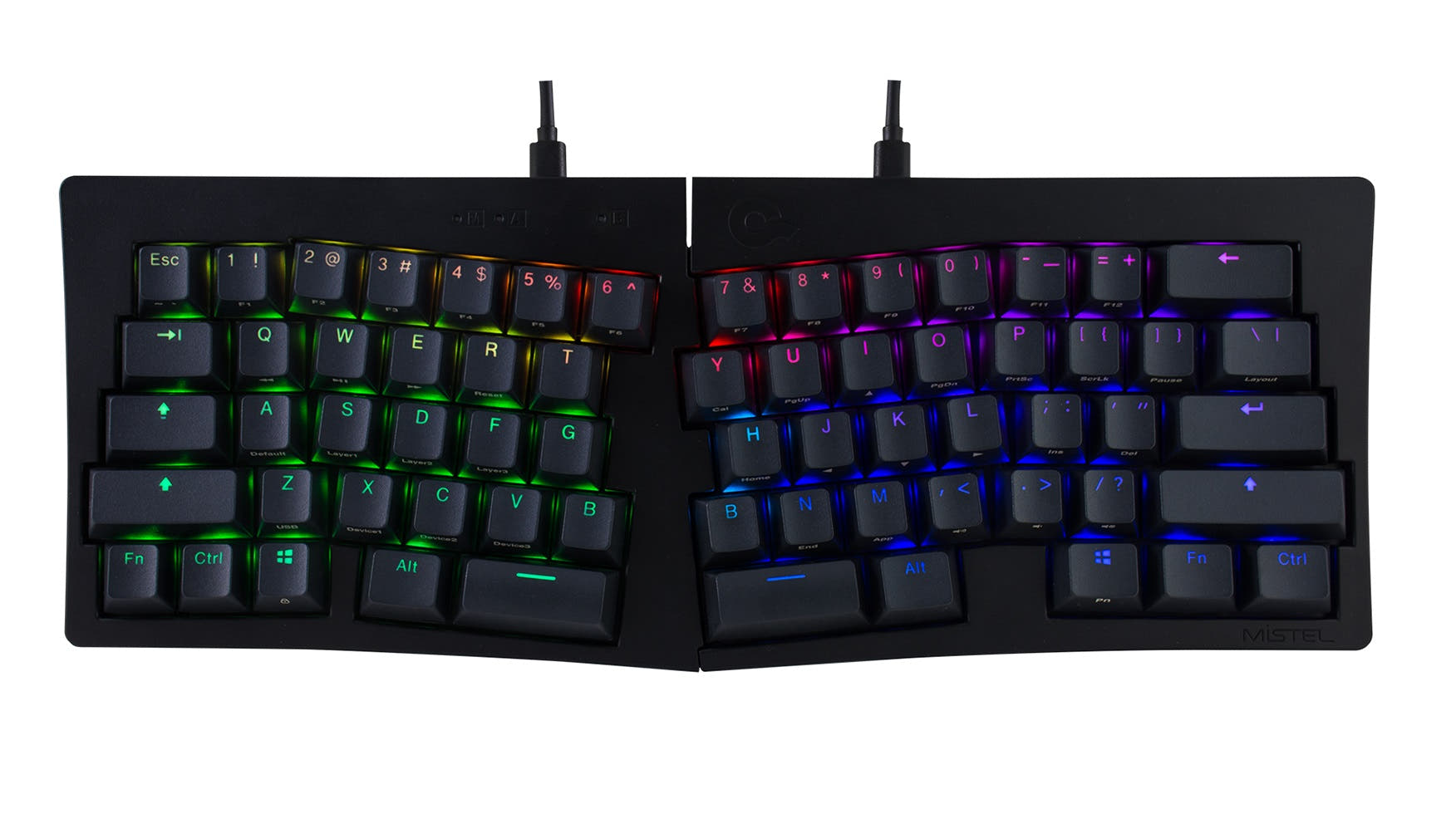
The Q14 Pro uses an Alice layout, which is a split, curved keyboard with a traditional staggered key arrangement. The Q15 Max uses an ortholinear layout, where all keys are aligned in a perfect grid with no staggering. The Q14 Pro also includes a left-side numpad, while the Q15 Max is more compact and uses a split spacebar.
The Keychron Q14 Pro Alice is specifically designed with a southpaw layout, placing the numpad on the left side. According to the manufacturer, this design leaves more room on the right for a mouse, which can benefit both left and right-handed users by reducing arm reach.
Yes, but with different options. The Q14 Pro supports Bluetooth 5.1 and wired USB-C. The Q15 Max supports 2.4 GHz wireless, Bluetooth 5.1, and wired USB-C, giving it a dedicated low-latency wireless option the Q14 Pro lacks.
Yes, both the Keychron Q14 Pro and Q15 Max are hot-swappable. The manufacturer states they are compatible with most 3-pin and 5-pin MX-style mechanical switches from brands like Gateron, Cherry, and Kailh.
The Keychron Q15 Max is more portable. It weighs 1232g compared to the Q14 Pro's 2395g, and its dimensions (283 x 114 x 21 mm) are significantly smaller than the Q14 Pro (445 x 157 x 34 mm).
The fully assembled Q14 Pro uses KSA (Keychron Spherical Angle) profile double-shot PBT keycaps. The fully assembled Q15 Max uses XDA profile dye-sublimated PBT keycaps, which have a uniform height across all rows.
Yes, both keyboards support full programmability via the open-source QMK firmware and the VIA/Keychron Launcher web app. This allows for key remapping, macro creation, and layer configuration.
Both have a 4000mAh battery. The manufacturer lists the Q14 Pro's Bluetooth working time at up to 300 hours with backlighting off. For the Q15 Max, wireless working time is listed as up to 180 hours with backlighting off. Actual results will vary with use.
The Q14 Pro Alice has one programmable knob. The Q15 Max has two programmable knobs, offering more direct controls for volume, scrolling, or other custom functions.
The Q14 Pro Alice is likely an easier transition. Its Alice layout maintains the familiar staggered rows of a standard keyboard while introducing a split, curved design. The Q15 Max's ortholinear grid requires completely retraining muscle memory for key placement, which has a steeper learning curve.
Both keyboards feature full CNC-machined aluminum cases. The manufacturer specifies the use of 6063 aluminum that undergoes multiple finishing stages including anodizing and sandblasting.
Both use a double-gasket mount design with silicone pads between the case halves. The Q15 Max specifically mentions additional layers of IXPE, PET, and Latex acoustic foams inside the case to enhance the typing sound.
Not sold on either?


Still torn?
Answer a few quick questions and the keyboard finder ranks 2,000+ boards by how you will actually use yours.