Keychron V2 vs V3 UltraWired 65% vs Wireless 8K TKL
Choose the Keychron V2 for a compact, wired, and highly customizable budget board, or the V3 Ultra for wireless freedom, high-performance gaming, and a softer typing feel.
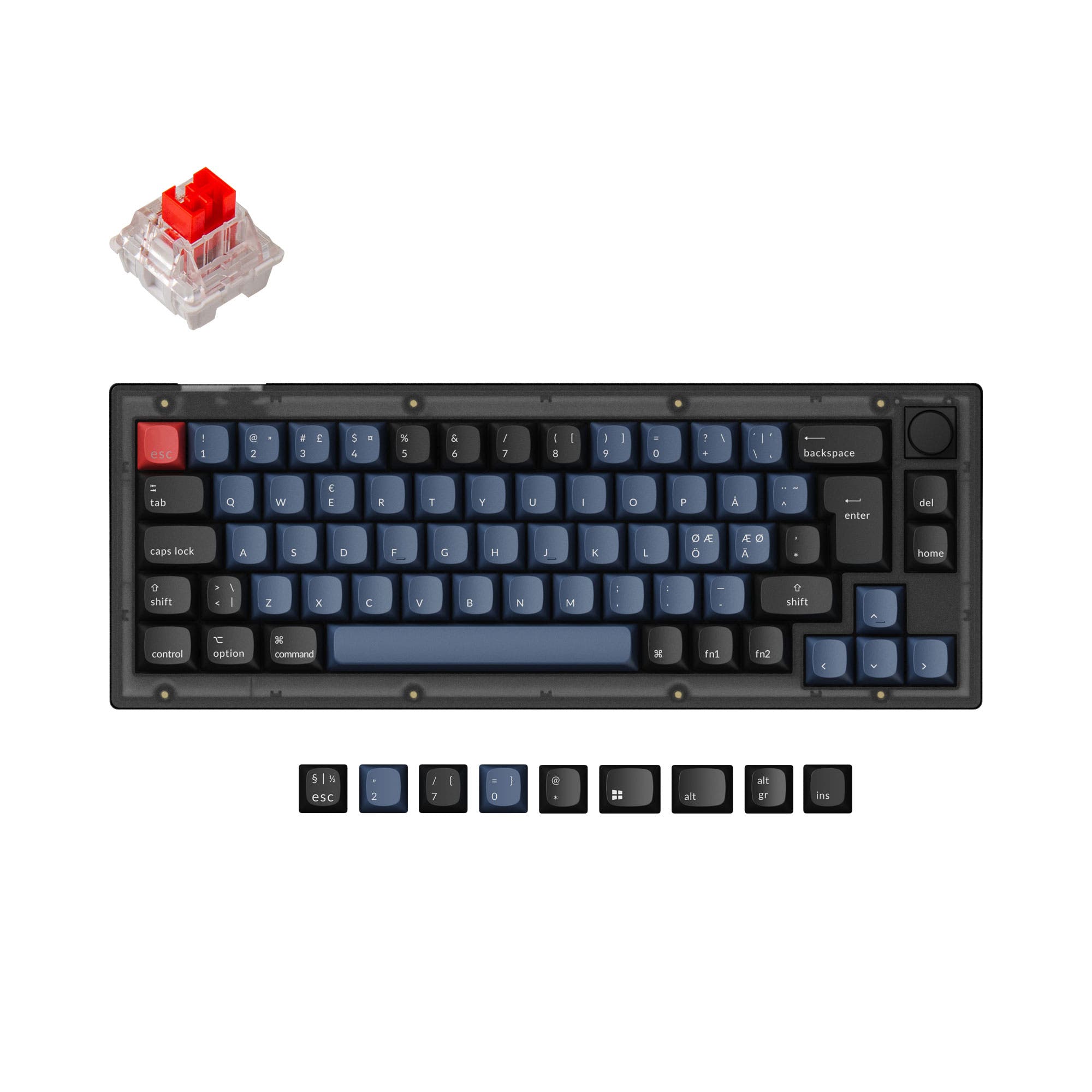

Which one should you get?
Get the
Keychron V2
Wired 65%
- More compact 65% layout saves desk space.
- Supports a wide range of ISO and ANSI layouts.
- Available as a barebones kit for custom builds.
- Wired-only connectivity limits placement flexibility.
- Standard 1000 Hz polling rate, lower than the V3 Ultra's 8000 Hz.
- Steel plate and tray mount may produce a firmer, less dampened sound profile.
Get the
Keychron V3 Ultra
Wireless 8K TKL
- Tri-mode connectivity with 2.4 GHz, Bluetooth 5.3, and wired modes.
- High 8000 Hz polling rate for competitive gaming.
- Gasket mount design with a polycarbonate plate for a softer typing feel.
- Larger and heavier 80% TKL form factor.
- Currently commands a higher price.
- Only available in an ANSI layout, limiting international keycap compatibility.
Your primary need dictates the choice. If a smaller, wired keyboard with maximum layout flexibility and a lower entry cost is the goal, the Keychron V2 is a compelling option. If you require wireless connectivity, the highest performance for gaming, and a more refined, pre-dampened acoustic experience, the Keychron V3 Ultra justifies its higher cost.
The differences that matter
Skip the 40-row spec sheet. These are the specs that change how each board feels, sounds, and fits your desk.
Keychron V2
Keychron V3 Ultra
Layout size
65%
80%
Connection
Wired
Wired, Bluetooth, 2.4 GHz
Max polling rate
1,000 Hz
8,000 Hz
Mount style
Plate Mount, Tray Mount
Gasket Mount
Weight
855 g
960 g
- Keychron V2
- Keychron V3 Ultra
- Performance
- 6991
- Build quality
- 8783
- Productivity
- 9698
- Customizability
- 9994
- Portability
- 7676
- Hot-swappable
- Case material: ABS, Plastic
- Switch options: Clicky, Linear, Tactile
- Knob
- QMK
- VIA
What will you mostly use it for?
The V3 Ultra is the stronger choice for gaming, office multitasking, and content creation due to its high-speed wireless, extended battery, and creative controls. The V2 wins for travel and straightforward modding thanks to its smaller size, lighter weight, and barebones availability. For programming, the decision is a tie, leaning on personal preference for international layout support versus a dedicated function row.
Pick the Keychron V3 Ultra
- The V3 Ultra offers an 8000 Hz polling rate in both wired and 2.4 GHz wireless modes for lower latency.
- Its gasket mount design with a polycarbonate plate may provide a more consistent typing feel during rapid key presses.
- It features N-key rollover in both wireless and wired modes for reliable simultaneous key registration.
What owners say
Ratings and quotes collected from verified store reviews, including the critical ones.
Keychron V2
17 owner reviews
“Was looking for a good budget board to customize and this keyboard was great! Good price and high quality materials as well as fast shipping. Love it.”
Keychron V3 Ultra
2 owner reviews
“Second Keyboard I buy from Keychron! I live in El Salvador and it arrived on time and perfectly. Extremely comfortable, outstanding switches. Best keyboard I've had in my life.”
Keychron V2 vs V3 Ultra specs
Every tracked spec, side by side. Rows marked with a dot differ between the boards.
11 of 27 specs differ
Keychron V2
Keychron V3 Ultra
Switch options
Hot-swappable
Mount style
Sound dampening
Screw-in stabilizers
Layout size
Layout standard
Ergonomics
Knob
Display
Media keys
Connection
Max polling rate
Battery
USB-C
Case material
Plate material
Keycaps
Weight
Dimensions
Typing angle
Backlight
QMK
VIA
N-key rollover
Mac & Windows
Released
Compare prices
Live prices from the stores we track, cheapest in-stock offer first.
Lowest price across stores, Amazon excluded.



Prices in USD are converted to your currency and can change at any time. KeebFinder may earn a commission when you buy through these links, at no extra cost to you.
Keychron V2 vs V3 Ultra: your questions
The core difference is connectivity and layout. The V2 is a wired-only 65% keyboard, while the V3 Ultra is a wireless-capable (2.4GHz/Bluetooth) 80% TKL keyboard. The V3 Ultra also features a much higher 8000 Hz polling rate and a gasket mount design.
The Keychron V3 Ultra is designed for wireless gaming. Its manufacturer specifies an 8000 Hz polling rate in the 2.4 GHz wireless mode, which aims to minimize input lag. It also includes N-key rollover in wireless mode for reliable keypress registration.
Yes. The Keychron V2 listing includes Mac/Win support. The vendor description confirms it comes with a system toggle and an additional set of keycaps for both macOS and Windows systems, allowing you to save a separate layout for each.
No, the Keychron V3 Ultra uses ZMK firmware according to its product description. It is programmed via the Keychron Launcher web app. The V2, however, supports both QMK and VIA for programming.
Both are highly customizable with hot-swap sockets and screw-in stabilizers. The V2 has a slight edge for modders as it is available in a barebones kit, allowing you to choose all components from the start, and it uses a common tray mount with a steel plate that many are familiar with.
The Keychron V3 Ultra comes with pre-lubed Keychron Silk POM switches, available in Red (linear), Brown (tactile), and Banana (tactile) variants. The switches feature POM housing and stem for smoothness.
Both keyboards come with OSA profile double-shot PBT keycaps. According to Keychron, this profile has a similar height to OEM but with an SA-like spherical shape.
Keychron claims the V3 Ultra's 4000mAh battery lasts up to 660 hours with the backlight off, and up to 200 hours with RGB lighting at its lowest brightness, based on 5 hours of daily use.
Yes. Both keyboards feature a programmable knob. You can customize its function, such as volume, zoom, or brush size, using the Keychron Launcher web app, as described in their respective product pages.
The Keychron V2 is better for small desks due to its compact 65% layout, which measures 330mm in length. The V3 Ultra, as a TKL, is larger at 368mm long and may require more space.
Yes, both the Keychron V2 and V3 Ultra feature south-facing RGB LEDs. This design helps prevent interference with Cherry-profile keycaps and illuminates the board better from the typist's angle.
Not sold on either?


Still torn?
Answer a few quick questions and the keyboard finder ranks 2,000+ boards by how you will actually use yours.