Leopold FC750R PD vs FC750RBT V2Wired vs Wireless TKL Choice
Choose the FC750RBT V2 for wireless flexibility, or the FC750R PD for a simpler, often more affordable wired-only setup.

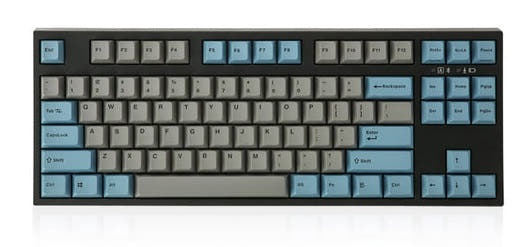
Which one should you get?
Get the
Leopold FC750R PD
Wired
- Wired-only design ensures a consistent, lag-free connection.
- Typically available at a lower price point than the Bluetooth model.
- Includes 1.5mm thick PBT doubleshot keycaps for durability.
- Lacks wireless connectivity of any kind.
- Uses an older USB connection instead of USB-C.
- Plate material is plastic, not metal.
Get the
Leopold FC750RBT V2
Wireless TKL Choice
- Offers dual connectivity with Bluetooth 5.1 and USB-C wired modes.
- Equipped with newer Cherry MX2A series switches.
- Build includes an aluminum plate and an FR4 dual-layer PCB.
- Requires three AAA batteries for wireless operation.
- Case is constructed from ABS plastic, not higher-grade materials.
- Priced higher than the wired-only PD model.
Your primary need dictates the choice. If you value a clean desk, need to switch between devices, or plan to use the keyboard on the go, the FC750RBT V2 is worth the extra cost for its Bluetooth and modern USB-C port. If your setup is permanently wired, you are budget-conscious, and you prefer a simpler tool, the FC750R PD delivers the same Leopold typing foundation without the wireless features.
The differences that matter
Skip the 40-row spec sheet. These are the specs that change how each board feels, sounds, and fits your desk.
Leopold FC750R PD
Leopold FC750RBT V2
Connection
Wired
Bluetooth, Wired
Case material
Plastic
ABS
Plate material
Plastic
Aluminum, FR4
Backlight
None
Yes, north-facing
Mac & Windows
Yes
No
- Leopold FC750R PD
- Leopold FC750RBT V2
- Performance
- 5965
- Build quality
- 4949
- Productivity
- 6157
- Customizability
- 4847
- Portability
- 5467
- Layout size: 80%
- Switch options: Clicky, Linear, Silent, Tactile
- Mount style: Plate Mount
- Sound dampening
- Keycaps: PBT
What will you mostly use it for?
The FC750RBT V2 is the clear choice for mobile and multi-device workflows like office use and travel due to its Bluetooth connectivity. The standard FC750R PD is better suited for stationary, latency-sensitive tasks like gaming where a wired connection is preferred. For stationary creative or programming work, the decision is neutral and comes down to a personal preference for wired or wireless operation.
Pick the Leopold FC750R PD
- Wired-only connection ensures consistent latency.
- Lower price point for similar core performance.
- Both offer full N-key rollover for simultaneous key presses.
Leopold FC750R PD vs FC750RBT V2 specs
Every tracked spec, side by side. Rows marked with a dot differ between the boards.
7 of 17 specs differ
Leopold FC750R PD
Leopold FC750RBT V2
Switch options
Mount style
Sound dampening
Layout size
Layout standard
Ergonomics
Display
Media keys
Connection
USB-C
Case material
Plate material
Keycaps
Backlight
N-key rollover
Mac & Windows
Released
Compare prices
Live prices from the stores we track, cheapest in-stock offer first.
Lowest price across stores, Amazon excluded.


Prices in USD are converted to your currency and can change at any time. KeebFinder may earn a commission when you buy through these links, at no extra cost to you.
Leopold FC750R PD vs FC750RBT V2: your questions
The core difference is connectivity. The FC750R PD is a wired-only keyboard with a standard USB cable. The FC750RBT V2 adds Bluetooth 5.1 wireless capability and uses a USB-C port for its wired connection, offering much greater flexibility.
The FC750RBT V2 is listed with north-facing RGB LEDs in its metadata. However, the vendor characteristics list the backlighting as 'Blank / None LED', suggesting the LEDs may not be used for backlighting in the standard configuration but are physically present on the PCB.
Both keyboards feature double-shot PBT keycaps, which are highly durable and resistant to shine. The FC750R PD specifically mentions 1.5mm thick keycaps, while the FC750RBT V2 uses an SS2 profile.
For competitive gaming where consistent latency is critical, the wired FC750R PD is the safer choice. The FC750RBT V2 can be used in wired mode for gaming, but its wireless mode may introduce variable latency not ideal for high-level play.
The FC750R PD comes with standard Cherry MX switches (e.g., Red, Blue, Brown, Black, Silent Red, Clear, Silver). The FC750RBT V2 is installed with the newer Cherry MX2A line of switches, which are an updated version of the classic MX design.
According to the vendor description, the FC750RBT V2 is powered by three AAA batteries for its Bluetooth functionality. These batteries are included with the keyboard.
Yes, both models feature DIP switches that allow for basic layout customization, as stated in the vendor description for the FC750R PD. This typically allows you to remap certain keys like Caps Lock or swap the Ctrl and Win keys.
The FC750RBT V2 incorporates some internal upgrades, including an aluminum plate and an FR4 dual-layer PCB, which may offer a more rigid typing feel. The FC750R PD uses a plastic plate. Both have sound-dampening materials, but the V2 includes both a pad and foam.
The product metadata for the FC750R PD explicitly lists Mac support as an extra feature. Mac compatibility is not explicitly listed for the FC750RBT V2 in the provided data, though Bluetooth keyboards are generally compatible with macOS.
The FC750RBT V2 is more portable due to its Bluetooth capability, eliminating the need to carry or use a cable. Its operation on AAA batteries also means you don't need a power outlet, making it suitable for use on planes, in cafes, or with tablets.
No, neither the FC750R PD nor the FC750RBT V2 are hot-swappable. The vendor description for the PD model explicitly states 'Hotswap: No'. Both use a traditional plate-mounted design requiring soldering to change switches.
Not sold on either?


Still torn?
Answer a few quick questions and the keyboard finder ranks 2,000+ boards by how you will actually use yours.