Leopold FC900RBT vs FC900RBT V2Classic vs Updated Switch & Plate
Choose the V2 for its updated MX2A switches and aluminum plate, or the original for its wider switch selection and Mac/Linux support.

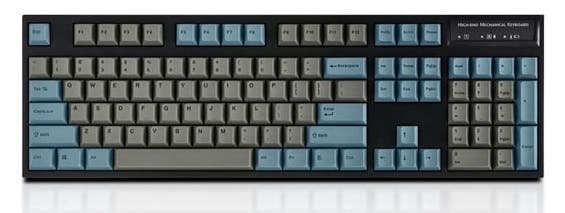
Which one should you get?
Get the
Leopold FC900RBT
Classic
- Explicit Mac, Windows, and Linux compatibility per vendor description.
- Connects to up to 4 Bluetooth devices simultaneously.
- Wider selection of classic Cherry MX switches, including Clear.
- Plastic plate and case construction.
- Lacks the updated internal acoustics package of the V2.
- Keycap legends are top-printed, which may show more wear than front-printing.
Get the
Leopold FC900RBT V2
Updated Switch & Plate
- Updated Cherry MX2A switches installed.
- Aluminum plate and FR4 dual-layer PCB for a more rigid feel.
- Includes sound absorbing pad and foam for enhanced acoustics.
- Vendor description only confirms Windows compatibility.
- Requires three AAA batteries for wireless, one more than the original.
- ABS case material, compared to the original's unspecified plastic.
Select the Leopold FC900RBT V2 if your priority is the updated typing experience from the MX2A switches, aluminum plate, and enhanced internal foam. Opt for the original FC900RBT if you need guaranteed Mac or Linux support, a wider classic switch selection, or a slightly simpler two-battery wireless system. Both are solid, pre-built full-size boards with excellent PBT keycaps.
The differences that matter
Skip the 40-row spec sheet. These are the specs that change how each board feels, sounds, and fits your desk.
Leopold FC900RBT
Leopold FC900RBT V2
Hall effect (magnetic)
No
Yes
Case material
Plastic
ABS
Plate material
Plastic
Aluminum, FR4
Keycaps
ABS, PBT
PBT
Backlight
None
Yes, north-facing
- Leopold FC900RBT
- Leopold FC900RBT V2
- Performance
- 5762
- Build quality
- 4849
- Productivity
- 6957
- Customizability
- 4547
- Portability
- 5049
- Layout size: 100%
- Connection: Bluetooth, Wired
- Switch options: Clicky, Linear, Silent, Tactile
- Mount style: Plate Mount
- Sound dampening
What will you mostly use it for?
The V2 takes a slight lead for gaming and modding due to its updated internal construction with an aluminum plate and FR4 PCB. The original FC900RBT is stronger for office and content creation use, primarily because of its confirmed multi-OS support. For programming and travel, the boards are evenly matched, sharing core layouts and similar wireless implementations.
Pick the Leopold FC900RBT V2
- The V2 features an aluminum plate, which can provide a more consistent and stable typing feel.
- It includes a flex cut PCB design, which may affect the typing feel.
- The V2 is listed with Hall Effect as an extra feature, though its implementation is not detailed.
Leopold FC900RBT vs FC900RBT V2 specs
Every tracked spec, side by side. Rows marked with a dot differ between the boards.
8 of 19 specs differ
Leopold FC900RBT
Leopold FC900RBT V2
Switch options
Hall effect (magnetic)
Mount style
Sound dampening
Layout size
Layout standard
Ergonomics
Display
Media keys
Connection
USB-C
Case material
Plate material
Keycaps
Weight
Backlight
N-key rollover
Mac & Windows
Released
Compare prices
Live prices from the stores we track, cheapest in-stock offer first.
Lowest price across stores, Amazon excluded.


Prices in USD are converted to your currency and can change at any time. KeebFinder may earn a commission when you buy through these links, at no extra cost to you.
Leopold FC900RBT vs FC900RBT V2: your questions
The V2 updates the internal components, featuring newer Cherry MX2A switches, an aluminum plate, an FR4 PCB, and added sound foam. The original uses classic Cherry MX switches and has a plastic plate.
The vendor description for the V2 only explicitly lists Windows compatibility. The original FC900RBT's vendor page confirms compatibility with Mac, Windows, and Linux.
No. Both the Leopold FC900RBT and FC900RBT V2 are listed as not hot-swappable in their vendor characteristics. Switches are soldered to the PCB.
Both use disposable AAA batteries. The original FC900RBT requires 2 batteries, while the V2 requires 3 batteries for its Bluetooth mode.
Both use double-shot PBT keycaps, but the legend printing differs. The original has top-printed legends, while the V2 uses front-printed legends on its SS2 profile keycaps.
No. The metadata lists RGB as 'Yes' but with a 'North-face' qualifier, while the vendor description explicitly states the backlighting is 'Blank / None LED'. This suggests it may have north-facing LEDs for shine-through but no active RGB lighting effects.
Yes. Both models include dip switches for hardware-level layout customization, as referenced in their respective user manuals.
A flex cut PCB has cuts in the circuit board designed to allow for more flex or a specific typing feel. The V2 includes this feature, while the original model's PCB design is not specified.
The original FC900RBT offers Cherry MX Silent Red switches, which are designed to be quieter. Both boards list sound dampening as a feature, but the V2 specifically mentions a sound absorbing pad and foam.
The vendor description for the original FC900RBT states it can connect to up to 4 devices. The V2's vendor description does not specify a number for simultaneous Bluetooth connections.
The V2 lists 'Hall Effect' as an extra feature in its metadata. This typically refers to a switch technology using magnetic fields for actuation, but the specific implementation (e.g., on all switches or just a hall effect spacebar) is not detailed in the provided information.
Not sold on either?


Still torn?
Answer a few quick questions and the keyboard finder ranks 2,000+ boards by how you will actually use yours.