Machenike AIR50 vs MK LowKey70Slim Plastic vs Aluminum Low-Profile
Choose the Machenike AIR50 for its 2.4GHz wireless dongle and ultra-slim design, or the MK LowKey70 for its full aluminum build and larger battery.


Which one should you get?
Get the
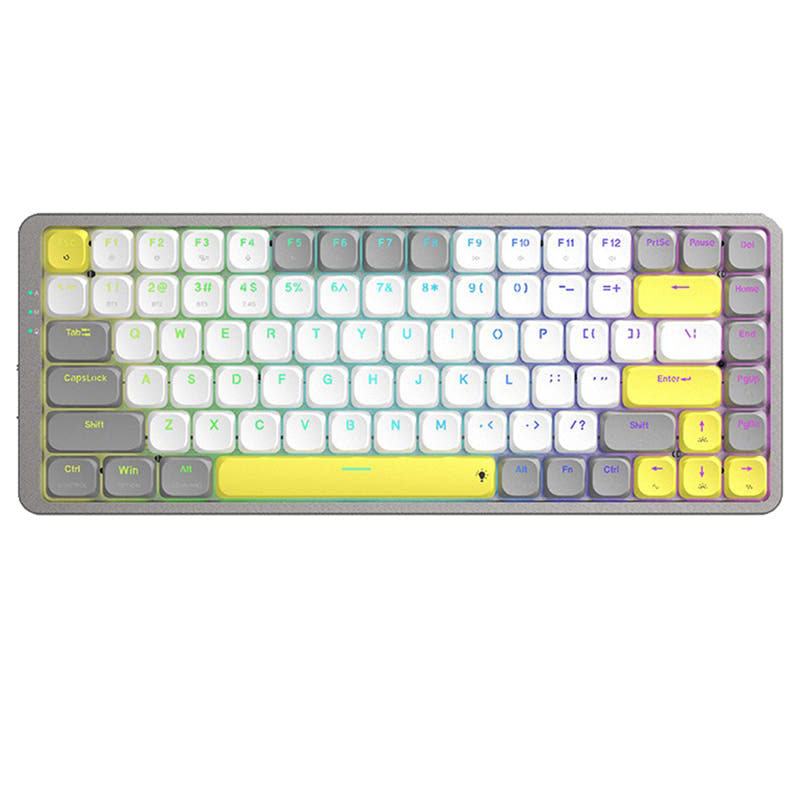
Machenike AIR50
Slim Plastic
- Includes a 2.4GHz wireless dongle alongside Bluetooth and wired modes.
- Vendor emphasizes an ultra-slim design, as thin as 1.5cm.
- Lightweight build at 456 grams.
- Plastic case construction.
- Smaller 1600mAh battery capacity.
- Lacks dedicated multimedia keys.
Get the
MK LowKey70
Aluminum Low-Profile
- Full CNC aluminum case and plate for a solid build.
- Larger 2000mAh battery.
- Includes dedicated multimedia keys.
- No 2.4GHz wireless mode, only Bluetooth and wired.
- Multimedia controls are listed as only operating in macOS.
- Some user reviews mention a cramped layout and a wobbly foot.
Your primary wireless need dictates the choice. If you require a reliable, low-latency 2.4GHz connection for gaming or general use, the Machenike AIR50 is the clear option. If you prioritize build quality, battery life, and macOS multimedia controls and can work with Bluetooth, the MK LowKey70's aluminum construction makes it the more substantial-feeling keyboard.
The differences that matter
Skip the 40-row spec sheet. These are the specs that change how each board feels, sounds, and fits your desk.
Machenike AIR50
MK LowKey70
Connection
Bluetooth, 2.4 GHz, Wired
Bluetooth, Wired
Battery
1,600 mAh
2,000 mAh
Case material
Plastic
Aluminum
Switch options
Clicky, Linear
Clicky, Linear, Tactile
Media keys
No
Yes
- Machenike AIR50
- MK LowKey70
- Performance
- 4864
- Build quality
- 3967
- Productivity
- 5676
- Customizability
- 5974
- Portability
- 7483
- Layout size: 75%
- Hot-swappable
- Low profile
- Keycaps: PBT
What will you mostly use it for?
The MK LowKey70 wins for office use and content creation due to its multimedia keys and aluminum build, while the Machenike AIR50 is better suited for gaming and travel with its 2.4GHz wireless and lighter, slimmer profile. For programming, both are equally capable with their shared layout and hot-swap features. Modders may prefer the MK for its known switch ecosystem and included specialized tool.
Pick the Machenike AIR50
- Includes a 2.4GHz wireless dongle for a potentially more stable, low-latency connection.
- Vendor description mentions a power-saving mode that activates after inactivity, not during use.
- The MK LowKey70 listing does not mention a 2.4GHz mode, relying solely on Bluetooth.
Machenike AIR50 vs MK LowKey70 specs
Every tracked spec, side by side. Rows marked with a dot differ between the boards.
6 of 20 specs differ
Machenike AIR50
MK LowKey70
Switch options
Hot-swappable
Mount style
Low profile
Layout size
Layout standard
Ergonomics
Display
Media keys
Connection
Battery
USB-C
Case material
Plate material
Keycaps
Weight
Dimensions
Backlight
Mac & Windows
Released
Compare prices
Live prices from the stores we track, cheapest in-stock offer first.
Lowest price across stores, Amazon excluded.



Prices in USD are converted to your currency and can change at any time. KeebFinder may earn a commission when you buy through these links, at no extra cost to you.
Machenike AIR50 vs MK LowKey70: your questions
Only the Machenike AIR50 offers a 2.4GHz wireless mode. The MK LowKey70 connects via Bluetooth 5.1 or a wired USB-C cable.
Yes, the MK LowKey70 product listing states it is Windows compatible. However, its multimedia key controls are noted to only operate in macOS.
The Machenike AIR50 uses custom-developed low-profile switches in Red (linear) or Blue (clicky) options. The MK LowKey70 uses Kailh Choc low-profile switches, available in Red (linear), White (clicky), and Brown (tactile).
Yes, both keyboards are hot-swappable. The AIR50 has full-key hot-swap sockets, and the LowKey70 has low-profile hot-swap sockets for Kailh Choc switches.
The MK LowKey70 has a larger 2000mAh battery compared to the Machenike AIR50's 1600mAh, which suggests a potential for longer use between charges.
Both keyboards use PBT keycaps. The MK LowKey70 specifically uses double-shot pudding-style PBT keycaps.
Yes, both feature RGB backlighting. The AIR50 has dynamic RGB with 20 lighting effects, and the LowKey70 has per-key RGB backlighting.
The Machenike AIR50 is marketed as ultra-slim and lightweight at 456g, with provided dimensions of 322x127x23mm. This likely makes it the more portable option, though the LowKey70's weight is not specified.
According to the vendor, the MK LowKey70 includes the keyboard, a newly redesigned low-profile switch puller, a USB Type-C cable with a Type-A adapter, a user manual, and a quick start guide.
Yes, both product listings explicitly state support for Mac systems. The MK LowKey70's multimedia controls are specifically designed for macOS.
The Machenike AIR50 uses a plastic case, while the MK LowKey70 uses a full CNC aluminum case and an aluminum plate, giving it a more premium and rigid feel.
Not sold on either?




Still torn?
Answer a few quick questions and the keyboard finder ranks 2,000+ boards by how you will actually use yours.