Nuphy Air60 HE vs Air75 HE60% vs 75% Low-Profile Hall Effect
Choose the Air60 HE for maximum portability and a minimalist desk, or the Air75 HE for dedicated arrow keys and function row without a layer.
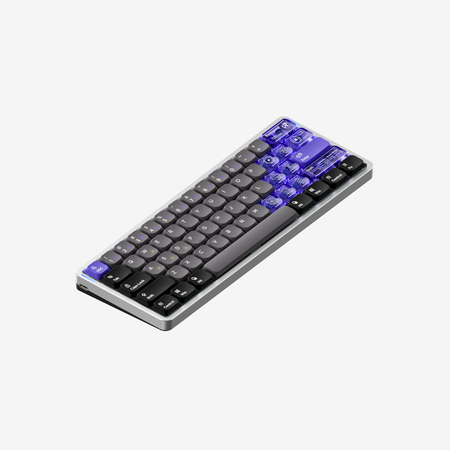
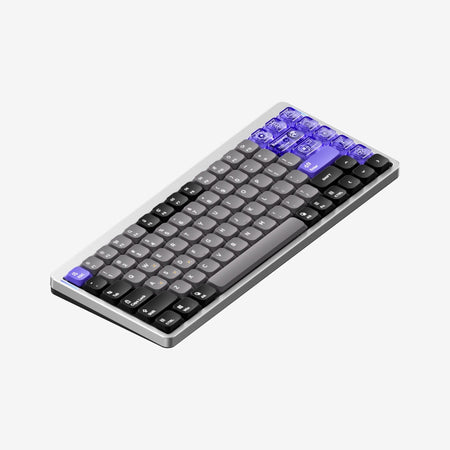
Which one should you get?
Get the
Nuphy Air60 HE
60%
- More compact and portable 60% layout (297.2mm long, 534g).
- Includes 10 extra PC keycaps for customization.
- Features the same high-performance 8000Hz polling and magnetic switches as the larger model.
- Lacks dedicated arrow keys and function row, requiring layer usage.
- Wired-only connectivity limits placement flexibility.
- The vendor description mentions excluding sound dampers and switch pads for travel accuracy.
Get the
Nuphy Air75 HE
75% Low-Profile Hall Effect
- 75% layout includes dedicated arrow keys, function row, and navigation cluster.
- Vendor listing includes 'sound dampening' as a specific feature.
- Includes 9 extra PC keycaps for customization.
- Larger and heavier (316.4mm long, 702g) than the Air60 HE.
- Wired-only connectivity.
- Higher base price compared to the Air60 HE.
Your primary need dictates the choice. If you want the smallest possible footprint for gaming or a minimalist desk and don't mind using function layers, the Air60 HE is the better pick. If you require immediate access to arrow keys, function keys, and navigation for work or content creation, the Air75 HE's more complete layout is worth the extra size and cost. Their core gaming performance is identical.
The differences that matter
Skip the 40-row spec sheet. These are the specs that change how each board feels, sounds, and fits your desk.
Nuphy Air60 HE
Nuphy Air75 HE
Layout size
60%
75%
Weight
534 g
702 g
Dimensions
19 x 297 x 107 mm
18 x 316 x 133 mm
- Nuphy Air60 HE
- Nuphy Air75 HE
- Performance
- 9698
- Build quality
- 6363
- Productivity
- 6976
- Customizability
- 6968
- Portability
- 7466
- Hall effect (magnetic)
- Rapid trigger
- Connection: Wired
- Hot-swappable
- Low profile
- Max polling rate: 8,000 Hz
What will you mostly use it for?
The Air75 HE is the more versatile choice for productivity-focused tasks like office work, programming, and content creation due to its more complete key layout. For pure gaming performance, the keyboards are identical. The Air60 HE wins for travel and portability thanks to its smaller, lighter form factor. Modding potential is equal between both models.
It's a tie
- Both feature an 8000Hz polling rate and ultra-low latency.
- Both support rapid trigger, hyper tap, and dynamic keystroke features via magnetic switches.
- Both have a 0.1mm to 3.3mm adjustable actuation range.
Nuphy Air60 HE vs Air75 HE specs
Every tracked spec, side by side. Rows marked with a dot differ between the boards.
3 of 25 specs differ
Nuphy Air60 HE
Nuphy Air75 HE
Switch options
Hall effect (magnetic)
Rapid trigger
Hot-swappable
Mount style
Low profile
Sound dampening
Layout size
Layout standard
Ergonomics
Display
Media keys
Connection
Max polling rate
USB-C
Case material
Plate material
Keycaps
Weight
Dimensions
Typing angle
Backlight
N-key rollover
Mac & Windows
Released
Compare prices
Live prices from the stores we track, cheapest in-stock offer first.
Lowest price across stores, Amazon excluded.


Prices in USD are converted to your currency and can change at any time. KeebFinder may earn a commission when you buy through these links, at no extra cost to you.
Nuphy Air60 HE vs Air75 HE: your questions
The main difference is the layout size. The Air60 HE is a 60% keyboard with 61 keys, requiring the use of function layers for arrows and media controls. The Air75 HE is a 75% keyboard with 84 keys, which includes dedicated arrow keys, a function row, and a navigation cluster while maintaining a relatively compact form factor.
No. According to the specifications and vendor descriptions, both the Nuphy Air60 HE and Air75 HE are wired-only keyboards. The connection is listed as 'Wired only' in their features.
Yes. The technical specifications for both keyboards state support for 'Power-Off Replaceable Switches'. This means you can swap the low-profile magnetic switches, but you must ensure the keyboard is powered off before doing so to prevent damage, as noted in the vendor description.
The Air75 HE is generally better for typing and office work. Its 75% layout provides dedicated arrow keys and a function row, which are commonly used in spreadsheets and documents without needing to memorize layer shortcuts. The vendor also lists 'sound dampening' as a feature for the Air75 HE, which may result in a quieter typing experience.
Both the Air60 HE and Air75 HE support a true 8000Hz polling rate, as stated in their vendor descriptions and technical specifications. This is combined with a PCB scan rate of 8000Hz for low latency.
Yes, both keyboards include extra keycaps. The Air60 HE comes with 5 extra PBT keycaps and 10 extra PC keycaps. The Air75 HE comes with 5 extra PBT keycaps and 9 extra PC keycaps. Both also include a keycap and switch puller tool.
Rapid Trigger is a feature of magnetic (Hall Effect) switches that allows for rapid re-actuation with minimal reset distance. According to the vendor descriptions, both the Air60 HE and Air75 HE support Rapid Trigger, along with other advanced features like Hyper Tap and Dynamic Keystroke for gaming.
Yes. The vendor description for both models states that the magnetic switches enable an actuation range adjustable from 0.1mm to 3.3mm. This is configurable through the NuPhyIO web driver software.
Both keyboards use NuPhy's web-based driver called NuPhyIO. The vendor states it works on any platform with a Chromium-based browser, allowing for key remapping, macro creation, and adjustment of switch parameters like actuation point and rapid trigger settings.
The Air60 HE is more portable. It is shorter (297.2mm vs 316.4mm) and significantly lighter (534g vs 702g) than the Air75 HE. Its 60% footprint also takes up less space in a bag, making it the better choice for frequent travelers with limited desk space.
Both keyboards feature keycaps made from PBT and PC (polycarbonate) materials. The vendor describes them as five-sided dye-sub nSA profile keycaps, with some transparent PC keycap options available for added visual appeal.
Yes, both keyboards feature south-facing RGB LED backlighting with 20 different backlight modes, as confirmed in their technical specifications. The south-facing orientation helps prevent interference with Cherry-profile keycaps.
Not sold on either?


Still torn?
Answer a few quick questions and the keyboard finder ranks 2,000+ boards by how you will actually use yours.