Varmilo Muse65 HE Asgard vs Muse65 HE AuroraWhich 65% Magnetic?
Choose the Asgard for its slightly higher build quality and productivity scores, or the Aurora if you prefer the navy color and a modest saving.
KeebFinder may earn a commission when you buy through these links, at no extra cost to you.


Which one should you get?
Get the
Varmilo Muse65 HE Asgard
Mac & Windows
Build quality in the bottom 45% of 65% boards under $150.
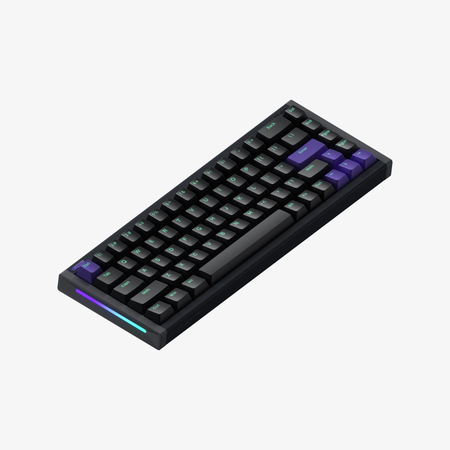
- Full CNC aluminum case with a zircon sandblasted finish and UV mirror glass backplate for a premium look.
- Higher build quality and productivity scores compared to the Aurora.
- Includes Mac/Win support as an extra feature, offering OS flexibility.
- Magnetic switches only. Standard MX switches will not fit.
- North-facing LEDs. Cherry-profile keycaps can hit the switch housing.
Get the
Varmilo Muse65 HE Aurora
Build quality in the bottom 40% of 65% boards under $150.
- Navy and blue color option provides a unique aesthetic alternative to the Asgard's black.
- Tray mount design with aluminum plate, as noted in the vendor description, offers a specific typing feel.
- Slightly lower price point than the Asgard for budget-conscious buyers.
- Magnetic switches only. Standard MX switches will not fit.
- North-facing LEDs. Cherry-profile keycaps can hit the switch housing.
Choose the Varmilo Muse65 HE Asgard if you want the better overall package for productivity and a few extra features like explicit Mac/Win support. Pick the Aurora if the navy color appeals to you and you prefer a tray mount design, though be aware it has slightly lower benchmark scores. In most scenarios, the Asgard is the more versatile choice, but either delivers the same fast magnetic-switch performance.
The differences that matter
Skip the 40-row spec sheet. These are the specs that change how each board feels, sounds, and fits your desk.
Varmilo Muse65 HE Asgard
Varmilo Muse65 HE Aurora
Mac & Windows
Yes
No
- Varmilo Muse65 HE Asgard
- Varmilo Muse65 HE Aurora
- Performance
- 9191
- Build quality
- 6058
- Productivity
- 6452
- Customizability
- 5247
- Portability
- 7167
- Layout size: 65%
- Hall effect (magnetic)
- Rapid trigger
- Connection: Wired
- Max polling rate: 8,000 Hz
- Case material: Aluminum
What will you mostly use it for?
In nearly every use case, the Varmilo Muse65 HE Asgard comes out ahead, largely due to its higher performance, productivity, and customizability scores. The Aurora ties only in travel because both are similarly compact and wired. For gaming and programming, the Asgard's slight edge in metrics makes it the better choice, while office users and content creators benefit from its Mac/Win support. Modders may find the Asgard slightly more accommodating, but neither keyboard is built for heavy aftermarket customization.
Pick the Varmilo Muse65 HE Asgard
- Slightly higher performance score relative to its price tier.
- Rapid Trigger and Dynamic Key Stroke functions are present on both, but the Asgard's overall latency advantage is hinted at by a higher performance metric.
- Both offer 8000Hz polling and adjustable actuation via software, but the Asgard has a slight edge in gaming-oriented benchmarks.
Varmilo Muse65 HE Asgard vs Muse65 HE Aurora specs
Every tracked spec, side by side. Rows marked with a dot differ between the boards.
1 of 18 specs differ
Varmilo Muse65 HE Asgard
Varmilo Muse65 HE Aurora
Switch options
Hall effect (magnetic)
Rapid trigger
Mount style
Sound dampening
Layout size
Layout standard
Ergonomics
Display
Connection
Max polling rate
USB-C
Case material
Plate material
Keycaps
Backlight
Mac & Windows
Released
Compare prices
Live prices from the stores we track, cheapest in-stock offer first.
Prices in USD are converted to your currency and can change at any time. KeebFinder may earn a commission when you buy through these links, at no extra cost to you.
Lowest price across stores, Amazon excluded.


Varmilo Muse65 HE Asgard vs Muse65 HE Aurora: your questions
Both keyboards use Gateron KS-20 White Magnetic HE switches. According to the vendor description, these are 30g PCB mount switches that use magnets and sensors instead of physical contacts for actuation. They are designed to provide a smoother keypress without bounce or chatter.
Yes, both the Asgard and Aurora support Rapid Trigger function, as listed in the vendor descriptions. This allows for faster repeat key presses by resetting the actuation point dynamically.
Both the Varmilo Muse65 HE Asgard and Aurora are wired only keyboards. They connect via USB-C and do not have wireless connectivity or a battery, which means they are always tethered to a cable.
Both keyboards have a max polling rate of 8000Hz, as stated in the product specifications. This high polling rate can reduce input latency for gaming and fast typing.
Yes, both keyboards allow you to adjust the actuation point of each switch using software. The vendor description also mentions an adjustable switch dead zone with a minimum of 0, giving you fine control over key sensitivity.
Both keyboards come with OEM profile 5-sided Dye Sub PBT keycaps. The Asgard features black keycaps with grey legends, while the Aurora has navy and blue keycaps with blue and navy legends.
The Asgard lists Mac/Win support as an extra feature, indicating compatibility with macOS. The Aurora does not explicitly mention Mac support in its specs or vendor description, so Mac users may prefer the Asgard for guaranteed compatibility.
Both keyboards have a 65% layout size with 67 keys in an ANSI physical layout. This compact form factor saves desk space while retaining arrow keys and a few navigation keys.
Yes, both the Asgard and Aurora feature RGB backlighting with north-facing LEDs. The vendor description indicates they have full RGB / All LED backlighting, and you can adjust the RGB and actuation point using software.
Both keyboards have a full CNC aluminum case with a zircon sandblasted finish. The Asgard also includes a UV mirror glass backplate, while the Aurora's case is described similarly in its vendor listing.
The Asgard has a build quality score of 60.3 out of 100 relative to its price tier, while the Aurora scores 58.3. This suggests the Asgard may have slightly better construction, though both use aluminum cases and similar materials.
Both keyboards are pre-built with magnetic switches and a plate mount design, which limits modding potential compared to hot-swap or custom builds. The Asgard has a slightly higher customizability score (52 vs 47.2), but neither is designed for extensive aftermarket modifications.
Not sold on either?



Still torn?
Answer a few quick questions and the keyboard finder ranks 2,000+ boards by how you will actually use yours.