Nuphy Air75 V2 vs Kick75Low-Profile vs Gasket-Mount Showdown
Choose the Air75 V2 for a sleek, portable laptop companion, or the Kick75 for a bouncy, customizable typing experience at your desk.

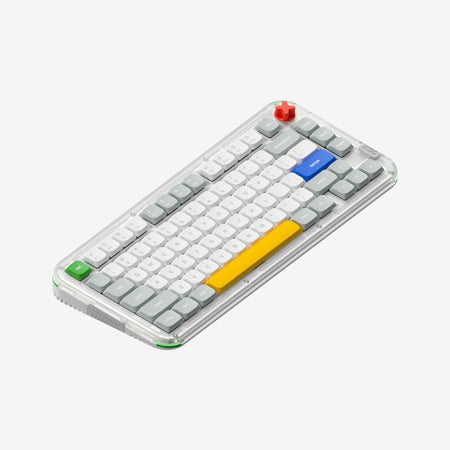
Which one should you get?
Get the
Nuphy Air75 V2
Low-Profile
- Ultra-slim low-profile design optimized for portability and laptop compatibility.
- Larger 4000mAh battery capacity for extended wireless use.
- Includes specific sound-dampening materials like plate poron, IXPE foam, and spacebar silicone.
- Lacks a volume knob or encoder.
- Uses a standard mounting style instead of a gasket mount.
- Case construction combines aluminum top with an ABS bottom, not a full polycarbonate build.
Get the
Nuphy Kick75
Gasket-Mount Showdown
- Features a soft gasket mount structure for a bouncy typing feel.
- Includes a volume knob that can be remapped for application controls.
- Convertible design with kits available to switch between high and low-profile configurations.
- Significantly heavier, even in its low-profile configuration (877g vs 598g).
- Smaller 2500mAh battery capacity in its standard configuration.
- Does not offer clicky switch options, only linear and tactile.
Your desk setup and typing priorities decide this match. If you value a keyboard that slips into a bag and pairs seamlessly with a laptop, the Nuphy Air75 V2 is the superior tool. If your keyboard is a stationary centerpiece where typing feel, sound, and tactile controls matter most, the Nuphy Kick75's gasket mount and knob offer a more engaging and customizable experience. Both are competent wireless performers, so let your primary use case guide you.
The differences that matter
Skip the 40-row spec sheet. These are the specs that change how each board feels, sounds, and fits your desk.
Nuphy Air75 V2
Nuphy Kick75
Low profile
Yes
No
Case material
ABS, Aluminum
Plastic
Switch options
Linear, Low-profile Mechanical, Tactile
Mechanical
Knob
No
Yes
Weight
598 g
1,009 g
- Nuphy Air75 V2
- Nuphy Kick75
- Performance
- 8182
- Build quality
- 8078
- Productivity
- 8993
- Customizability
- 9492
- Portability
- 7982
- Layout size: 75%
- Connection: Bluetooth, 2.4 GHz, Wired
- Hot-swappable
- Battery: 4,000 mAh
- Max polling rate: 1,000 Hz
- QMK
What will you mostly use it for?
The Air75 V2 is the clear choice for mobile professionals and travelers due to its light weight, slim profile, and laptop-focused design. The Kick75 wins for stationary, customization-focused users like programmers and content creators, thanks to its gasket mount, knob, and sound-dampening features. For gaming, the keyboards are evenly matched on core performance specs, leaving the decision to preference for key feel.
It's a tie
- Both keyboards feature a 1000Hz polling rate in 2.4GHz and wired modes for low latency.
- Both support N-key rollover for simultaneous key presses.
- The Air75 V2 offers a Cowberry switch with a 1.2mm pre-travel for rapid actuation.
- The Kick75's gasket mount may provide a softer, more forgiving bottom-out feel during long sessions.
Nuphy Air75 V2 vs Kick75 specs
Every tracked spec, side by side. Rows marked with a dot differ between the boards.
9 of 27 specs differ
Nuphy Air75 V2
Nuphy Kick75
Switch options
Hot-swappable
Mount style
Low profile
Sound dampening
Layout size
Layout standard
Ergonomics
Knob
Display
Media keys
Connection
Max polling rate
Battery
USB-C
Case material
Plate material
Keycaps
Weight
Dimensions
Typing angle
Backlight
QMK
VIA
N-key rollover
Mac & Windows
Released
Compare prices
Live prices from the stores we track, cheapest in-stock offer first.
Lowest price across stores, Amazon excluded.



Prices in USD are converted to your currency and can change at any time. KeebFinder may earn a commission when you buy through these links, at no extra cost to you.
Nuphy Air75 V2 vs Kick75: your questions
The Air75 V2 is specifically marketed as a laptop partner. Its vendor description lists extensive compatibility with MacBook models and includes dedicated MacOS shortcut keys for Spotlight and Dictation implemented through QMK. Its low-profile design is also made to fit over laptop keyboards.
Yes, according to the vendor description, the knob on the Kick75 is customizable. It can be used for system volume by default or remapped for other functions, such as zoom control in creative software like Photoshop, using the NuPhyIO or QMK/VIA firmware.
The primary difference comes from the mounting style. The Kick75 uses a soft gasket mount designed to provide a bouncy, cushioned feel. The Air75 V2 uses a standard low-profile design, which will feel more direct and rigid in comparison.
Based on the listed specifications, the Air75 V2 has a larger 4000mAh battery. The standard Kick75 (NuPhyIO version) has a 2500mAh battery, though the vendor notes a QMK version of the Kick75 is also available with a 4000mAh battery.
Yes, both keyboards are hot-swappable. This allows you to change switches without soldering. The Air75 V2 supports low-profile Gateron KS-33 switches, while the Kick75 supports both high and low-profile MX-style switches.
Yes, the Kick75 is designed to be convertible. You can purchase it in either a high or low-profile configuration. The vendor sells separate conversion kits to swap the top case, plate foam, and switch pad to change the profile after purchase.
Yes, both the Nuphy Air75 V2 and the Kick75 (in its QMK version) support QMK and VIA firmware. This allows for deep customization of key mappings, layers, and lighting effects directly through a browser-based configurator.
The Kick75 likely has an advantage for dampening sound due to its listed internal foams, which include plate foam, a switch pad, a sound damper, PCB foam, and bottom foam. The Air75 V2 also has sound treatments like plate poron and IXPE foam, but the Kick75's gasket mount and additional dampening may result in a more muted typing sound.
The Air75 V2 uses low-profile nSA keycaps. The Kick75's profile depends on its configuration; it uses keycaps appropriate for either its high or low-profile switch setup, with the vendor listing compatibility with both Cherry-profile and nSA keycaps.
No, the Air75 V2 is designed for low-profile switches. Its specifications list support for Gateron Low-profile Mechanical (KS-33) switches, which are not compatible with standard Cherry MX-style switches.
The Air75 V2 includes the keyboard, a USB-C cable, a 2.4G receiver, a keycap/switch puller, 7 extra keycaps, 4 extra switches, and a sticker set. The Kick75 includes the keyboard, a USB-C cable, a 2.4G receiver, a puller, 5 extra keycaps, and a sticker set.
Not sold on either?






Still torn?
Answer a few quick questions and the keyboard finder ranks 2,000+ boards by how you will actually use yours.