Not sure which keyboard to choose? Try the Keyboard Finder now!

Compare Keychron K1 Pro vs K13 Pro Differences Side by Side

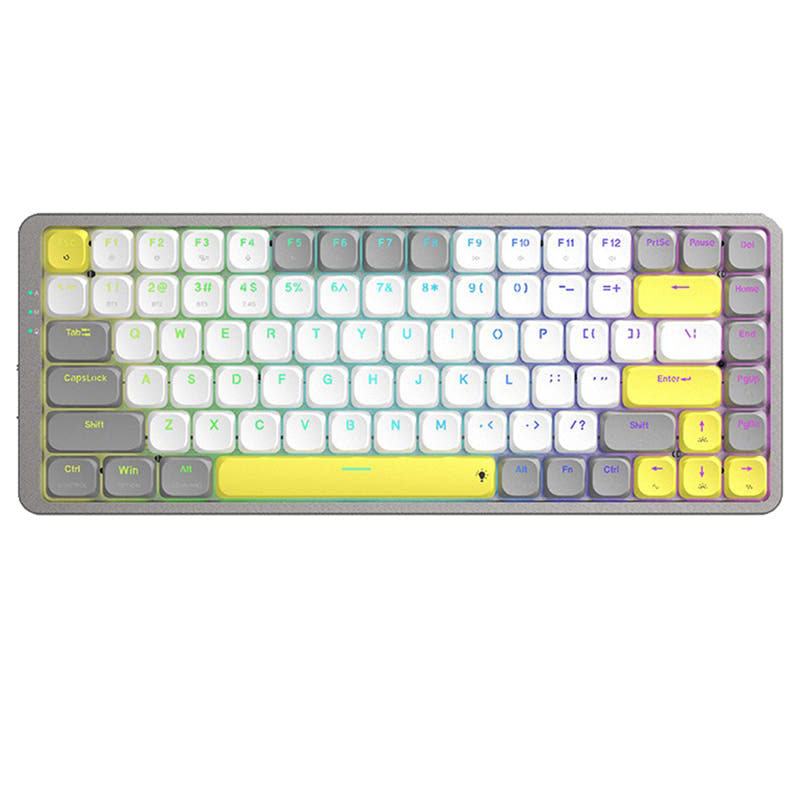
This comparison is for buyers torn between two very similar low-profile wireless keyboards from Keychron. Both the K1 Pro and K13 Pro share the same core components: an 80% layout, low-profile Gateron switches, PBT keycaps, a 1000 Hz wired polling rate, and Bluetooth 5.1 connectivity. The decision is difficult because they offer nearly identical performance and features, with the main difference being the physical layout. The K1 Pro uses a standard tenkeyless arrangement, while the K13 Pro squeezes in a numpad by omitting the dedicated arrow key row.

86
Keychron K1 Pro QMK/VIA Wireless Custom Mechanical Keyboard ISO Layout Collection
87
Keychron K13 Pro QMK/VIA Wireless Custom Mechanical Keyboard ISO Layout Collection

Select a keyboard to compare

5.0 (10)
4.5 (8)
  • Has Linear, Tactile, Clicky switch options
  • Built with the ISO, ISO-DE, ISO-Nordic, ISO-UK, JIS, ISO-FR, ISO-ES, ISO-SW, ANSI layout standard
  • Made with a Aluminum, Plastic, ABS, case
  • Offers Yes, Rgb, North-face, Rgb North-face, White, White North-face RGB lighting
  • Has Tactile, Linear, Clicky switch options
  • Built with the ISO, JIS, ANSI, ISO-DE, ISO-Nordic, ISO-UK layout standard
  • Made with a ABS, Aluminum, Plastic case
  • Offers Yes, Rgb, White, North-face, Rgb North-face, White North-face RGB lighting
Scores
  • Performance: 81.2
  • Build Quality: 79.9
  • Productivity: 79.9
  • Customizability: 89.3
  • Portability: 73.1
Scores
  • Performance: 81
  • Build Quality: 81.4
  • Productivity: 79.9
  • Customizability: 89.2
  • Portability: 73
Name
Keychron K1 Pro
Name
Keychron K13 Pro
Release year
2023
Release year
2023
Switch Options
Linear, Tactile, Clicky
Switch Options
Tactile, Linear, Clicky
Profile
Low Profile
Profile
Low Profile
Hot Swappable
 
Hot Swappable
 
Layout Size
80%
Layout Size
80%
Layout Standard
ISO, ISO-DE, ISO-Nordic, ISO-UK, JIS, ISO-FR, ISO-ES, ISO-SW, ANSI
Layout Standard
ISO, JIS, ANSI, ISO-DE, ISO-Nordic, ISO-UK
Layout Ergonomics
Normal
Layout Ergonomics
Normal
Knob Support
 
Knob Support
 
Display Support
 
Display Support
 
Mac/Win Support
 
Mac/Win Support
 
Multi-Media Keys
 
Multi-Media Keys
 
USB-C
 
USB-C
 
USB passthrough
 
USB passthrough
 
Connection
Bluetooth, Wired, Wireless
Connection
Bluetooth, Wired, Wireless
Polling Rate
1000 Hz
Polling Rate
1000 Hz
Battery capacity
2000 mAh
Battery capacity
2000 mAh
Hall Effect Support
 
Hall Effect Support
 
QMK Support
 
QMK Support
 
VIA Support
 
VIA Support
 
VIAL Support
 
VIAL Support
 
N-Key Rollover
 
N-Key Rollover
 
Rapid Trigger
 
Rapid Trigger
 
Mount Style
Tray Mount
Mount Style
Tray Mount
Screw in Stabilizers
 
Screw in Stabilizers
 
Sound Dampening
 
Sound Dampening
 
Backlight
 
Rgb, North-face, White
Backlight
 
Rgb, White, North-face
Case Colors
Case Colors
Case Material
Aluminum, Plastic, ABS,
Case Material
ABS, Aluminum, Plastic
Keycaps Material
ABS, PBT
Keycaps Material
ABS, PBT
Dimensions
8 x 346 x 119 mm
Dimensions
8 x 346 x 119 mm
Weight
580g
Weight
580g
*Something incorrect or missing? Please
let me know
!

Pros and Trade-offs

If a separate arrow cluster is critical for your workflow, the Keychron K1 Pro is the obvious choice. If you need a numpad but still want a compact board, the Keychron K13 Pro offers that specific layout without sacrificing performance or build quality. Both are excellent, well-supported keyboards, so your decision should hinge entirely on which layout better suits your daily tasks.

Keychron K1 Pro

  • +True TKL layout with separated arrow keys and navigation cluster.
  • +Lighter on desk space without a numpad, giving more mouse room.
  • +Separated arrow keys are better for keyboard-centric workflows like code editing.
  • +Both hot-swappable and wired/wireless options are identical to the K13 Pro.

  • No dedicated numpad, which can slow down data entry tasks.
  • Layout only available in standard TKL, no numpad variant.

Keychron K13 Pro

  • +Dedicated numpad in a still-compact 80% form factor.
  • +Ideal for users who frequently input numbers or navigate timelines.
  • +Numpad is locked without a NumLock key, according to one user review.

  • No dedicated arrow key row, which may require a layer or FN key for cursor movement.
  • Keycaps do not allow backlight to shine through the letters, as noted by a user review.
  • Numpad may be locked without a NumLock key, according to one user review.

Which Keyboard Is Better for Your Needs?

The core trade-off between these two keyboards comes down to layout. The K1 Pro wins for gaming and programming due to its standard TKL layout with dedicated arrow and navigation keys. The K13 Pro takes the lead for office work and content creation where a numpad is more valuable than a separate arrow cluster. For portability and modding, they are effectively tied, sharing the same dimensions, weight, wireless features, and QMK/VIA customization potential.

GamingKeychron K1 Pro
  • Standard TKL layout with separated arrow keys is preferred for most games.
  • 1000 Hz wired polling rate is identical on both boards.
OfficeKeychron K13 Pro
  • Dedicated numpad is highly useful for data entry and spreadsheet work.
  • Both have 12 multimedia keys and Mac/Windows support.
ProgrammingKeychron K1 Pro
  • Separated arrow keys and TKL cluster are more efficient for code navigation.
  • Both offer QMK/VIA for full key remapping and macro creation.
TravelTie
  • Both weigh 580g and have identical dimensions of 8 x 346 x 119 mm.
  • Both feature Bluetooth 5.1 for cable-free use with up to three devices.
  • Both have slim low-profile designs with a 2000mAh battery.
ModdingTie
  • Both are hot-swappable and compatible with Gateron low-profile mechanical switches.
  • Both offer QMK and VIA support for extensive firmware customization.
  • Both use a tray mount construction with an aluminum and ABS frame.
Content CreationKeychron K13 Pro
  • Numpad speeds up numeric input for video editing timelines and financial tracking.
  • Both offer extensive macro programmability via the VIA web app.

Frequently Asked Questions (FAQ)


Discover similar products

You might also like similar products in that price range:

88
$69
Keychron K5 Pro QMK/VIA Wireless Custom Mechanical Keyboard ISO Layout Collection
Keychron K5 Pro
100%,
Hotswap,
Wireless,
Wired,
RGB/ White LEDs,
VIA,
QMK,
Alu case,
Tray Mount

84
$109
Keychron K13 Max QMK Wireless Custom Mechanical Keyboard ISO Layout Collection
Keychron K13 Max
80%,
Hotswap,
Wireless,
Wired,
RGB/ White LEDs,
VIA,
QMK,
Alu case,
PCB Mount

84
$94
Keychron K1 QMK Wireless Mechanical Keyboard (ISO Layout) - Version 6
Keychron K1 V6
80%,
Hotswap,
Wireless,
Wired,
RGB/ White LEDs,
VIA,
QMK,
HE,
Alu case,
Top Mount

94
$59
Keychron K8 Pro QMK/VIA Wireless Mechanical Keyboard
Keychron K8 Pro
80%,
Hotswap,
Wireless,
Wired,
RGB/ White LEDs,
VIA,
QMK,
Alu case,
Tray Mount

92
$69
Keychron K4 Pro QMK/VIA Wireless Mechanical Keyboard
Keychron K4 Pro
96%,
Hotswap,
Wireless,
Wired,
RGB/ White LEDs,
VIA,
QMK,
Tray Mount

85
$106
Keychron K1 Max QMK Wireless Custom Mechanical Keyboard ISO Layout Collection
Keychron K1 Max
80%,
Hotswap,
Wireless,
Wired,
RGB/ White LEDs,
VIA,
QMK,
Alu case,
PCB Mount

93
$59
Keychron Q2 QMK Custom Mechanical Keyboard
Keychron Q2
65%,
Hotswap,
Wired,
RGB,
Knob,
VIA,
QMK,
Alu case,
Gasket Mount

87
$83
Keychron K3 Pro QMK/VIA Wireless Mechanical Keyboard ISO Layout Collection
Keychron K3 Pro
75%,
Hotswap,
Wireless,
Wired,
RGB/ White LEDs,
VIA,
QMK,
Alu case,
Tray Mount

83
$94
Keychron K3 QMK Wireless Mechanical Keyboard (ISO Layout) - Version 3
Keychron K3 V3
75%,
Hotswap,
Wireless,
Wired,
RGB/ White LEDs,
VIA,
QMK,
Alu case,
Top Mount

96
$54
Keychron V3 QMK Custom Mechanical Keyboard ISO Layout Collection
Keychron V3
80%,
Hotswap,
Wired,
RGB/ White LEDs,
Knob,
VIA,
QMK,
Tray Mount