Keychron K1 Pro vs K2Low Profile vs Compact 75%
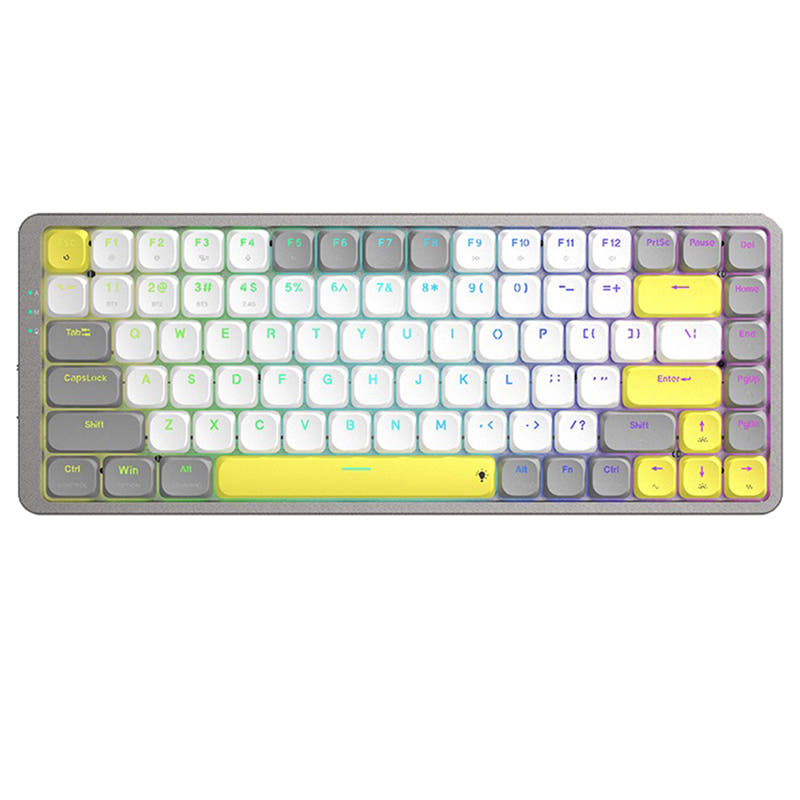
Choose the K1 Pro for its low profile design and QMK/VIA programmability, or the K2 for its compact 75% layout and longer battery life.
KeebFinder may earn a commission when you buy through these links, at no extra cost to you.

5.0 (5)5.0 · 5 reviews
from$67at Keychron

4.8 (35)4.8 · 35 reviews
from$52at Keychron
Which one should you get?
Get the
Keychron K1 Pro
Low Profile
Build quality in the top 15% of 80% boards under $100.
- QMK and VIA firmware support for full key remapping and macros.
- Low profile double-shot PBT keycaps provide durability and oil resistance.
- 1000 Hz polling rate in wired mode is specified for low latency gaming.
- Low-profile switches and keycaps only. Standard MX keycaps will not fit.
- North-facing LEDs. Cherry-profile keycaps can hit the switch housing.
- No numpad.
Get the
Keychron K2
Compact 75%
Build quality in the top 45% of 75% boards under $100.
- Large 4000mAh battery offers up to 2 months of usage per the vendor description.
- Compact 75% layout retains essential function keys like Page Up and Home for productivity.
- Hot-swappable socket supports most MX style 3-pin and 5-pin mechanical switches.
- North-facing LEDs. Cherry-profile keycaps can hit the switch housing.
- No ISO layout. ISO-DE, UK, and other ISO variants are not offered.
- No numpad.
If you need extensive programmability for macros and key remapping, or prefer a lighter, slimmer keyboard for travel, the K1 Pro is the better choice. If longer battery life and a compact layout with dedicated navigation keys matter more, the K2 serves those needs well. Both are well-built Keychron keyboards with hot-swappable switches, but the K1 Pro offers more customization while the K2 focuses on endurance and a traditional typing experience.
The differences that matter
Skip the 40-row spec sheet. These are the specs that change how each board feels, sounds, and fits your desk.
Keychron K1 Pro
Keychron K2
Layout size
80%
75%
Battery
2,000 mAh
4,000 mAh
A larger battery means fewer cables during the day
Low profile
Yes
No
Weight
580 g
794 g
Heavier boards stay planted and lighter ones travel
QMK
Yes
No
The deep option when you want to remap every key
- Keychron K1 Pro
- Keychron K2
- Performance
- 8168
- Build quality
- 8067
- Productivity
- 8067
- Customizability
- 8863
- Portability
- 7381
- Connection: Bluetooth, Wired
- Hot-swappable
- Max polling rate: 1,000 Hz
- Case material: ABS, Aluminum, Plastic
- Switch options: Clicky, Linear, Tactile
- Mount style: Tray Mount
What will you mostly use it for?
The K1 Pro wins in gaming, programming, travel, modding, and content creation, largely due to its QMK/VIA programmability, lighter weight, and 1000 Hz wired polling rate. The K2 takes the office category thanks to its larger 4000mAh battery and compact 75% layout that includes dedicated navigation keys. Both keyboards support hot-swappable switches, but the K1 Pro offers more firmware customization while the K2 provides longer battery life. Overall, the K1 Pro is the more versatile pick for users who prioritize customization and portability, whereas the K2 suits those who need extended wireless runtime and a traditional typing feel.
Pick the Keychron K1 Pro
- 1000 Hz polling rate in wired mode is specified by the manufacturer for competitive gaming.
- N-Key Rollover is supported in both wireless and wired modes.
- Ultra-slim design with low profile switches may aid faster keystroke reaction.
What owners say
Ratings and quotes collected from verified store reviews, including the critical ones.
Keychron K1 Pro
5 owner reviews
“I realy like this keyboard. I feel is harder to make typos compared to the K3 v2. I decided to go with the K1 Pro instead of the K3 Pro and it's going to to take time to adjust to the new layout, but the feeling and shape of the keys is definitely better.”
Keychron K2
35 owner reviews
“It is an amazing keyboard. One thing, I don’t like that there is no battery indicator for this version so that I don’t when I need to charge it before it die out.”
Keychron K1 Pro vs K2 specs
Every tracked spec, side by side. Rows marked with a dot differ between the boards.
11 of 24 specs differ
Keychron K1 Pro
Keychron K2
Switch options
Hot-swappable
Mount style
Low profile
Layout size
Layout standard
Ergonomics
Display
Media keys
Connection
Max polling rate
Battery
USB-C
Case material
Keycaps
Weight
Dimensions
Typing angle
Backlight
QMK
VIA
N-key rollover
Mac & Windows
Released
ISO layouts by store
Which stores sell ISO-DE, UK, and the other regional layouts.
Keychron K1 Pro
Keychron
ISO-DE, ISO-UK, ISO-Nordic, ISO-FR, ISO-ES, ISO-SW
In stockShips to you
Keychron (DE)
ISO-DE, ISO-UK, ISO-Nordic, ISO-FR, ISO-ES, ISO-SW
In stockDoes not ship to you
Keychron K2
No ISO layout at the stores we track.
Compare prices
Live prices from the stores we track, cheapest in-stock offer first.
Prices in USD are converted to your currency and can change at any time. KeebFinder may earn a commission when you buy through these links, at no extra cost to you.
Lowest price across stores, Amazon excluded.


Keychron K1 Pro vs K2: your questions
The K1 Pro supports wireless mode with a 90 Hz polling rate as specified by the manufacturer. For low latency gaming, the wired mode with 1000 Hz polling is recommended. N-Key Rollover works in both wireless and wired modes, ensuring all key presses are registered.
No, the Keychron K2 does not support QMK or VIA firmware based on the available specifications. It is a pre-built keyboard with standard key functions. The K2 is best suited for users who do not need custom macro programming.
The Keychron K2 has a larger 4000mAh battery, and the vendor states it can last up to 2 months on a single charge for the non-backlight version. The K1 Pro has a 2000mAh battery, so the K2 offers significantly longer runtime between charges.
Yes, the K1 Pro offers a hot-swappable version that allows you to change Gateron low profile mechanical switches without soldering. The manufacturer notes it is only compatible with Gateron low profile mechanical switches due to QMK support limitations, not optical switches.
The Keychron K2 uses ABS keycaps according to its specifications. The non-backlight version comes with standard ABS keycaps. Some versions may include shine-through PBT keycaps as noted in vendor descriptions for updated models.
Yes, the K1 Pro is fully compatible with both Mac and Windows. It includes a Mac layout with dedicated function keys and keycaps for both operating systems. The Keychron Launcher web app also works on macOS, Windows, and Linux.
The K1 Pro is generally better for programming due to its QMK and VIA support, which allows you to remap keys and create macros for coding workflows. It also has a Mac-compatible layout that many developers prefer. The K2 lacks firmware customization.
Yes, the Keychron K2 supports N-Key Rollover, but the vendor notes it is only available in wired mode, not wireless. This means you can press multiple keys simultaneously without missing inputs when connected via USB-C.
The K1 Pro is an 80% tenkeyless layout with 87 keys, while the K2 is a 75% layout with 84 keys. The K1 Pro is slightly wider but has a standard TKL layout, whereas the K2 is more compact with a column of function keys and navigation keys integrated.
The vendor description does not include a palm rest in the box for the K1 Pro. However, third-party palm rests are available that may fit its low profile design. The K2 has compatible Keychron silicone palm rests sold separately.
The Keychron K1 Pro is lighter at 580 grams and has slimmer dimensions of 8 x 346 x 119 mm, making it more portable than the K2 which weighs 794 grams. The K1 Pro's low profile design also reduces its overall thickness.
The vendor description for the K2 mentions it uses a Broadcom Bluetooth 5.1 chipset for the non-backlight version. Some updated versions may feature Bluetooth 5.2 as noted in marketing text, but this is not confirmed in the core specification data.
Not sold on either?




Still torn?
Answer a few quick questions and the keyboard finder ranks 2,000+ boards by how you will actually use yours.