Keychron Q1 Pro vs WhatGeek PMO Aurora 80Compact vs TKL Wireless
Choose the Keychron Q1 Pro for its compact size and extensive layout support, or the WhatGeek Aurora 80 for its larger form factor and massive battery.
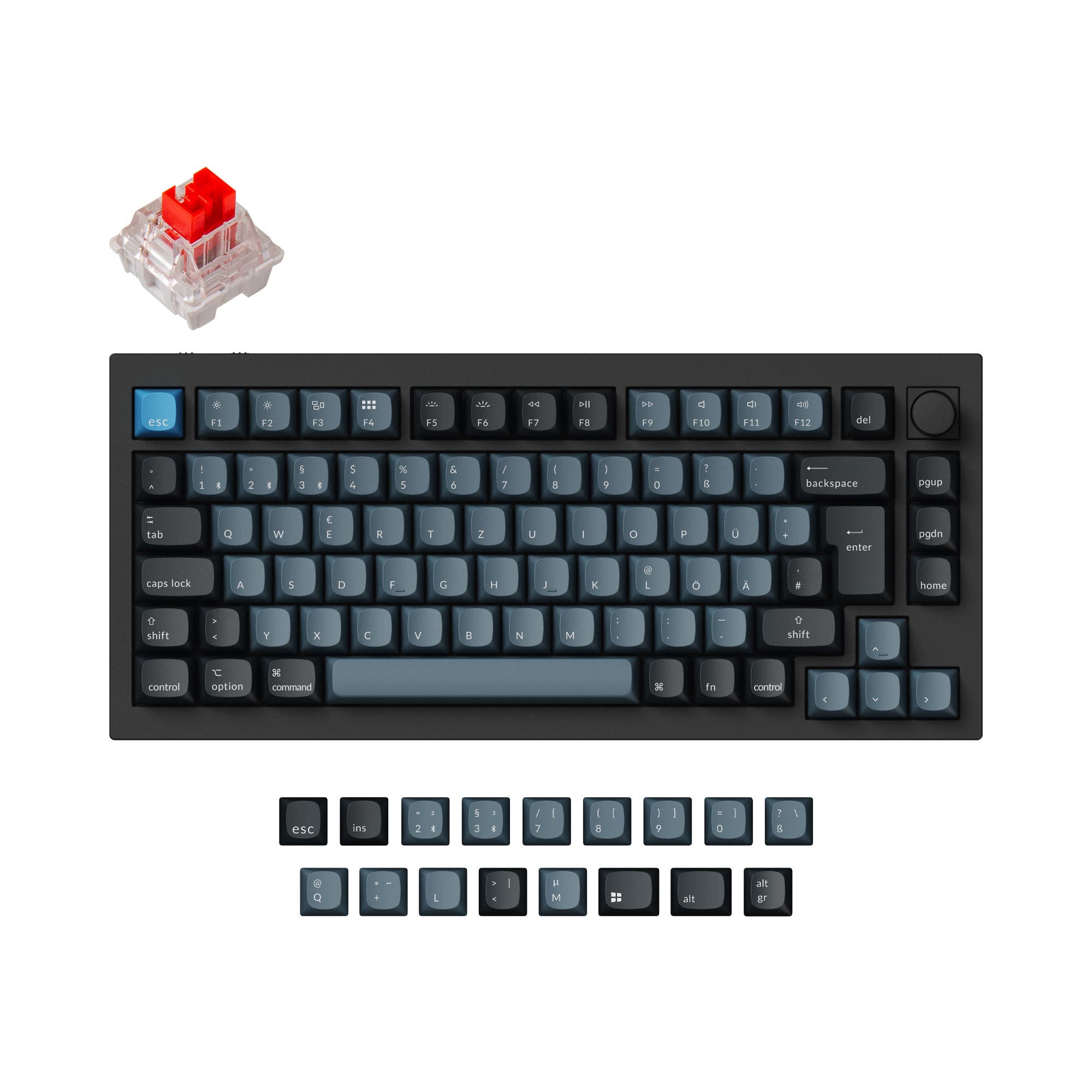

Which one should you get?
Get the
Keychron Q1 Pro
Compact
- Extensive ISO layout support for UK, German, Nordic, French, Spanish, and Swiss users.
- Available as a barebones DIY kit for custom builds.
- Includes a programmable aluminum knob for volume or macro control.
- Smaller 4000mAh battery compared to the Aurora 80.
- The 75% layout lacks dedicated function row and navigation cluster for some users.
- Wireless polling rate is lower at 90 Hz compared to its 1000 Hz wired mode.
Get the
WhatGeek PMO Aurora 80
TKL Wireless
- Larger 8000mAh battery for extended wireless use.
- Unique music rhythm lighting system that reacts to audio.
- Features a five-layer acoustic filling structure and IXPE foam for sound dampening.
- Heavier at 2300g and larger footprint.
- Only available in ANSI layout, limiting international users.
- No mention of a barebones kit or knob option for customization.
Your primary need dictates the choice. The Keychron Q1 Pro is the more versatile and portable option, especially for users outside North America or those who want to build their own keyboard from a kit. The WhatGeek PMO Aurora 80 is a compelling TKL alternative if you prioritize battery life, reactive lighting effects, and a standard larger layout, provided you can find it in stock.
The differences that matter
Skip the 40-row spec sheet. These are the specs that change how each board feels, sounds, and fits your desk.
Keychron Q1 Pro
WhatGeek PMO Aurora 80
Layout size
75%
80%
Connection
Bluetooth, Wired, 2.4 GHz
Bluetooth, 2.4 GHz, Wired
Battery
4,000 mAh
8,000 mAh
Mount style
Gasket Mount, Plate Mount
Gasket Mount
Knob
Yes
No
- Keychron Q1 Pro
- WhatGeek PMO Aurora 80
- Performance
- 8281
- Build quality
- 8986
- Productivity
- 9895
- Customizability
- 9890
- Portability
- 8288
- Hot-swappable
- Max polling rate: 1,000 Hz
- Case material: Aluminum
- QMK
- VIA
- Sound dampening
What will you mostly use it for?
The Keychron Q1 Pro wins in scenarios demanding portability, international layout support, and deep customization via its barebones kit option. The WhatGeek Aurora 80 takes the lead for content creators drawn to its reactive lighting features. For general office use and wireless flexibility, both keyboards are equally capable, leaving the choice to size preference.
Pick the Keychron Q1 Pro
- The Q1 Pro has a confirmed 1000 Hz polling rate in wired mode.
- Its 75% layout saves desk space for larger mouse movements.
- The product listing mentions a 90 Hz wireless polling rate for low-latency wireless play.
What owners say
Ratings and quotes collected from verified store reviews, including the critical ones.
Keychron Q1 Pro
15 owner reviews
“The Q1 Pro is the second keyboard I bought from Keychron. The basic materials are very good and she looks amazing. The only thing that is not perfect is the sound. I think she will be perfect with a simple adaption of foam and lubed switches. But the Q1 is…”
WhatGeek PMO Aurora 80
No owner reviews collected yet.
Keychron Q1 Pro vs WhatGeek PMO Aurora 80 specs
Every tracked spec, side by side. Rows marked with a dot differ between the boards.
11 of 27 specs differ
Keychron Q1 Pro
WhatGeek PMO Aurora 80
Switch options
Hot-swappable
Mount style
Sound dampening
Screw-in stabilizers
Layout size
Layout standard
Ergonomics
Knob
Display
Media keys
Connection
Max polling rate
Battery
USB-C
Case material
Plate material
Keycaps
Weight
Dimensions
Typing angle
Backlight
QMK
VIA
N-key rollover
Mac & Windows
Released
Compare prices
Live prices from the stores we track, cheapest in-stock offer first.
Lowest price across stores, Amazon excluded.




Prices in USD are converted to your currency and can change at any time. KeebFinder may earn a commission when you buy through these links, at no extra cost to you.
Keychron Q1 Pro vs WhatGeek PMO Aurora 80: your questions
The WhatGeek PMO Aurora 80 has a larger 8000mAh battery, which should provide longer usage between charges compared to the Keychron Q1 Pro's 4000mAh battery. Actual battery life will depend on usage patterns like RGB brightness and connection mode.
Yes. The Keychron Q1 Pro vendor description states it is fully compatible with macOS and Windows. It includes a system toggle and an additional set of keycaps for Mac layout, allowing you to save separate layouts for each operating system.
No. The product specifications and vendor description for the WhatGeek PMO Aurora 80 do not mention a knob or rotary encoder. The Keychron Q1 Pro does include a programmable aluminum knob.
Yes. Both the Keychron Q1 Pro and the WhatGeek PMO Aurora 80 list hot-swappable as a feature. The Q1 Pro's description specifies compatibility with most 3-pin and 5-pin MX-style switches.
The Keychron Q1 Pro offers more avenues for customization. It is sold as a barebones DIY kit, supports QMK/VIA for firmware programming, and has a wider selection of supported switch types and ISO layouts according to its product listing.
The Keychron Q1 Pro vendor page specifies a 90 Hz polling rate in wireless mode. The WhatGeek Aurora 80's specifications do not state a wireless polling rate, only confirming a 1000 Hz rate for wired mode alongside its wireless capabilities.
Both are available as pre-built units that include keycaps and switches. The Keychron Q1 Pro is also offered in a barebone version without keycaps and switches for those who want to supply their own.
The Keychron Q1 Pro comes with KSA profile double-shot PBT keycaps in its assembled version. The WhatGeek Aurora 80's keycap material is not specified in the provided details.
The Keychron Q1 Pro is better for small desks due to its 75% layout. It has a length of 328mm and weighs 1825g, making it more compact and lighter than the 360mm long, 2300g WhatGeek Aurora 80 TKL.
Yes. Both keyboards support QMK and VIA, which are open-source firmware and software for extensive key remapping, macro creation, and layer configuration. The Aurora 80 also mentions a self-developed web and client driver.
Both keyboards feature south-facing RGB LEDs, which are better for compatibility with Cherry-profile keycaps. The Aurora 80 adds a distinctive 270-degree side halo RGB and underglow lighting, along with a music-reactive mode in its client software.
Based on the provided vendor data, the WhatGeek PMO Aurora 80 is listed as 'Sold out' and 'Out of stock' with zero vendors reported as having it in stock. Availability should be checked directly with retailers.
Not sold on either?


Still torn?
Answer a few quick questions and the keyboard finder ranks 2,000+ boards by how you will actually use yours.