Not sure which keyboard to choose? Try the Keyboard Finder now!

Compare Keychron Q1 V2 vs Q10 Differences Side by Side

This comparison is for buyers deciding between Keychron's premium wired aluminum keyboards. The choice is difficult because both share core features like QMK/VIA support, hot-swap sockets, and a 1000Hz polling rate. The decision ultimately hinges on whether you prioritize a traditional, space-efficient 75% layout or are willing to adapt to an ergonomic Alice layout for potential long-term comfort. Both are highly customizable and built with CNC aluminum.

96
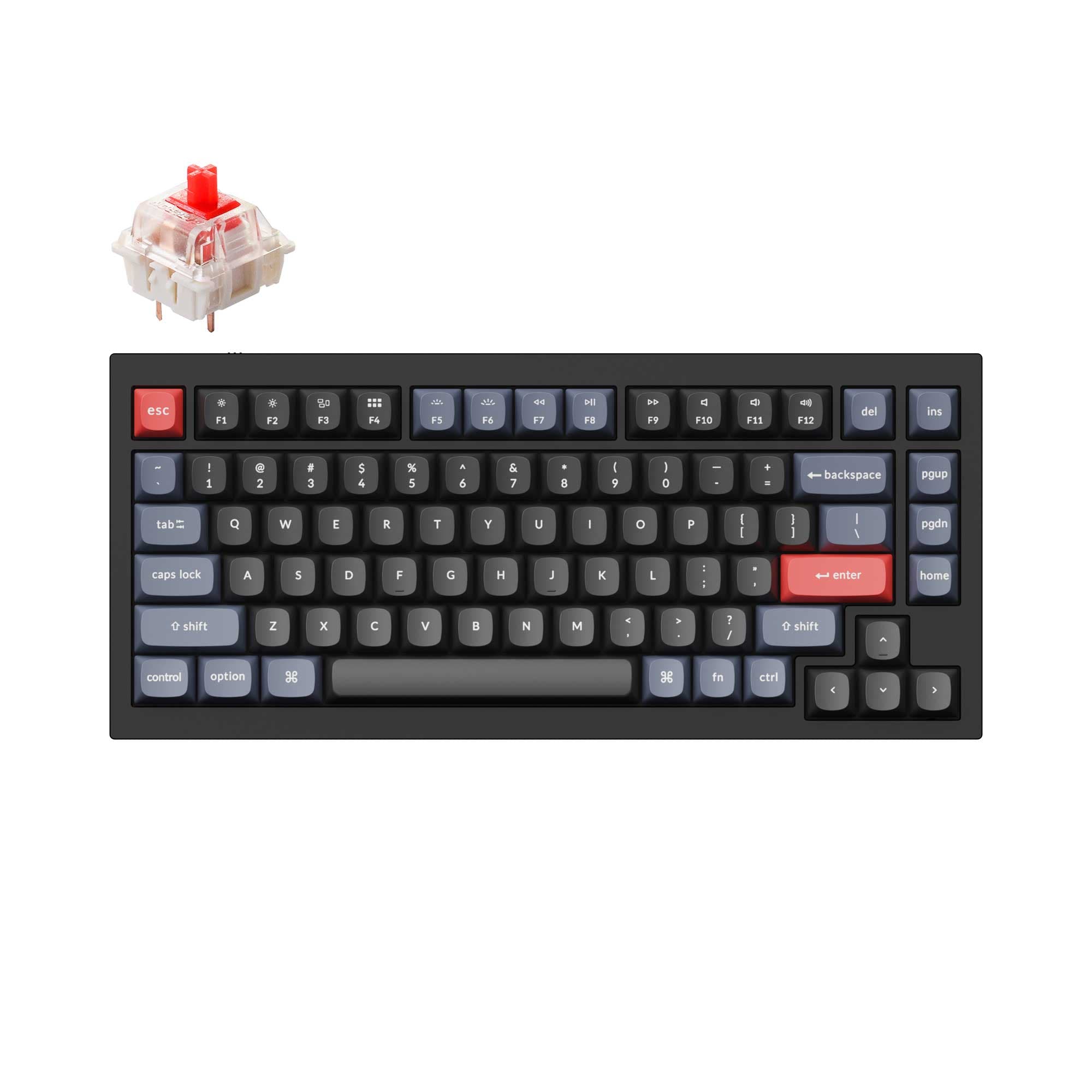
Keychron Q1 QMK Custom Mechanical Keyboard - Version 2
95
Keychron Q10 (Alice Layout) QMK Custom Mechanical Keyboard

Select a keyboard to compare

4.9 (616)
2.8 (70)
  • Built with the ANSI layout standard
  • Offers Normal ergonomics
  • Weighs about 1825 g
  • Sized at 23 x 145 x 328 mm
  • Built with the ANSI, ISO, JIS, ISO-DE, ISO-UK, ISO-FR, ISO-ES, ISO-SW layout standard
  • Offers Alice ergonomics
  • Weighs about 2460 g
  • Sized at 20 x 157 x 385 mm
Scores
  • Performance: 71.7
  • Build Quality: 89.3
  • Productivity: 97.5
  • Customizability: 99.6
  • Portability: 62.1
Scores
  • Performance: 71.9
  • Build Quality: 89.4
  • Productivity: 100
  • Customizability: 99.8
  • Portability: 62.6
Name
Keychron Q1 V2
Name
Keychron Q10
Release year
2022
Release year
2022
Switch Options
Linear, Tactile, Clicky
Switch Options
Linear, Tactile, Clicky
Profile
Normal Profile
Profile
Normal Profile
Hot Swappable
 
Hot Swappable
 
Layout Size
75%
Layout Size
75%
Layout Standard
ANSI
Layout Standard
ANSI, ISO, JIS, ISO-DE, ISO-UK, ISO-FR, ISO-ES, ISO-SW
Layout Ergonomics
Normal
Layout Ergonomics
Alice
Knob Support
 
Knob Support
 
Display Support
 
Display Support
 
Mac/Win Support
 
Mac/Win Support
 
Multi-Media Keys
 
Multi-Media Keys
 
USB-C
 
USB-C
 
USB passthrough
 
USB passthrough
 
Connection
Wired, Wired only
Connection
Wired, Wired only
Polling Rate
1000 Hz
Polling Rate
1000 Hz
Battery capacity
-
Battery capacity
-
Hall Effect Support
 
Hall Effect Support
 
QMK Support
 
QMK Support
 
VIA Support
 
VIA Support
 
VIAL Support
 
VIAL Support
 
N-Key Rollover
 
N-Key Rollover
 
Rapid Trigger
 
Rapid Trigger
 
Mount Style
Gasket Mount
Mount Style
Gasket Mount
Screw in Stabilizers
 
Screw in Stabilizers
 
Sound Dampening
 
Sound Dampening
 
Backlight
 
Rgb, South-face
Backlight
 
Rgb, South-face
Case Colors
Case Colors
Case Material
Aluminum
Case Material
Aluminum
Keycaps Material
PBT, ABS
Keycaps Material
PBT, ABS
Dimensions
23 x 145 x 328 mm
Dimensions
20 x 157 x 385 mm
Weight
1825g
Weight
2460g
*Something incorrect or missing? Please
let me know
!

Pros and Trade-offs

Your choice should be guided by layout preference and use case. Opt for the Keychron Q1 V2 if you want a premium, highly customizable keyboard in a familiar, space-saving form factor. Choose the Keychron Q10 Alice if your priority is ergonomic comfort for long typing sessions and you value the utility of a left-side control knob. Both deliver exceptional build quality and customizability.

Keychron Q1 V2

  • +Lighter weight (1825g) and more compact footprint for easier desk placement.
  • +Standard 75% layout requires no adaptation for most users.
  • +Vendor description notes sharper case corners for better third-party keycap compatibility.
  • +Available in a wider variety of color and switch configurations according to its product page.

  • Lacks the ergonomic benefits of a split Alice layout.
  • Knob is positioned on the right side, which may be less convenient for right-handed mouse users.

Keychron Q10

  • +Ergonomic Alice layout is designed to promote a more natural typing posture.
  • +Knob is positioned on the left side, convenient for adjustments while using a mouse.
  • +Supports a wider array of ISO language layouts out of the box.
  • +Vendor page shows a dedicated silicone palm rest is commonly purchased alongside it.

  • Substantially heavier (2460g) and larger, requiring more desk space.
  • Alice layout requires an adaptation period and may not suit all typing styles.
  • User reviews mention the lack of a dedicated End key in the default layout.

Which Keyboard Is Better for Your Needs?

The Q10 Alice is the clear choice for office work and content creation where ergonomics and left-side knob utility are prioritized. The standard-layout Q1 V2 wins for programming familiarity and is better for travel due to its lower weight and smaller size. For gaming and modding, the keyboards are evenly matched on core performance and customizability features, making the decision purely about layout preference.

GamingTie
  • Both have a 1000Hz polling rate for low latency.
  • Both support the same switch types (linear, tactile, clicky).
  • The Q1 V2's standard layout may be easier for existing muscle memory.
  • The Q10's Alice layout could reduce wrist strain during long sessions.
OfficeKeychron Q10
  • The Q10 Alice's ergonomic layout is designed to reduce wrist strain for prolonged typing.
  • Both include Mac and Windows keycaps and support.
  • The Q10's listing mentions a dedicated silicone palm rest is frequently bought with it, indicating an ergonomic focus.
ProgrammingKeychron Q1 V2
  • The Q1 V2's standard 75% layout offers a more familiar key placement for common shortcuts.
  • Its slightly smaller width (145mm vs 157mm) may free up more desk space for a mouse.
  • Both have full QMK/VIA support for extensive key remapping.
TravelKeychron Q1 V2
  • The Q1 V2 is significantly lighter at 1825g compared to the Q10's 2460g.
  • The Q1 V2 has a smaller desk footprint (328mm length vs 385mm).
  • Both are wired-only, so portability is limited to moving between desks.
ModdingTie
  • Both are hot-swappable, supporting 3-pin and 5-pin MX switches.
  • Both feature QMK and VIA firmware support for deep customization.
  • Both have a gasket mount design, screw-in stabilizers, and sound-dampening foam.
Content CreationKeychron Q10
  • The Q10 Alice's left-side knob placement allows for adjustment (e.g., volume, brush size) without taking the right hand off a mouse.
  • Its ergonomic design may improve comfort during long editing sessions.
  • Both have programmable knobs and macro support via VIA.

Frequently Asked Questions (FAQ)


Discover similar products

You might also like similar products in that price range:

98
$186
Keychron Q1 Max QMK/VIA Wireless Custom Mechanical Keyboard
Keychron Q1 Max
75%,
Hotswap,
Wireless,
Wired,
RGB,
Knob,
VIA,
QMK,
Alu case,
Gasket Mount

95
$86
Keychron Q1 QMK Custom Mechanical Keyboard - Version 1
Keychron Q1
75%,
Hotswap,
Wired,
RGB,
Knob,
VIA,
QMK,
Alu case,
Gasket Mount

98
$94
Keychron V1 Max QMK Wireless Custom Mechanical Keyboard ISO Layout Collection
Keychron V1 Max
75%,
Hotswap,
Wireless,
Wired,
RGB,
Knob,
VIA,
QMK,
Gasket Mount

95
$149
Keychron Q1 Pro QMK/VIA Wireless Custom Mechanical Keyboard ISO Layout Collection
Keychron Q1 Pro
75%,
Hotswap,
Wireless,
Wired,
RGB,
Knob,
VIA,
QMK,
Alu case,
Gasket Mount

97
$239
Keychron Q10 Max (Alice Layout) QMK/VIA Wireless Custom Mechanical Keyboard
Keychron Q10 Max
75%,
Hotswap,
Wireless,
Wired,
RGB,
Knob,
VIA,
QMK,
Alu case,
Gasket Mount

97
$59
Keychron Q3 QMK Custom Mechanical Keyboard
Keychron Q3
80%,
Hotswap,
Wired,
RGB,
Knob,
VIA,
QMK,
Alu case,
Gasket Mount

94
$67
Keychron K2 Pro QMK/VIA Wireless Mechanical Keyboard
Keychron K2 Pro
75%,
Hotswap,
Wireless,
Wired,
RGB/ White LEDs,
VIA,
QMK,
Alu case,
Tray Mount

96
$54
Keychron V3 QMK Custom Mechanical Keyboard ISO Layout Collection
Keychron V3
80%,
Hotswap,
Wired,
RGB/ White LEDs,
Knob,
VIA,
QMK,
Tray Mount

93
$59
Keychron Q8 (Alice Layout) QMK Custom Mechanical Keyboard
Keychron Q8
65%,
Hotswap,
Wired,
RGB,
Knob,
VIA,
QMK,
Alu case,
Gasket Mount

93
$59
Keychron Q2 QMK Custom Mechanical Keyboard
Keychron Q2
65%,
Hotswap,
Wired,
RGB,
Knob,
VIA,
QMK,
Alu case,
Gasket Mount