Keychron Q10 vs Q11Split vs Alice Ergonomic Layouts
Choose the Q10 for a more traditional, compact ergonomic experience, or the Q11 for fully adjustable hand positioning.

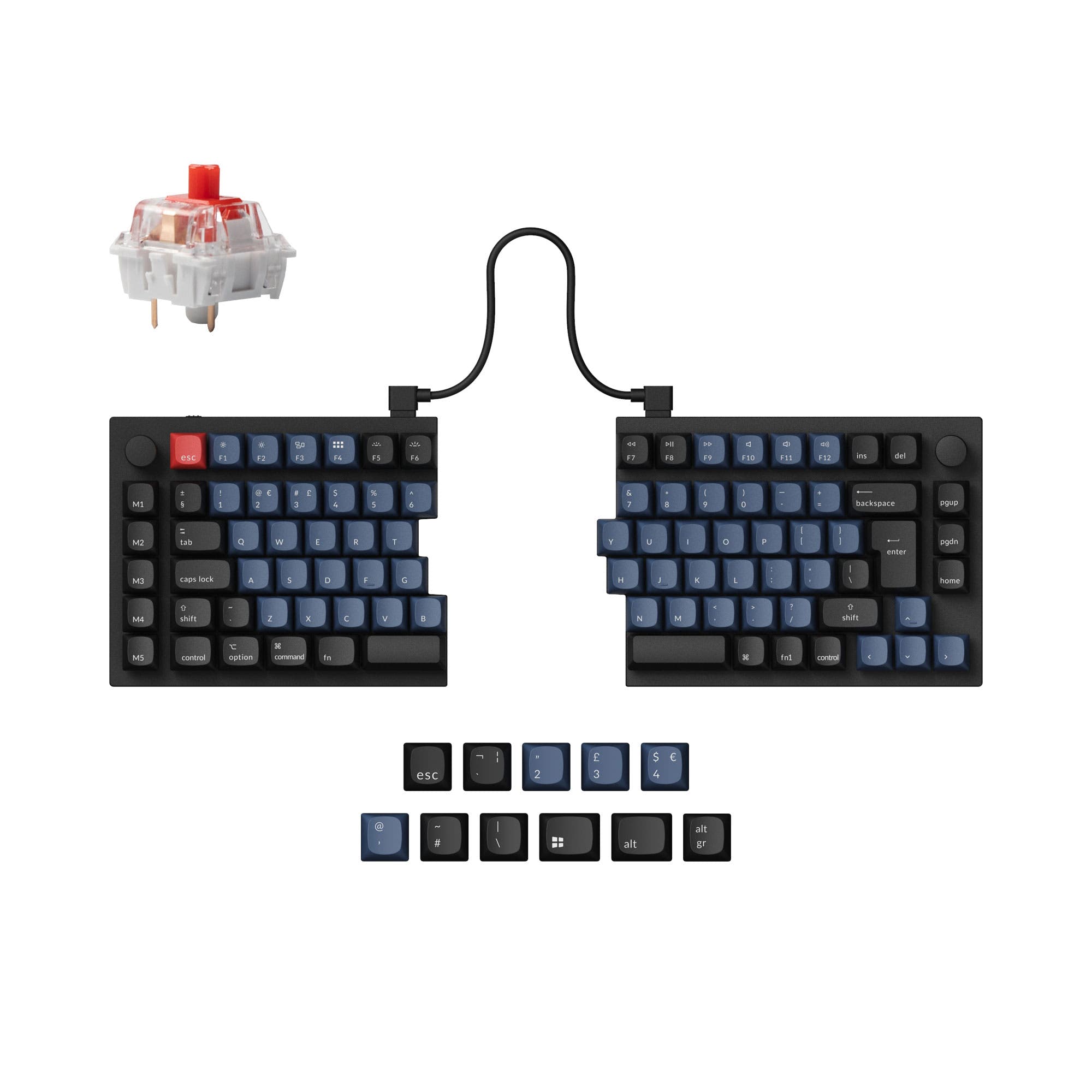
Which one should you get?
Get the
Keychron Q10
Split
- Fixed Alice layout promotes a natural hand angle without desk space adjustment.
- Double-gasket mount design for improved sound and typing feel.
- Heavy 2460g aluminum construction for exceptional desk stability.
- Very heavy at 2460g, making it less portable.
- Fixed layout offers no adjustability for shoulder width.
- Higher front height (19.8mm) may require a wrist rest for some users.
Get the
Keychron Q11
Alice Ergonomic Layouts
- Fully split design allows independent positioning of each half for optimal ergonomics.
- Lighter weight (1186g) and lower profile (9.8mm front height) than the Q10.
- Halves can be used independently or linked together with a cable.
- Split design requires more desk space and management of two halves.
- Uses a tray mount system, which may offer a different typing feel than gasket mount.
- Some user reviews mention a desire for an End key and longer bridge cable.
Your choice fundamentally depends on your ergonomic preference. Opt for the Keychron Q10 if you want the benefits of an ergonomic Alice layout in a single, solid unit that feels familiar. Choose the Keychron Q11 if you need the ultimate flexibility to position your hands apart or at different angles, and value a lighter, more portable build. Both deliver top-tier programmability and build quality.
The differences that matter
Skip the 40-row spec sheet. These are the specs that change how each board feels, sounds, and fits your desk.
Keychron Q10
Keychron Q11
Ergonomics
Alice
Split
Mount style
Gasket Mount, Plate Mount
Plate Mount, Tray Mount
Weight
2,460 g
1,186 g
Layout standard
ANSI, ISO, ISO-DE, ISO-ES, ISO-FR, ISO-SW, ISO-UK, JIS
ANSI, ISO, ISO-DE, ISO-Nordic, ISO-UK, JIS
Plate material
Steel
Aluminum, Steel
- Keychron Q10
- Keychron Q11
- Performance
- 7268
- Build quality
- 8988
- Productivity
- 10097
- Customizability
- 9898
- Portability
- 6273
- Connection: Wired
- Hot-swappable
- Max polling rate: 1,000 Hz
- Case material: Aluminum
- Switch options: Clicky, Linear, Tactile
- Knob
What will you mostly use it for?
The Q10 Alice holds advantages for gaming and programming due to its more traditional, unified layout and dedicated keys. The Q11 is the clear choice for travel and offers unique ergonomic benefits for content creation with its adjustable split. For office use and modding, both keyboards are highly capable, with the Q10 having a slight edge in acoustic modification potential due to its noted gasket design.
Pick the Keychron Q10
- The Q10's unified Alice layout is easier for gaming muscle memory than a fully split design.
- Both share a 1000 Hz polling rate for low latency.
- The Q10's heavier 2460g weight provides more stability on the desk.
What owners say
Ratings and quotes collected from verified store reviews, including the critical ones.
Keychron Q10
29 owner reviews
“For this kind of layout, having an option around 200usd is great, and even better when it is at this level of build quality and customization”
Keychron Q11
13 owner reviews
“I wish that the "launcher" app had more layer options and more layer options for the RGB, but that's ok. I have a Moonlander as well and I recommend the Q11 to almost everyone, the ortholinear boards take a lot of relearning for most people to type on.”
Keychron Q10 vs Q11 specs
Every tracked spec, side by side. Rows marked with a dot differ between the boards.
8 of 25 specs differ
Keychron Q10
Keychron Q11
Switch options
Hot-swappable
Mount style
Sound dampening
Screw-in stabilizers
Layout size
Layout standard
Ergonomics
Knob
Display
Media keys
Connection
Max polling rate
USB-C
Case material
Plate material
Keycaps
Weight
Dimensions
Typing angle
Backlight
QMK
VIA
Mac & Windows
Released
Compare prices
Live prices from the stores we track, cheapest in-stock offer first.
Lowest price across stores, Amazon excluded.




Prices in USD are converted to your currency and can change at any time. KeebFinder may earn a commission when you buy through these links, at no extra cost to you.
Keychron Q10 vs Q11: your questions
The core difference is the ergonomic layout. The Q10 uses a fixed Alice layout, which curves the key columns. The Q11 is a fully split keyboard, where the two halves are physically separate and can be positioned independently on your desk.
Yes. According to the manufacturer, the Q11's two halves can be linked together with a bridge cable to function as a non-split keyboard. You can also use just the left or right half independently.
Yes. Both the Keychron Q10 and Q11 support hot-swappable sockets for 3-pin and 5-pin MX-style switches, allowing you to change switches without soldering.
The Q10 Alice may be easier to adapt to, as it is a single unit with a fixed, gentle curve. The Q11's fully split design requires more adjustment in positioning but offers greater long-term customization for your posture.
Yes. Both the Q10 and Q11 include a system toggle switch and extra keycaps for both macOS and Windows, allowing seamless switching between operating systems.
Both keyboards come with double-shot PBT keycaps in the OSA profile. These are not shine-through, according to the product specifications.
Yes. The aluminum rotary encoder on both models is programmable via VIA or QMK software. You can assign functions like volume control, zoom, or brightness adjustment.
Both the Keychron Q10 and Q11 have a 1000 Hz polling rate out of the box, as stated in their specifications.
The Keychron Q11 is more portable. It weighs 1186g compared to the Q10's 2460g, and its split design allows the halves to be packed separately. The Q11 also has a lower front height.
The Keychron Q10 uses a gasket mount (specifically a double-gasket design). The Keychron Q11 uses a tray mount system.
Yes, both feature south-facing RGB LED backlighting. South-facing LEDs are designed to prevent interference with Cherry-profile keycaps and better illuminate the keyboard from the typist's angle.
Both keyboards use screw-in PCB stabilizers, which are generally considered more stable and easier to tune or replace than plate-mounted stabilizers.
Not sold on either?


Still torn?
Answer a few quick questions and the keyboard finder ranks 2,000+ boards by how you will actually use yours.