Keychron Q12 Max vs Q13 MaxSouthpaw vs Ergonomic Layout
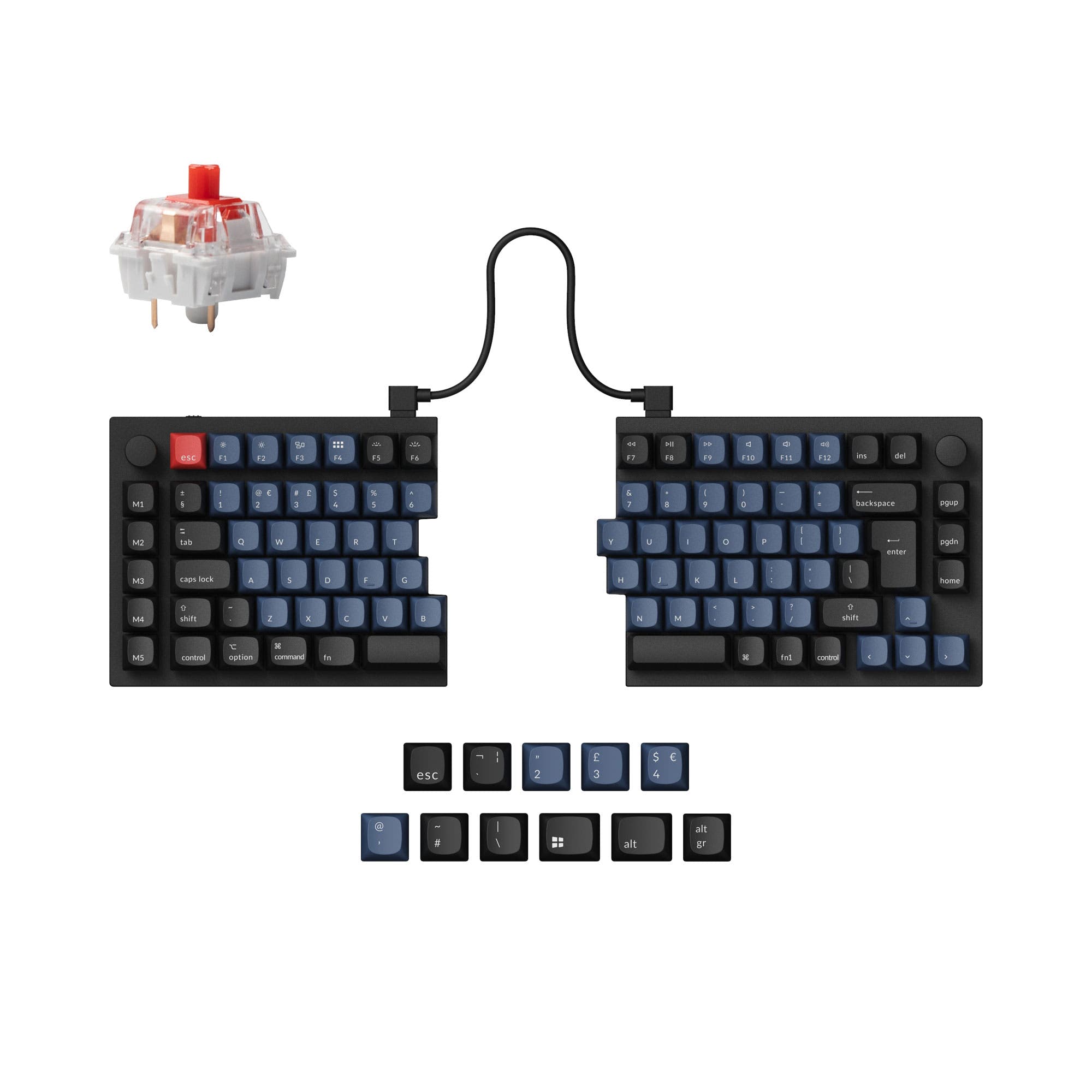
Choose based on your preferred ergonomic layout: left-side numpad with the Q12 Max or a split, angled Alice layout with the Q13 Max.


Which one should you get?
Get the
Keychron Q12 Max
Southpaw
- Unique southpaw layout places the numpad on the left for better mouse positioning.
- Slightly lighter weight (2195g) compared to the Q13 Max.
- Standard keycap sizes offer greater aftermarket compatibility.
- Southpaw layout requires adaptation, with some navigation keys (Del, PgUp/Dn) repositioned.
- The vendor description notes keycaps are not shine-through, limiting backlight visibility.
- Very heavy and large, not portable.
Get the
Keychron Q13 Max
Ergonomic Layout
- Ergonomic Alice layout with split spacebar promotes a more natural typing posture.
- Vendor listing claims up to 300 hours of wireless battery life with backlight off.
- Includes multiple layers of acoustic foam (IXPE, PET, Latex) for sound dampening.
- Alice layout requires specific keycap sets due to split spacebar and extra B key.
- Heavier weight (2405g) and wider dimensions than the Q12 Max.
- The vendor description notes keycaps are not shine-through, limiting backlight visibility.
Your choice between the Keychron Q12 Max and Q13 Max Alice boils down to ergonomic philosophy. Select the Q12 Max if you want a left-side numpad to center your keyboard and keep your mouse close, a boon for right-handed gamers and content creators. Opt for the Q13 Max Alice if you prioritize a split, angled typing posture to reduce wrist strain during long work or coding sessions. Both are exceptionally well-built and customizable keyboards that share nearly all other high-end features.
The differences that matter
Skip the 40-row spec sheet. These are the specs that change how each board feels, sounds, and fits your desk.
Keychron Q12 Max
Keychron Q13 Max
Ergonomics
Southpaw
Alice, Split Spacebar
Mount style
Gasket Mount, PCB Mount
Gasket Mount
Weight
2,195 g
2,405 g
Media keys
Yes
No
USB-C
Yes
No
- Keychron Q12 Max
- Keychron Q13 Max
- Performance
- 8181
- Build quality
- 9087
- Productivity
- 9895
- Customizability
- 9896
- Portability
- 5751
- Layout size: 96%
- Connection: Bluetooth, 2.4 GHz, Wired
- Hot-swappable
- Battery: 4,000 mAh
- Max polling rate: 1,000 Hz
- Case material: Aluminum
What will you mostly use it for?
The Q12 Max's southpaw layout gives it an edge for gaming and content creation where mouse proximity and left-hand numpad access are beneficial. The Q13 Max Alice is the clear choice for programming and extended typing due to its ergonomic split design aimed at reducing strain. For office use, modding, and travel, the keyboards are effectively tied, sharing nearly all functional features, with travel being impractical for both due to their substantial weight.
Pick the Keychron Q12 Max
- The southpaw layout on the Q12 Max keeps the mouse closer for right-handed users.
- Both offer a 1000 Hz polling rate in 2.4GHz and wired modes for low latency.
- The standard stagger of the Q12 Max may be more familiar for gaming keybinds.
What owners say
Ratings and quotes collected from verified store reviews, including the critical ones.
Keychron Q12 Max
12 owner reviews
“I bought this with the Banana switches, then bought a Mode Sonnet, and to be totally honest, I prefer the Q12 Max by far. Extremely functional and feels great to actually type on. I'd love to see a Southpaw Fullsize layout from Keychron in the future or…”
Keychron Q13 Max
10 owner reviews
“Feels very solid and looks great. Tactile and functional”
Keychron Q12 Max vs Q13 Max specs
Every tracked spec, side by side. Rows marked with a dot differ between the boards.
6 of 27 specs differ
Keychron Q12 Max
Keychron Q13 Max
Switch options
Hot-swappable
Mount style
Sound dampening
Screw-in stabilizers
Layout size
Layout standard
Ergonomics
Knob
Display
Media keys
Connection
Max polling rate
Battery
USB-C
Case material
Plate material
Keycaps
Weight
Dimensions
Typing angle
Backlight
QMK
VIA
N-key rollover
Mac & Windows
Released
Compare prices
Live prices from the stores we track, cheapest in-stock offer first.
Lowest price across stores, Amazon excluded.



Prices in USD are converted to your currency and can change at any time. KeebFinder may earn a commission when you buy through these links, at no extra cost to you.
Keychron Q12 Max vs Q13 Max: your questions
The core difference is the layout. The Q12 Max uses a southpaw design, moving the numpad to the left side of the board. The Q13 Max uses an Alice layout, which features a split, angled key arrangement and a split spacebar for ergonomic typing.
Yes, both keyboards are hot-swappable. They support both 3-pin and 5-pin MX-style mechanical switches, allowing you to change switches without soldering.
The Q13 Max Alice is specifically designed to address ergonomics. Its split and angled layout encourages a more natural hand position, which may help reduce wrist strain during extended typing compared to the traditional staggered layout of the Q12 Max.
Using standard sets on the Q13 Max is challenging. The Alice layout requires a specific 2.25u/2.75u split spacebar and an extra 'B' key, which are not included in most standard keycap kits. You may need to purchase Alice-specific sets.
Yes, both the Q12 Max and Q13 Max are compatible with macOS, Windows, and Linux. They include a system toggle switch and an extra set of keycaps for both Mac and Windows layouts.
According to the manufacturer's specs for the Q13 Max, battery life is up to 300 hours with the backlight off and up to 100 hours with RGB lighting at its lowest brightness. The Q12 Max listing states up to 180 hours with backlight off.
Both models feature multiple layers of acoustic foam as part of the Max series. The vendor descriptions mention enhanced foams including IXPE foam, PET film, and a latex bottom pad to dampen sound and improve typing acoustics.
Both are capable for gaming, featuring a 1000 Hz polling rate in their 2.4GHz and wired modes for low latency. The Q12 Max may have a slight edge for right-handed gamers due to its southpaw layout keeping the mouse closer to the main keyboard area.
Both the Keychron Q12 Max and Q13 Max use a gasket mount design. The vendor description specifies a double-gasket design with additional silicone pads between the top and bottom cases to reduce metal resonance.
Yes, both keyboards fully support reprogramming via the open-source QMK firmware and the VIA/Keychron Launcher web app. This allows for extensive key remapping, macro creation, and layer configuration.
The Q13 Max Alice is heavier, with a listed weight of 2405 grams for the fully assembled version. The Q12 Max is listed at 2195 grams. Both are exceptionally heavy boards due to their full aluminum construction.
Yes, both the Keychron Q12 Max and Q13 Max include knob support and are available in a 'Fully Assembled Knob' configuration, which includes a knob for media control.
Not sold on either?




Still torn?
Answer a few quick questions and the keyboard finder ranks 2,000+ boards by how you will actually use yours.