Keychron Q12 Max vs Q14 MaxSouthpaw vs Ergonomic Layout
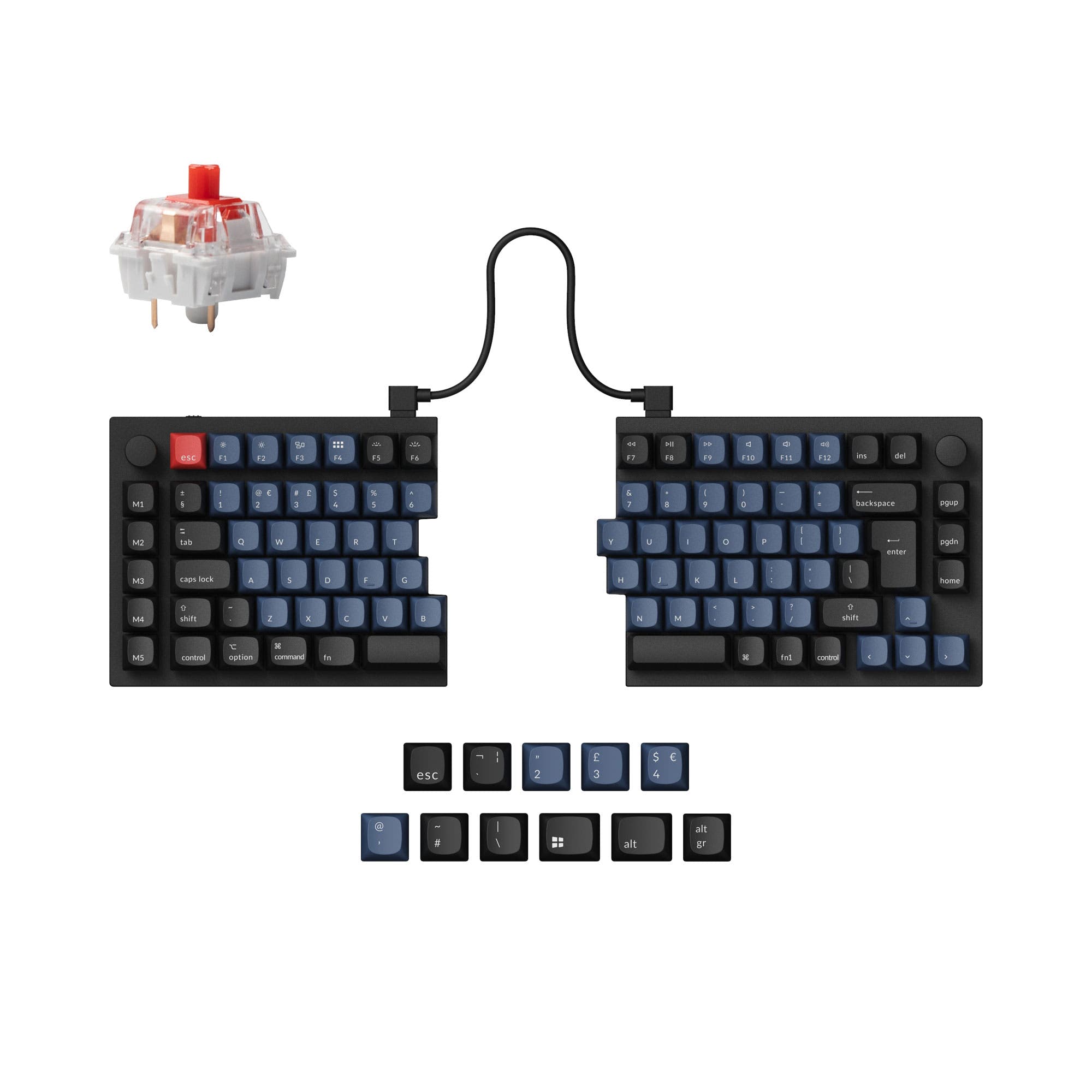
Choose the Q12 Max for a traditional typing experience with a left-side numpad, or the Q14 Max Alice for ergonomic wrist relief with the same southpaw benefit.


Which one should you get?
Get the
Keychron Q12 Max
Southpaw
- Traditional staggered layout is familiar for most typists.
- Slightly more compact and lighter than the Q14 Max Alice.
- Includes multiple layers of acoustic foam (IXPE, PET, Latex) for sound dampening.
- Standard layout offers no inherent ergonomic benefits for wrist alignment.
- Heavy aluminum construction limits true portability.
- KSA profile keycaps may not be preferred by all users.
Get the
Keychron Q14 Max
Ergonomic Layout
- Alice split layout promotes a more natural wrist posture.
- Southpaw numpad combined with ergonomic split is a unique layout combination.
- Vendor claims up to 300 hours of wireless battery life with lighting off.
- Requires adaptation to the split Alice layout, which can be challenging.
- Larger and heavier than the Q12 Max, taking up more desk space.
- The southpaw numpad is not mirrored, which some users find counter-intuitive for left-hand use.
Your choice between these two premium keyboards is a direct trade-off between ergonomics and familiarity. If reducing wrist strain during long workdays is your primary goal, the Q14 Max Alice's split design is the clear, albeit more expensive, path. If you want the space-saving benefit of a left-side numpad without relearning your typing posture, the slightly more affordable Q12 Max is the logical choice. Both deliver exceptional build quality, sound, and wireless performance.
The differences that matter
Skip the 40-row spec sheet. These are the specs that change how each board feels, sounds, and fits your desk.
Keychron Q12 Max
Keychron Q14 Max
Ergonomics
Southpaw
Southpaw, Alice
Mount style
Gasket Mount, PCB Mount
Gasket Mount
Weight
2,195 g
2,450 g
Media keys
Yes
No
Dimensions
20 x 145 x 409 mm
20 x 157 x 445 mm
- Keychron Q12 Max
- Keychron Q14 Max
- Performance
- 8181
- Build quality
- 9087
- Productivity
- 98100
- Customizability
- 9896
- Portability
- 5757
- Layout size: 96%
- Connection: Bluetooth, 2.4 GHz, Wired
- Hot-swappable
- Battery: 4,000 mAh
- Max polling rate: 1,000 Hz
- Case material: Aluminum
What will you mostly use it for?
The Q14 Max Alice wins for office work and content creation primarily due to its ergonomic split design, which may alleviate wrist strain. The Q12 Max is better suited for gaming and travel because of its lighter weight, smaller footprint, and traditional key arrangement. For programming and modding, the keyboards are tied, as they share identical customization firmware and hardware foundations, leaving the choice to layout preference.
Pick the Keychron Q12 Max
- Slightly lower weight (2195g vs 2450g) may allow for easier repositioning.
- Traditional staggered layout is more familiar for gaming keybind muscle memory.
- Both share the same 1000 Hz polling rate for low latency.
What owners say
Ratings and quotes collected from verified store reviews, including the critical ones.
Keychron Q12 Max
12 owner reviews
“I bought this with the Banana switches, then bought a Mode Sonnet, and to be totally honest, I prefer the Q12 Max by far. Extremely functional and feels great to actually type on. I'd love to see a Southpaw Fullsize layout from Keychron in the future or…”
Keychron Q14 Max
14 owner reviews
“I've a Keychron Q13 Pro that I purchased over a year ago, and I've been pleased with it, so when I started reading reviews about the Q13/14 Max, I wasn't convinced it would be noticeably better. I took a chance and purchased a Q14 Max even though I'm not…”
Keychron Q12 Max vs Q14 Max specs
Every tracked spec, side by side. Rows marked with a dot differ between the boards.
5 of 27 specs differ
Keychron Q12 Max
Keychron Q14 Max
Switch options
Hot-swappable
Mount style
Sound dampening
Screw-in stabilizers
Layout size
Layout standard
Ergonomics
Knob
Display
Media keys
Connection
Max polling rate
Battery
USB-C
Case material
Plate material
Keycaps
Weight
Dimensions
Typing angle
Backlight
QMK
VIA
N-key rollover
Mac & Windows
Released
Compare prices
Live prices from the stores we track, cheapest in-stock offer first.
Lowest price across stores, Amazon excluded.



Prices in USD are converted to your currency and can change at any time. KeebFinder may earn a commission when you buy through these links, at no extra cost to you.
Keychron Q12 Max vs Q14 Max: your questions
The core difference is the key layout. The Q12 Max uses a traditional, staggered key arrangement with a southpaw (left-side) numpad. The Q14 Max Alice combines that southpaw numpad with an ergonomic Alice layout, which splits the main typing area to promote a more natural wrist angle.
Yes, both keyboards are hot-swappable. According to the manufacturer, they support both 3-pin and 5-pin MX-style switches, allowing you to change switches easily without soldering.
The Q14 Max Alice is designed for better ergonomics. Its split Alice layout aligns keys with the natural angle of your hands, which can reduce wrist pronation and strain during long typing sessions compared to the traditional staggered layout of the Q12 Max.
Yes, both the Q12 Max and Q14 Max Alice offer triple-mode connectivity. They can connect via a 1000 Hz 2.4 GHz wireless dongle, Bluetooth 5.1, or a wired USB-C connection.
According to the Q14 Max product specifications, the battery life is up to 300 hours with the RGB backlight turned off, and up to 100 hours with RGB at its lowest brightness setting. The Q12 Max is listed for up to 180 hours with lighting off.
Yes, both models fully support key remapping and macro programming. They run on open-source QMK firmware and are compatible with the VIA and Keychron Launcher web configurator for easy, graphical customization.
Both keyboards come with KSA profile, double-shot PBT keycaps. The manufacturer states these keycaps are oil-resistant and durable, with a spherical-angle design. They are not shine-through for the south-facing RGB LEDs.
No, the southpaw numpad on both the Q12 Max and Q14 Max Alice uses the standard number pad layout, not a mirrored one. Some user reviews for the Q14 Max note that this requires retraining muscle memory for left-hand data entry.
Both feature a full CNC-machined aluminum body, a polycarbonate plate, and a double-gasket mount design. They also include multiple layers of sound-dampening foam, such as IXPE, PET, and a latex bottom pad, for a premium typing feel and acoustics.
The Q12 Max is slightly more portable. It is shorter in length (409mm vs 445mm) and lighter (2195g vs 2450g) than the Q14 Max Alice. However, both are very heavy, solid metal keyboards not designed for frequent travel.
Yes, both the Keychron Q12 Max and Q14 Max Alice are compatible with macOS, Windows, and Linux. They include dedicated system toggles and extra keycaps for both Mac and Windows layouts.
The fully assembled versions of both keyboards come with pre-lubed Gateron Jupiter switches. You can typically choose between linear (Red), tactile (Brown), and tactile (Banana) variants, according to the vendor selection options.
Not sold on either?




Still torn?
Answer a few quick questions and the keyboard finder ranks 2,000+ boards by how you will actually use yours.