Keychron Q12 Max vs Q6 MaxSouthpaw vs Standard Layout Choice
Choose the Q12 Max for a left-side numpad and centered typing, or the Q6 Max for a traditional layout and optional ISO keycaps.


Which one should you get?
Get the
Keychron Q12 Max
Southpaw
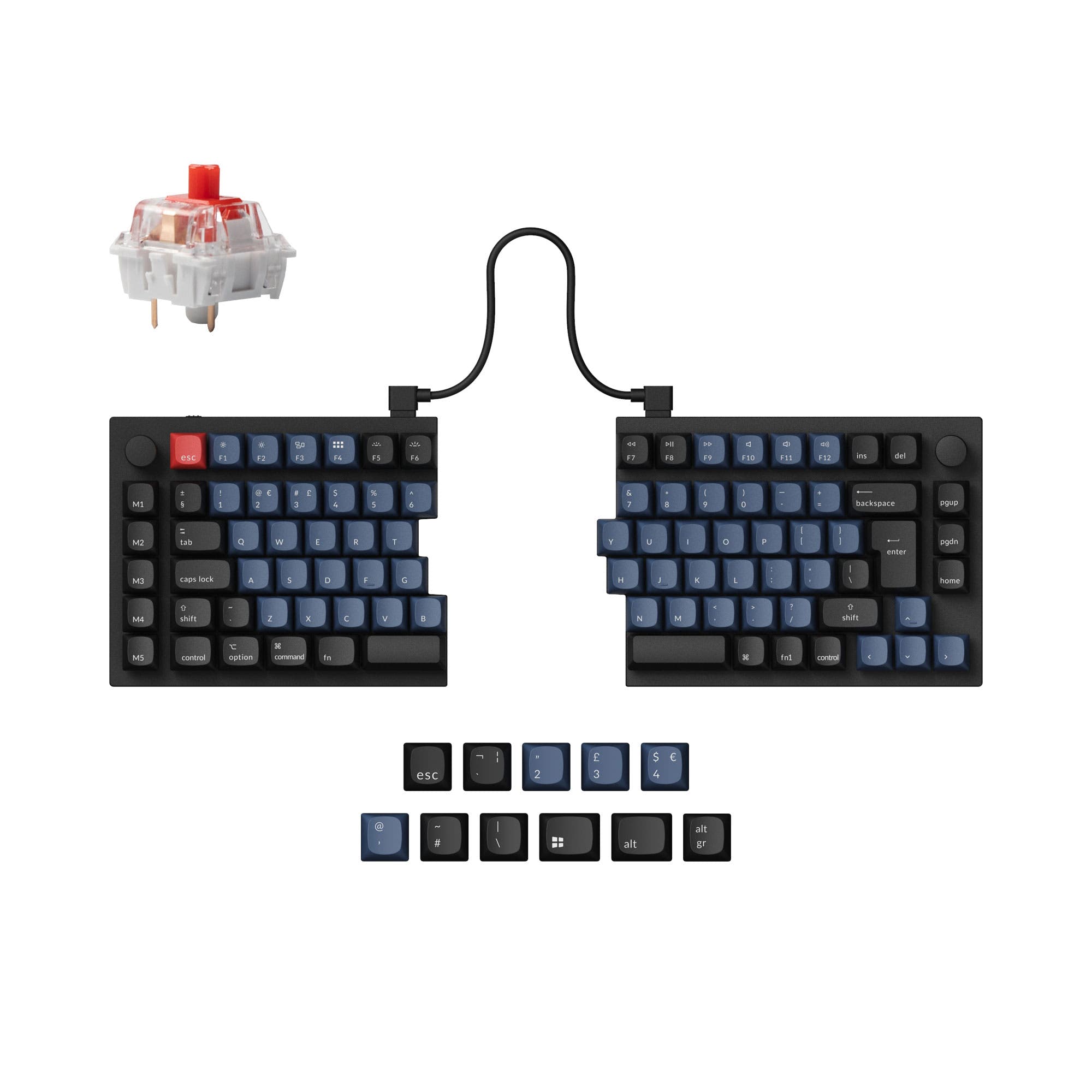
- Unique southpaw (left-side numpad) 96% layout centers the alphanumeric keys.
- Includes multiple layers of acoustic foam (IXPE, PET, Latex) for sound dampening.
- Full customizability with hot-swap sockets, QMK/VIA support, and screw-in stabilizers.
- Southpaw layout requires retraining and may conflict with standard keyboard muscle memory.
- Very heavy at 2195g, limiting portability.
- Keycap legends are not shine-through, according to the manufacturer's spec sheet.
Get the
Keychron Q6 Max
Standard Layout Choice
- Traditional 100% layout is immediately familiar and widely compatible.
- Offers extensive ISO layout support (UK, DE, Nordic, FR, ES, etc.).
- Includes optional OSA side-printed shine-through keycaps for better backlighting.
- Standard layout places the numpad on the right, pushing the mouse farther from the center.
- Equally heavy at 2184g, not suitable for mobile use.
- Some user reviews mention potential long-term PCB issues and key chatter.
Your choice between the Keychron Q12 Max and Q6 Max is a direct trade-off between ergonomic innovation and traditional compatibility. If you want your mouse closer and are willing to learn a new layout for a more centered typing posture, the Q12 Max is the compelling option. If you need a keyboard that works seamlessly with other setups, prefer shine-through keycaps, or require a specific ISO layout, the Q6 Max is the safer, more versatile pick. Both deliver a premium, customizable typing experience.
The differences that matter
Skip the 40-row spec sheet. These are the specs that change how each board feels, sounds, and fits your desk.
Keychron Q12 Max
Keychron Q6 Max
Layout size
96%
100%
Ergonomics
Southpaw
Standard
Display
None
LED
Weight
2,195 g
2,184 g
Layout standard
ANSI
ANSI, ISO, ISO-CH, ISO-DE, ISO-ES, ISO-FR, ISO-Nordic, ISO-SW, ISO-UK, JIS
- Keychron Q12 Max
- Keychron Q6 Max
- Performance
- 8180
- Build quality
- 9091
- Productivity
- 9896
- Customizability
- 98100
- Portability
- 5755
- Connection: Bluetooth, 2.4 GHz, Wired
- Hot-swappable
- Battery: 4,000 mAh
- Max polling rate: 1,000 Hz
- Case material: Aluminum
- Switch options: Clicky, Linear, Tactile
What will you mostly use it for?
The Q6 Max is the default choice for office and general use due to its standard layout and ISO options. The Q12 Max's southpaw design provides a distinct advantage for programming and content creation where mouse and numpad use intersect. For gaming and modding, the keyboards are functionally equivalent, while both are equally impractical for travel due to their substantial weight.
It's a tie
- Both offer a 1000 Hz polling rate in 2.4 GHz and wired modes for low latency.
- Both feature N-key rollover for simultaneous key presses.
- Their similar weights and aluminum cases provide a stable, non-slip base.
What owners say
Ratings and quotes collected from verified store reviews, including the critical ones.
Keychron Q12 Max
12 owner reviews
“I bought this with the Banana switches, then bought a Mode Sonnet, and to be totally honest, I prefer the Q12 Max by far. Extremely functional and feels great to actually type on. I'd love to see a Southpaw Fullsize layout from Keychron in the future or…”
Keychron Q6 Max
24 owner reviews
“Amazing. Love the weight, keycaps, color. Knob placement could be much better. Spacebar leans to one side since I always press it on the right and gets uneven.”
“Keystrokes doesn’t have light instead a rainbow where i can’t focus when typing”
Keychron Q12 Max vs Q6 Max specs
Every tracked spec, side by side. Rows marked with a dot differ between the boards.
7 of 27 specs differ
Keychron Q12 Max
Keychron Q6 Max
Switch options
Hot-swappable
Mount style
Sound dampening
Screw-in stabilizers
Layout size
Layout standard
Ergonomics
Knob
Display
Media keys
Connection
Max polling rate
Battery
USB-C
Case material
Plate material
Keycaps
Weight
Dimensions
Typing angle
Backlight
QMK
VIA
N-key rollover
Mac & Windows
Released
Compare prices
Live prices from the stores we track, cheapest in-stock offer first.
Lowest price across stores, Amazon excluded.




Prices in USD are converted to your currency and can change at any time. KeebFinder may earn a commission when you buy through these links, at no extra cost to you.
Keychron Q12 Max vs Q6 Max: your questions
A southpaw layout moves the numeric keypad to the left side of the keyboard. The Keychron Q12 Max uses this design to center the alphanumeric keys and allow simultaneous use of the numpad and a right-handed mouse.
Yes, both keyboards offer triple-mode connectivity. You can use them via a 2.4 GHz wireless dongle with a 1000 Hz polling rate, Bluetooth 5.1, or a wired USB-C connection.
Yes, both models are hot-swappable. This means you can easily replace the mechanical switches without soldering, supporting both 3-pin and 5-pin MX-style switches.
Yes. According to Keychron, both the Q12 Max and Q6 Max are compatible with macOS, Windows, and Linux. They include a physical toggle switch and extra keycaps for switching between Mac and Windows layouts.
Both keyboards have a 4000mAh rechargeable battery. Keychron states they can last up to 180 hours with the backlight off, and up to 100 hours with RGB lighting at its lowest brightness.
The Q12 Max comes with KSA profile double-shot PBT keycaps. The Q6 Max offers a choice between KSA profile keycaps or OSA side-printed shine-through double-shot PBT keycaps.
The core difference is the layout. The Q12 Max has a 96% southpaw layout with the numpad on the left. The Q6 Max has a standard 100% layout with the numpad on the right and supports many ISO language layouts.
Both are designed for a premium typing experience. They feature a double-gasket mount, a flexible polycarbonate plate, multiple acoustic foam layers (IXPE, PET, Latex), and screw-in stabilizers to create a cushioned feel and dampened sound.
Yes, both support full reprogramming via the open-source QMK firmware and the VIA/Keychron Launcher web app. This allows for deep customization of key mappings, layers, macros, and RGB lighting.
The Q12 Max is slightly narrower (145mm wide vs. 137mm for the Q6 Max) but longer. However, its southpaw layout can free up space on the right side for your mouse, potentially making better use of a compact desk area.
Yes, both the Keychron Q12 Max and Q6 Max include a knob, which is typically programmable but defaults to controlling volume.
Not sold on either?





Still torn?
Answer a few quick questions and the keyboard finder ranks 2,000+ boards by how you will actually use yours.