Keychron V2 vs V365% vs TKL Layout Custom Keyboard Comparison
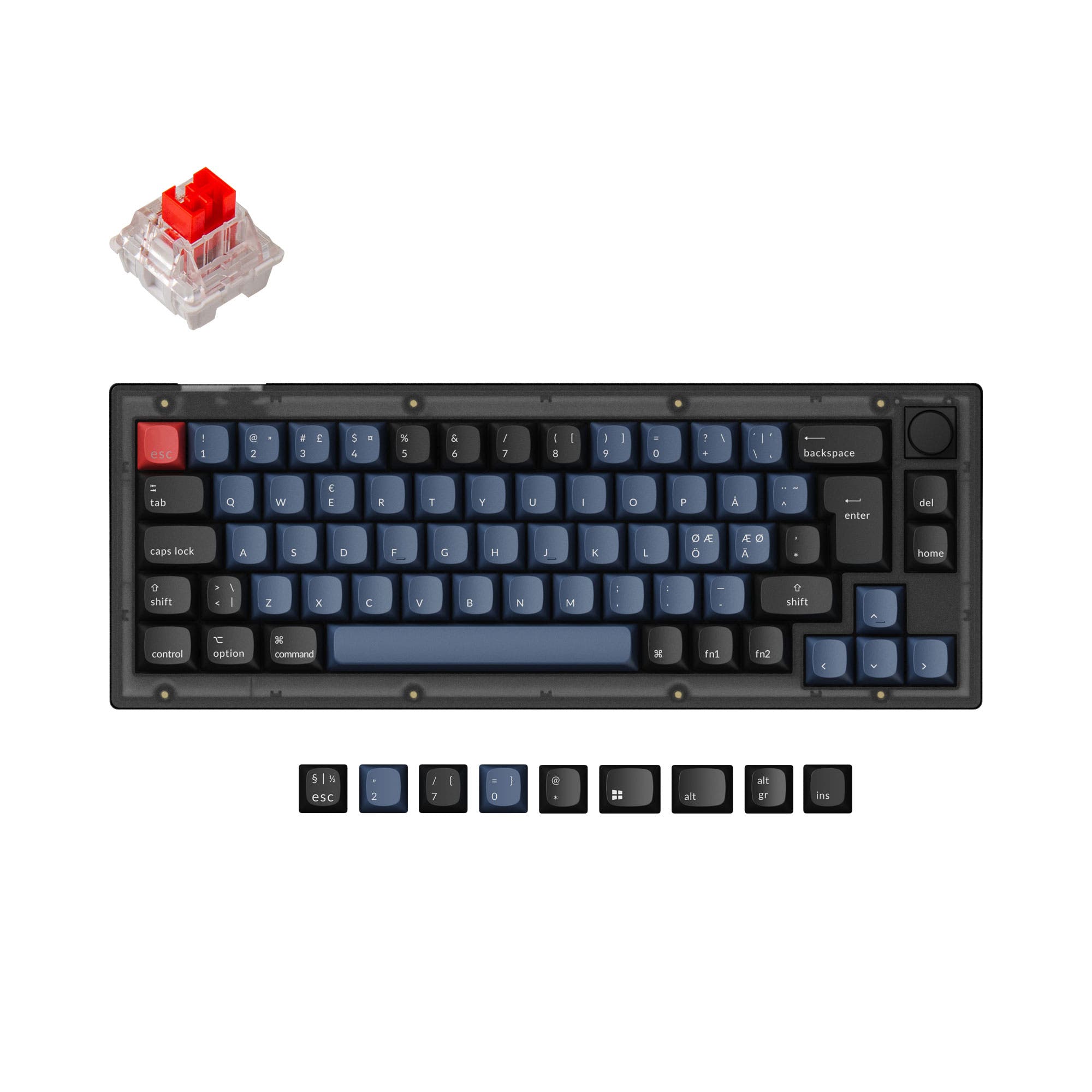
Choose the Keychron V2 for a compact, portable layout or the V3 for a full TKL layout with dedicated navigation keys.
KeebFinder may earn a commission when you buy through these links, at no extra cost to you.
4.9 · 17 reviews
from$44at Keychron

4.6 · 17 reviews
from$54at Keychron
Which one should you get?
Get the
Keychron V2
65%
Build quality in the top 10% of 65% boards under $100.
- More compact 65% layout saves substantial desk space.
- Lighter weight at 855g for better portability.
- Includes all the same high-end customization features as the larger V3.
- South-facing LEDs. Shine-through legends stay dark, and some sculpted keycaps can clip the LED.
- Missing ISO-SW. The other board is sold in those layouts.
- 65% layout. No function row and no numpad.
Get the
Keychron V3
TKL Layout Custom Keyboard Comparison
Build quality in the top 5% of 80% boards under $100.
- Classic TKL (80%) layout retains the function row and navigation cluster for productivity.
- Larger form factor and heavier 1120g build offer a more solid, desk-anchored feel.
- Supports a wider range of layout standards including JIS and ISO-SW.
- South-facing LEDs. Shine-through legends stay dark, and some sculpted keycaps can clip the LED.
- No numpad.
Your primary workflow and desk space should guide this decision. If you regularly use function keys, arrow keys, and the navigation cluster without wanting to memorize layers, the Keychron V3's TKL layout is the practical choice. If you value a minimalist desk setup, need to transport your keyboard, or are comfortable using keyboard layers, the Keychron V2's 65% form factor offers the same premium features in a more compact package.
The differences that matter
Skip the 40-row spec sheet. These are the specs that change how each board feels, sounds, and fits your desk.
Keychron V2
Keychron V3
Layout size
65%
80%
Max polling rate
1,000 Hz
8,000 Hz
Higher polling helps competitive FPS and does nothing for typing
Mount style
Plate Mount, Tray Mount
Gasket Mount, Plate Mount, Tray Mount
Weight
855 g
1,360 g
Heavier boards stay planted and lighter ones travel
Layout standard
ANSI, ISO, ISO-DE, ISO-ES, ISO-FR, ISO-UK
ANSI, ISO, ISO-DE, ISO-ES, ISO-FR, ISO-SW, ISO-UK, JIS
ISO and JIS exist so regional layouts fit
- Keychron V2
- Keychron V3
- Performance
- 6991
- Build quality
- 8789
- Productivity
- 9698
- Customizability
- 9998
- Portability
- 7658
- Connection: Wired
- Hot-swappable
- Case material: ABS, Plastic
- Switch options: Clicky, Linear, Tactile
- Knob
- QMK
What will you mostly use it for?
The V3 is the clear choice for office work and programming where its TKL layout provides immediate access to function and navigation keys. The V2 wins for travel due to its smaller size and lower weight. For gaming, modding, and content creation, the keyboards are functionally equivalent, sharing the same core customization and performance features, making the decision purely about layout preference.
It's a tie
- Both have a 1000 Hz polling rate for low latency.
- Both support hot-swapping for trying different switch types.
- Both feature south-facing RGB LEDs.
What owners say
Ratings and quotes collected from verified store reviews, including the critical ones.
Keychron V2
17 owner reviews
“Was looking for a good budget board to customize and this keyboard was great! Good price and high quality materials as well as fast shipping. Love it.”
Keychron V3
17 owner reviews
“Mainly bought this keyboard for the russian layout, despite this I prefer it over my steelseries apex pro, its nice feel and sounds nice”
“I bought this keyboard in March 2023 and genuinely liked it at first. It's solid, heavy, well-built, sounds great. Keychron clearly knows what they're doing in terms of design and firmware. The problem is the switches. After about a year and a half of normal…”
Keychron V2 vs V3 specs
Every tracked spec, side by side. Rows marked with a dot differ between the boards.
8 of 26 specs differ
Keychron V2
Keychron V3
Switch options
Hot-swappable
Mount style
Sound dampening
Screw-in stabilizers
Layout size
Layout standard
Ergonomics
Knob
Display
Media keys
Connection
Max polling rate
USB-C
Case material
Plate material
Keycaps
Weight
Dimensions
Typing angle
Backlight
QMK
VIA
N-key rollover
Mac & Windows
Released
ISO layouts by store
Which stores sell ISO-DE, UK, and the other regional layouts.
Keychron V2
Input Gear
ISO-DE
In stockShips to you
Keychron
ISO-DE, ISO-UK, ISO-FR, ISO-ES
In stockShips to you
Keychron (DE)
ISO-DE, ISO-UK, ISO-FR, ISO-ES
In stockDoes not ship to you
Keychron V3
Keychron
ISO-DE, ISO-UK, ISO-FR, ISO-ES, ISO-SW
In stockShips to you
Keychron (DE)
ISO-DE, ISO-ES
In stockDoes not ship to you
Keychron (DE)
ISO-DE, ISO-UK, ISO-FR, ISO-ES, ISO-SW
Out of stockDoes not ship to you
Compare prices
Live prices from the stores we track, cheapest in-stock offer first.
Prices in USD are converted to your currency and can change at any time. KeebFinder may earn a commission when you buy through these links, at no extra cost to you.
Lowest price across stores, Amazon excluded.




Keychron V2 vs V3: your questions
The main difference is the layout size. The V2 is a 65% keyboard, which omits the function row, navigation cluster, and numpad. The V3 is an 80% TKL (Tenkeyless) keyboard, which retains the function row and navigation cluster but removes the numpad. Both share identical core features like QMK support and hot-swap sockets.
Yes, both the Keychron V2 and V3 are hot-swappable. Their PCBs support both 3-pin and 5-pin mechanical switch types, allowing you to change switches without any soldering required.
Yes, both keyboards are fully programmable. They support open-source QMK firmware and the VIA configuration software, allowing for extensive key remapping, macro creation, and layer customization directly through a web app.
Both keyboards are available in versions with or without a programmable aluminum knob. You can select a 'Knob' or 'Non-Knob' variant when purchasing either the fully assembled or barebone kit.
According to Keychron, the fully assembled versions of both keyboards come with double-shot PBT keycaps in the OSA profile. These keycaps are not shine-through and include an additional set for both macOS and Windows layouts.
Yes, both keyboards feature screw-in PCB stabilizers. This design, as noted by Keychron, increases stability and makes it easier to tune, upgrade, or replace the stabilizers compared to clip-in varieties.
The hot-swap sockets on both boards support the vast majority of MX-style mechanical switches. This includes 3-pin and 5-pin switches from brands like Gateron, Cherry, and Keychron's own K Pro switches.
Yes, both keyboards feature south-facing RGB LEDs. Keychron states this orientation better illuminates the keyboard from the typist's angle and prevents interference with Cherry or OEM profile keycaps.
Both are equally suitable for Mac users. Each keyboard includes a system toggle switch and comes with dedicated Mac modifier keycaps (Command, Option) in the box, allowing for seamless switching between macOS and Windows layouts.
Both the Keychron V2 and V3 have a polling rate of 1000 Hz. Keychron's product description notes this makes latency hardly noticeable, even in competitive gaming scenarios.
Yes, both the V2 and V3 are available for purchase as barebone kits. These kits include the case, PCB, plate, and stabilizers, but do not include switches or keycaps, allowing for complete customization from the start.
Not sold on either?


Still torn?
Answer a few quick questions and the keyboard finder ranks 2,000+ boards by how you will actually use yours.