Monsgeek M1W vs Nuphy Kick75Aluminum vs Polycarbonate 75%
Choose the Monsgeek M1W for a premium aluminum build and long battery life, or the Nuphy Kick75 for a lighter, convertible design with a confirmed high polling rate.

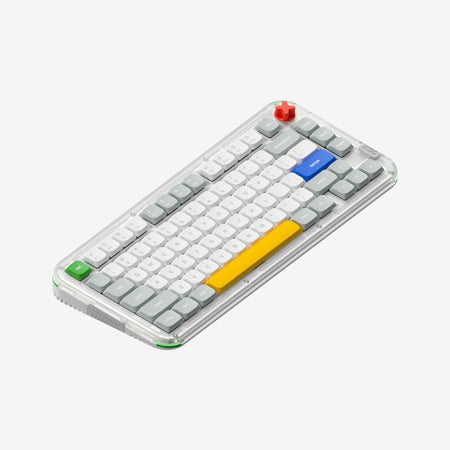
Which one should you get?
Get the
Monsgeek M1W
Aluminum
- Full aluminum case construction for a premium, solid feel.
- Large 6000mAh battery for extended wireless use between charges.
- Includes a comprehensive modding kit with extra foam, tape, and Teflon pads.
- Very heavy at 2200g, which reduces portability.
- Lacks an explicitly stated polling rate in its provided specifications.
- Plate-mounted stabilizers may offer less tuning potential than screw-in types.
Get the
Nuphy Kick75
Polycarbonate 75%
- Confirmed 1000Hz polling rate for wired and 2.4GHz wireless modes.
- Convertible high and low-profile design via optional conversion kits.
- Open-source 3D printing files for custom case accessories.
- Smaller 2500mAh battery capacity compared to the M1W.
- Polycarbonate case may feel less premium than aluminum to some users.
- Profile conversion requires purchasing a separate kit, adding to the total cost.
Your priority should guide this choice. For a traditional, hefty aluminum keyboard with outstanding battery life and modding supplies included, the Monsgeek M1W is the clear pick. If you value a lighter, more versatile design with a confirmed high-performance wireless connection and unique convertible profiles, the Nuphy Kick75 is the better route. Both are excellent pre-built platforms with strong customizability.
The differences that matter
Skip the 40-row spec sheet. These are the specs that change how each board feels, sounds, and fits your desk.
Monsgeek M1W
Nuphy Kick75
Battery
6,000 mAh
4,000 mAh
Case material
Aluminum
Plastic
Switch options
Clicky, Linear, Tactile
Mechanical
Mount style
Gasket Mount, Plate Mount
Gasket Mount
Weight
2,200 g
1,009 g
- Monsgeek M1W
- Nuphy Kick75
- Performance
- 7082
- Build quality
- 8578
- Productivity
- 9793
- Customizability
- 9692
- Portability
- 9282
- Layout size: 75%
- Connection: Bluetooth, 2.4 GHz, Wired
- Hot-swappable
- Knob
- QMK
- VIA
What will you mostly use it for?
The Nuphy Kick75 takes the lead for gaming and travel due to its confirmed high polling rate and lighter weight, while also offering unique advantages for content creators. The Monsgeek M1W is stronger for office use and modding, thanks to its exceptional battery life and included modification accessories. For programming, both are equally capable due to their shared support for advanced firmware.
Pick the Nuphy Kick75
- The Nuphy Kick75 listing explicitly states a 1000Hz polling rate for both wired and 2.4GHz modes.
- The manufacturer describes its 2.4GHz connection as offering 'ultra-low latency and fast response' for gaming.
- The Kick75 is notably lighter, which may be preferable for quick desk adjustments during gameplay.
Monsgeek M1W vs Nuphy Kick75 specs
Every tracked spec, side by side. Rows marked with a dot differ between the boards.
11 of 27 specs differ
Monsgeek M1W
Nuphy Kick75
Switch options
Hot-swappable
Mount style
Sound dampening
Screw-in stabilizers
Layout size
Layout standard
Ergonomics
Knob
Display
Media keys
Connection
Max polling rate
Battery
USB-C
Case material
Plate material
Keycaps
Weight
Dimensions
Typing angle
Backlight
QMK
VIA
N-key rollover
Mac & Windows
Released
Compare prices
Live prices from the stores we track, cheapest in-stock offer first.
Lowest price across stores, Amazon excluded.





Prices in USD are converted to your currency and can change at any time. KeebFinder may earn a commission when you buy through these links, at no extra cost to you.
Monsgeek M1W vs Nuphy Kick75: your questions
The Monsgeek M1W has a significantly larger 6000mAh battery, while the base Nuphy Kick75 (NuPhyIO version) has a 2500mAh battery. The M1W will generally require less frequent charging. The Kick75's QMK version is listed with a 4000mAh battery.
Yes, the Nuphy Kick75 is marketed for gaming with a stated 1000Hz polling rate in both its wired and 2.4GHz wireless modes. The manufacturer claims this provides 'ultra-low latency and fast response' for competitive play.
No. The Monsgeek M1W is a fixed high-profile design with an aluminum case. The Nuphy Kick75 is the model that offers convertible high and low profiles through the purchase of separate conversion kits.
Yes. Both the Monsgeek M1W and Nuphy Kick75 are listed as compatible with macOS, Windows, and Linux. The M1W includes a physical switch to toggle between OS modes.
Both offer extensive software customization. They support QMK and VIA for deep key remapping and macro programming. The Nuphy Kick75 also has a 'NuPhyIO' web-based configuration tool mentioned as an option.
According to the vendor description, the Monsgeek M1W's included keycaps vary by color. The Purple version comes with OEM profile PBT backlit keycaps, while the Sky Blue version includes Cherry profile PBT keycaps.
The Kick75 comes with a keycap/switch puller and extra keycaps. For major modifications like changing the profile from high to low, you must purchase a separate 'conversion kit' which includes a new top case, foams, and tools.
The provided specifications do not state whether the stabilizers are pre-lubed. The Monsgeek M1W uses 'purple plate mount stabilizers,' and the Nuphy Kick75 uses plate-mounted stabilizers, but lubrication status is not confirmed.
The Monsgeek M1W is substantially heavier at 2200 grams (4.85 lbs) due to its full aluminum case. The Nuphy Kick75's high-profile version weighs 1009 grams (2.22 lbs), making the M1W feel much more solid and desk-bound.
Yes. The Monsgeek M1W vendor page explicitly states its hotswap sockets support both 3-pin and 5-pin switches. The Nuphy Kick75 tech specs also list hot-swappable support for '3/5 pin MX-style' switches.
The core material difference is the case. The Monsgeek M1W uses an aluminum case, while the Nuphy Kick75 uses a polycarbonate (PC) case. This affects weight, sound, and the perceived premium feel of the board.
Not sold on either?





Still torn?
Answer a few quick questions and the keyboard finder ranks 2,000+ boards by how you will actually use yours.