Nuphy Kick75 vs Node75 Low ProfileHigh-End Customization vs Budget Simplicity
Choose the Kick75 for extensive firmware customization and a premium build, or the Node75 for a simpler, more affordable entry point.
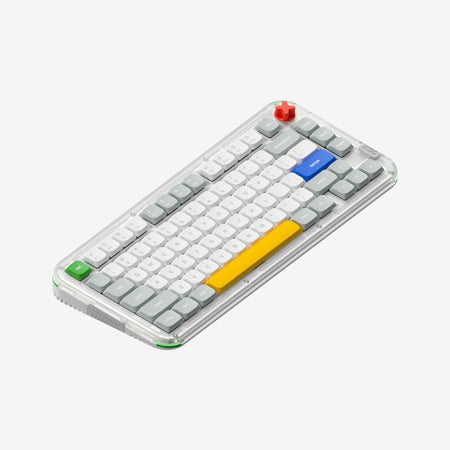

Which one should you get?
Get the
Nuphy Kick75
High-End Customization
- Extensive firmware support with both QMK and VIA compatibility.
- Includes a volume knob for media and application control.
- Features a transparent polycarbonate case and plate with south-facing RGB lighting.
- Heavier than the Node75, especially in its high-profile configuration.
- The polycarbonate case may show wear or scratches more easily than opaque materials.
- More expensive than the Node75.
Get the
Nuphy Node75 Low Profile
Budget Simplicity
- More affordable price point.
- Lighter weight (827g) compared to the Kick75.
- Larger 3000mAh battery capacity.
- Lacks RGB backlighting.
- No support for QMK, VIA, or advanced firmware customization mentioned.
- Case material is ABS instead of polycarbonate.
The NuPhy Kick75 is the superior keyboard for enthusiasts, programmers, and modders who will utilize its advanced QMK/VIA firmware, knob, and extensive customization options. The Node75 is a practical, budget-friendly alternative for users who want a reliable, wireless 75% keyboard with good battery life but do not need RGB or deep software tweaking. Your budget and need for customization are the primary deciding factors.
The differences that matter
Skip the 40-row spec sheet. These are the specs that change how each board feels, sounds, and fits your desk.
Nuphy Kick75
Nuphy Node75 Low Profile
Battery
4,000 mAh
3,000 mAh
Low profile
No
Yes
Case material
Plastic
ABS
Switch options
Mechanical
Clicky, Linear
Knob
Yes
No
- Nuphy Kick75
- Nuphy Node75 Low Profile
- Performance
- 8249
- Build quality
- 7859
- Productivity
- 9353
- Customizability
- 9245
- Portability
- 8279
- Layout size: 75%
- Connection: Bluetooth, 2.4 GHz, Wired
- Hot-swappable
- Max polling rate: 1,000 Hz
- Mount style: Gasket Mount
- Plate material: Polycarbonate
What will you mostly use it for?
The Kick75 is the clear choice for users who need deep customization for programming, modding, or gaming. Its QMK/VIA support and knob are significant advantages for creators and tinkerers. For office use, both are capable, sharing core wireless features. The Node75 wins for travel due to its lower weight, and serves as a competent, more affordable option if advanced firmware features are not required.
Pick the Nuphy Kick75
- The Kick75 offers a 1000Hz polling rate in its 2.4GHz mode, as stated by the manufacturer.
- It features south-facing RGB lighting, which can be beneficial for certain keycap compatibility.
- The vendor description highlights its use for gaming with macro recording capabilities.
Nuphy Kick75 vs Node75 Low Profile specs
Every tracked spec, side by side. Rows marked with a dot differ between the boards.
14 of 27 specs differ
Nuphy Kick75
Nuphy Node75 Low Profile
Switch options
Hot-swappable
Mount style
Low profile
Sound dampening
Layout size
Layout standard
Ergonomics
Knob
Display
Media keys
Connection
Max polling rate
Battery
USB-C
Case material
Plate material
Keycaps
Weight
Dimensions
Typing angle
Backlight
QMK
VIA
N-key rollover
Mac & Windows
Released
Compare prices
Live prices from the stores we track, cheapest in-stock offer first.
Lowest price across stores, Amazon excluded.



Prices in USD are converted to your currency and can change at any time. KeebFinder may earn a commission when you buy through these links, at no extra cost to you.
Nuphy Kick75 vs Node75 Low Profile: your questions
No, the NuPhy Node75 does not have RGB backlighting according to its specifications. The Kick75 features south-facing RGB lighting.
Yes. The NuPhy Kick75 supports both QMK and VIA firmware, allowing for deep key remapping, layer creation, and macro recording. The vendor description provides examples of remapping keys for programming.
The Node75 has a larger 3000mAh battery capacity. The Kick75 has a 2500mAh battery, but its vendor page claims up to 360 hours of use with lights off. Actual life depends on usage patterns like backlight and connection mode.
Yes, both the NuPhy Kick75 and Node75 feature hot-swappable PCBs. This allows you to change the mechanical switches without soldering.
The Kick75 uses a transparent polycarbonate (PC) case and plate, while the Node75 uses an opaque ABS case. The Kick75's design showcases its internal components and RGB lighting.
No, the NuPhy Node75 does not include a volume knob. The Kick75 features a dedicated volume knob for media control.
Both keyboards include sound-dampening features. The choice may come down to switch selection; the Kick75's vendor page recommends its 'Blush' switches for quiet, comfortable typing sessions.
Yes, but it requires a separate conversion kit. The Kick75 is sold as either high or low-profile, and NuPhy sells kits to swap the top case, plate foam, and switch pad to change the profile.
Both keyboards list a 1000Hz polling rate. The Kick75's vendor description specifies this rate applies to its 2.4GHz wireless and wired modes.
The Node75 is more portable by weight, listed at 827g. The Kick75's low-profile configuration weighs 877g, and its high-profile configuration is 1009g.
Yes, both the NuPhy Kick75 and Node75 are listed with Mac/Win support in their specifications, indicating compatibility with macOS.
Not sold on either?





Still torn?
Answer a few quick questions and the keyboard finder ranks 2,000+ boards by how you will actually use yours.