Nuphy Kick75 vs Node75 High ProfileHigh Customizability vs Larger Battery
Choose the Kick75 for deep customization and firmware support, or the Node75 for its larger battery and unique touch zone.
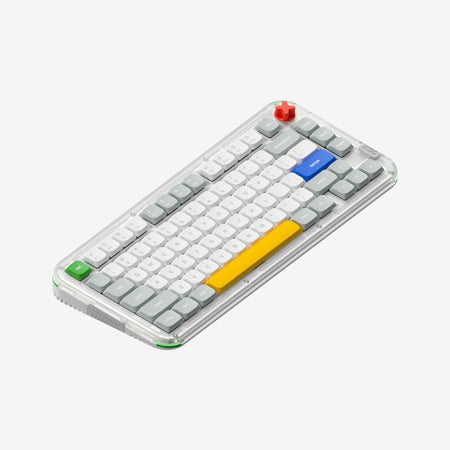

Which one should you get?
Get the
Nuphy Kick75
High Customizability
- Extensive firmware support with both QMK and VIA for deep customization.
- Convertible design with optional kits to switch between high and low-profile configurations.
- Includes a volume knob for quick media control.
- Smaller 2500mAh battery compared to the Node75.
- Requires purchasing a separate conversion kit to change profiles after the initial purchase.
- The vendor page indicates a complex array of foam layers, which might be overwhelming for beginners to mod.
Get the
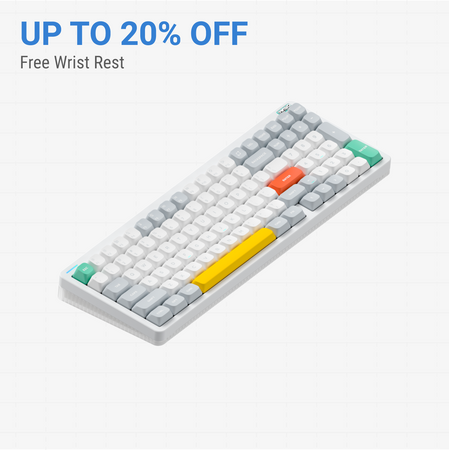
Nuphy Node75 High Profile
Larger Battery
- Larger 4000mAh battery for extended wireless use.
- Features a unique touch zone for slide, tap, and double-tap inputs.
- Available in multiple layout standards including ANSI, ISO, and ISO-DE.
- Lacks advanced firmware support like QMK or VIA mentioned in its description.
- ABS case material, compared to the Kick75's polycarbonate.
- No mention of a volume knob or similar multimedia control.
Your priority should guide this choice. If you plan to heavily customize your typing experience, key mappings, or physical profile, the Nuphy Kick75 is the more capable and future-proof option. If you need a keyboard with a very long battery life and are intrigued by a touch-based interface, and do not require advanced firmware, the Node75 HighProfile is a suitable alternative.
The differences that matter
Skip the 40-row spec sheet. These are the specs that change how each board feels, sounds, and fits your desk.
Nuphy Kick75
Nuphy Node75 High Profile
Case material
Plastic
ABS
Switch options
Mechanical
Clicky, Linear
Knob
Yes
No
Weight
1,009 g
827 g
QMK
Yes
No
- Nuphy Kick75
- Nuphy Node75 High Profile
- Performance
- 8261
- Build quality
- 7860
- Productivity
- 9362
- Customizability
- 9252
- Portability
- 8275
- Layout size: 75%
- Connection: Bluetooth, 2.4 GHz, Wired
- Hot-swappable
- Battery: 4,000 mAh
- Max polling rate: 1,000 Hz
- Mount style: Gasket Mount
What will you mostly use it for?
The Kick75 is the clear choice for users who value deep customization, whether for gaming macros, programming layers, or creative work shortcuts, thanks to its superior firmware support. The Node75 HighProfile wins for office use primarily due to its larger battery capacity. For travel, both are competent wireless options, making it a tie. Modders will find far more to work with on the Kick75.
Pick the Nuphy Kick75
- The Kick75's vendor page explicitly mentions a 1000Hz polling rate for its 2.4G connection, which is highlighted for gaming.
- It offers QMK/VIA support for macro recording, allowing for complex in-game command setups.
- The Kick75 includes a volume knob, which can be useful for quick audio adjustments during gameplay.
Nuphy Kick75 vs Node75 High Profile specs
Every tracked spec, side by side. Rows marked with a dot differ between the boards.
13 of 26 specs differ
Nuphy Kick75
Nuphy Node75 High Profile
Switch options
Hot-swappable
Mount style
Sound dampening
Layout size
Layout standard
Ergonomics
Knob
Display
Media keys
Connection
Max polling rate
Battery
USB-C
Case material
Plate material
Keycaps
Weight
Dimensions
Typing angle
Backlight
QMK
VIA
N-key rollover
Mac & Windows
Released
Compare prices
Live prices from the stores we track, cheapest in-stock offer first.
Lowest price across stores, Amazon excluded.



Prices in USD are converted to your currency and can change at any time. KeebFinder may earn a commission when you buy through these links, at no extra cost to you.
Nuphy Kick75 vs Node75 High Profile: your questions
The Kick75 explicitly supports QMK and VIA firmware according to its vendor page, allowing for extensive key remapping and macro programming. The Node75 HighProfile's description does not mention QMK or VIA support.
The vendor description for the Node75 HighProfile does not mention a volume knob. The Kick75, however, includes a knob that its vendor page highlights for media control and application-specific functions like zooming in Photoshop.
Yes, but not immediately. The Kick75 is sold as either a high or low-profile configuration. To switch after purchase, you must buy a separate conversion kit, which includes a new top case, plate foam, and switch pad.
The Node75 HighProfile has a larger 4000mAh battery, while the Kick75 has a 2500mAh battery. Based on capacity alone, the Node75 should offer longer use between charges, though actual runtime depends on usage patterns like RGB lighting.
Yes, both keyboards are listed as having hot-swappable PCBs. This allows you to change the mechanical switches without soldering.
According to the vendor description, the Node75's touch zone allows you to slide, tap, or double-tap to execute various functions. It uses dot-matrixed LEDs to provide feedback for your inputs.
The Kick75 vendor page states it is compatible with macOS, Windows, and Linux. The Node75's metadata includes Mac/Win support, indicating both should work with major operating systems.
Both can be configured for quiet typing. The Kick75 vendor page specifically recommends its Blush Nano switches for quiet, comfortable sessions. The Node75 also offers Blush switches. Both also feature sound-dampening materials internally.
The Kick75 uses a polycarbonate (PC) material for both its top and bottom case, as well as its plate. This is different from the Node75 HighProfile, which uses an ABS case.
The Kick75 specifically lists south-facing RGB LEDs in its metadata, which prevents interference with Cherry-profile keycaps. The Node75's metadata confirms RGB lighting but does not specify the LED orientation.
Yes, as a hot-swappable keyboard with standard MX-style switches, the Node75 should accept most aftermarket keycap sets. The Kick75's south-facing RGB LEDs offer broader compatibility with sculpted keycap profiles.
Not sold on either?





Still torn?
Answer a few quick questions and the keyboard finder ranks 2,000+ boards by how you will actually use yours.