Jamesdonkey R2 V2 vs R2QMK vs DIY Kit Showdown
Choose the R2 V2 if you want a pre-built keyboard with QMK support, or the R2 if you prefer a DIY kit with a multimedia knob and larger battery.

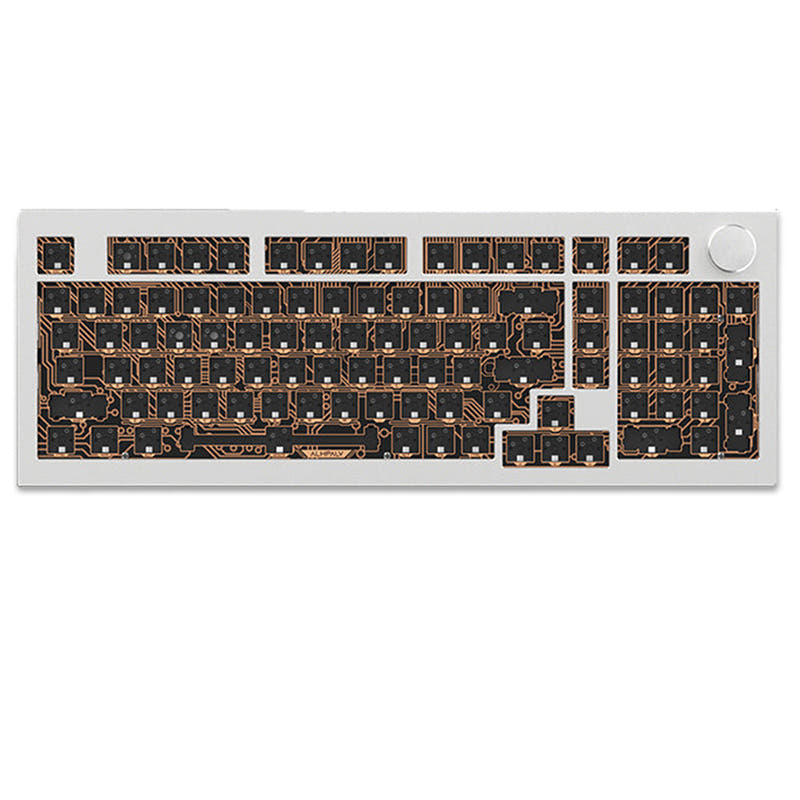
Which one should you get?
Get the
Jamesdonkey R2 V2
QMK
- QMK firmware support enables full key remapping and macros via a web-based driver
- Independent RGB chip provides 22 lighting effects with south-facing LEDs
- Custom Huanuo Latte switches are factory self-lubricating with a light 37g trigger force
- Smaller 4000mAh battery compared to the R2's 6000mAh
- Lacks a dedicated multimedia knob found on the R2
- No option to buy as a DIY barebones kit
Get the
Jamesdonkey R2
DIY Kit Showdown
- DIY kit/barebones format allows for complete customization of switches and keycaps
- Larger 6000mAh battery with vendor-claimed battery life up to 5 weeks
- Includes both 3-pin and 5-pin hot-swappable socket support for wider switch compatibility
- No QMK support, limiting software-level remapping compared to the R2 V2
- Heavier at 2205g, making it less portable than the R2 V2
- Pre-installed with clicky switches, which may not suit all users
If QMK programming is essential for your workflow or you prefer a pre-built board with linear switches out of the box, the Jamesdonkey R2 V2 is the better choice. If you enjoy building your own keyboard and want a multimedia knob with a larger battery for office or content creation tasks, the Jamesdonkey R2 kit offers more flexibility. Neither keyboard is a clear winner; your decision should hinge on whether you prioritize software customization or hardware modularity.
The differences that matter
Skip the 40-row spec sheet. These are the specs that change how each board feels, sounds, and fits your desk.
Jamesdonkey R2 V2
Jamesdonkey R2
Layout size
96%
100%
Battery
4,000 mAh
6,000 mAh
Knob
No
Yes
Weight
1,950 g
2,205 g
QMK
Yes
No
- Jamesdonkey R2 V2
- Jamesdonkey R2
- Performance
- 6557
- Build quality
- 6665
- Productivity
- 6388
- Customizability
- 7682
- Portability
- 5265
- Connection: Bluetooth, 2.4 GHz, Wired
- Hot-swappable
- Case material: Aluminum
- Mount style: Gasket Mount
- Plate material: FR4
- Keycaps: PBT
What will you mostly use it for?
The R2 V2 wins in gaming and programming due to its QMK support for custom keymaps and macros, while the R2 takes the lead for office and content creation thanks to its multimedia knob and larger battery. For travel, the lighter and more compact R2 V2 is preferable, but modders will favor the R2 for its DIY kit format with 3-pin and 5-pin switch support. Both keyboards are tied in build quality, but their feature sets cater to different user priorities.
Pick the Jamesdonkey R2 V2
- Features an independent RGB chip and vendor claims lag-free input with 1-2ms response time
- QMK support allows for custom keymaps and macros suited to game profiles
- Lighter weight at 1950g is easier to reposition on a desk
Jamesdonkey R2 V2 vs R2 specs
Every tracked spec, side by side. Rows marked with a dot differ between the boards.
12 of 23 specs differ
Jamesdonkey R2 V2
Jamesdonkey R2
Switch options
Hot-swappable
Mount style
Sound dampening
Layout size
Layout standard
Ergonomics
Knob
Display
Media keys
Connection
Battery
USB-C
Case material
Plate material
Keycaps
Weight
Dimensions
Backlight
QMK
N-key rollover
Mac & Windows
Released
Compare prices
Live prices from the stores we track, cheapest in-stock offer first.
Lowest price across stores, Amazon excluded.



Prices in USD are converted to your currency and can change at any time. KeebFinder may earn a commission when you buy through these links, at no extra cost to you.
Jamesdonkey R2 V2 vs R2: your questions
The R2 V2 has QMK support through a self-developed web-based driver. The vendor states that no download or installation is needed, as users can access settings and remap keys directly through the web driver. It does not mention VIA compatibility.
Yes, the R2 is a DIY kit with full-key hot-swappable sockets that support both 3-pin and 5-pin switches, giving you a wide range of aftermarket switch options. The kit comes with custom White Wings POM switches, but these can be replaced.
The Jamesdonkey R2 has a larger 6000mAh battery, with the vendor claiming up to 5 weeks of battery life per charge. The R2 V2 has a 4000mAh battery, which is smaller but still substantial.
The R2 V2 uses a 96% layout with a compact form factor, while the R2 has a 100-key compact layout. The R2 includes a volume knob and multi-media keys, whereas the R2 V2 does not have a knob.
Yes, both keyboards feature aluminum alloy cases. The R2 V2 uses high-quality aluminium alloy with CNC machining, and the R2 uses 6063 aluminum alloy with CNC-machined detailing, according to their respective vendors.
Yes, the R2 V2 is a pre-built keyboard that comes with custom Huanuo Latte linear switches and dual-tone injection-molded PBT keycaps. It is ready to use out of the box.
According to the vendor, the R2 is sold as a DIY kit. It comes with PBT five-sided heat sublimation keycaps and POM switches but is described as a barebones kit, meaning it is designed for users who want to customize components.
The R2 V2 is marketed with vendor claims of lag-free input and a 1-2ms response time, along with an independent RGB chip. The R2 mentions low-latency connectivity but does not specify a response time, making the R2 V2 the more clearly stated option for low latency.
Yes, both keyboards have Mac and Windows support. The R2 V2 includes a system mode switch key for toggling between Mac and Windows, while the R2 also lists Mac/Win support in its extra features.
Both boards use multi-layered internal padding. The R2 V2 includes PORON sandwich cotton, IXPE undershaft padding, and other foam layers. The R2 features IXPE undershaft padding, sandwich Poron padding, and silicone bottom cover padding.
Yes, the R2 V2 supports three-mode connectivity including USB-C wired connection, along with wireless Bluetooth and 2.4 GHz. The R2 also offers the same three-mode connectivity options.
Only the Jamesdonkey R2 includes a customizable multimedia knob. It defaults to volume control but can be customized for other functions using the driver software. The R2 V2 does not have a knob.
Not sold on either?


Still torn?
Answer a few quick questions and the keyboard finder ranks 2,000+ boards by how you will actually use yours.