Jamesdonkey R2 vs R2 ProFull-Size vs Screen-Equipped 95%
Choose the Jamesdonkey R2 for a full-size layout with dedicated media keys, or the R2 Pro for a slightly more compact design with an integrated screen.
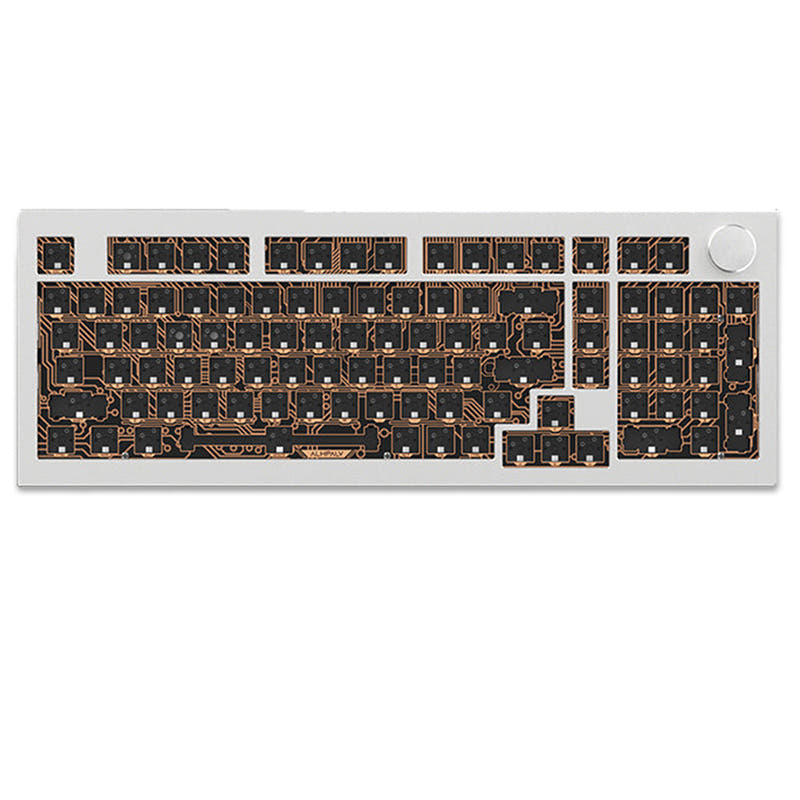

Which one should you get?
Get the
Jamesdonkey R2
Full-Size
- Full 100% layout with a dedicated numpad for data entry.
- Explicitly listed multi-media keys for quick audio and playback control.
- Includes a customized FR4 positioning plate according to its specifications.
- Larger 100% footprint may be less desk-space efficient.
- No integrated display screen for system information or customization.
- Switch options are listed only as 'Clicky' in the core specs.
Get the
Jamesdonkey R2 Pro
Screen-Equipped 95%
- 95% layout offers a slightly more compact design than a full-size board.
- Features a customizable display screen for showing system info or graphics.
- Switch options include Clicky, Linear, and Tactile in the core specifications.
- Lacks the explicit mention of dedicated multi-media keys found on the R2.
- The screen may add complexity without a defined productivity benefit for all users.
- Vendor listings showed it as sold out at the time of comparison.
Your primary need dictates the choice. If you require a numpad and dedicated media keys for office work or content creation, the Jamesdonkey R2 is the logical pick. If you prefer a slightly more compact layout and value the novelty or potential utility of an integrated display, the R2 Pro is the alternative, provided you can find it in stock. For all other uses, the experience will be nearly identical.
The differences that matter
Skip the 40-row spec sheet. These are the specs that change how each board feels, sounds, and fits your desk.
Jamesdonkey R2
Jamesdonkey R2 Pro
Layout size
100%
95%
Switch options
Clicky
Clicky, Linear, Tactile
Display
None
Yes
Media keys
Yes
No
Released
2023
2024
- Jamesdonkey R2
- Jamesdonkey R2 Pro
- Performance
- 5752
- Build quality
- 6569
- Productivity
- 8873
- Customizability
- 8282
- Portability
- 6564
- Connection: Bluetooth, 2.4 GHz, Wired
- Hot-swappable
- Battery: 6,000 mAh
- Case material: Aluminum
- Mount style: Gasket Mount
- Knob
What will you mostly use it for?
The R2 holds a clear advantage for office and content creation due to its full-size layout with dedicated media keys. For travel, the R2 Pro's 95% form factor is slightly more portable. In gaming, programming, and modding, the keyboards are essentially tied, sharing their core aluminum gasket-mount construction, hot-swap capability, and extensive internal sound-dampening features.
It's a tie
- Both offer the same triple-mode connectivity for low-latency options.
- Both feature the same gasket mount design and multi-layered internal padding for acoustics.
- Both have full-key hot-swappable sockets for switch customization.
Jamesdonkey R2 vs R2 Pro specs
Every tracked spec, side by side. Rows marked with a dot differ between the boards.
6 of 21 specs differ
Jamesdonkey R2
Jamesdonkey R2 Pro
Switch options
Hot-swappable
Mount style
Sound dampening
Layout size
Layout standard
Ergonomics
Knob
Display
Media keys
Connection
Battery
USB-C
Case material
Plate material
Keycaps
Weight
Dimensions
Backlight
Mac & Windows
Released
Compare prices
Live prices from the stores we track, cheapest in-stock offer first.
Lowest price across stores, Amazon excluded.



Prices in USD are converted to your currency and can change at any time. KeebFinder may earn a commission when you buy through these links, at no extra cost to you.
Jamesdonkey R2 vs R2 Pro: your questions
The main difference is the layout and the screen. The R2 is a 100% size keyboard, while the R2 Pro is a 95% size keyboard. The R2 Pro also includes a customizable display screen, which the standard R2 does not have.
Yes, both the Jamesdonkey R2 and R2 Pro feature a multi-function metallic knob. The vendor description for the R2 states its knob has a default volume control function and can be customized with driver software.
Yes, both keyboards feature full-key hot-swappable sockets. The manufacturer lists that they support both 3-pin and 5-pin mechanical switches, allowing for easy switch replacement without soldering.
Both the R2 and R2 Pro are equipped with a 6000mAh battery. The vendor page for the R2 claims this provides up to five weeks of battery life, depending on usage and RGB lighting settings.
According to the specifications, the standard R2 is listed with Clicky switches. The R2 Pro is listed with options for Clicky, Linear, and Tactile switches. Both are hot-swappable, so you can install any compatible switch you prefer.
Both keyboards feature an aluminum alloy case crafted with CNC machining. They use PBT material for the keycaps. The R2 specifically mentions an FR4 plate, while both utilize internal foam layers like IXPE and Poron for sound dampening.
Yes, both models offer triple-mode connectivity. They support a wired USB-C connection, a 2.4GHz wireless connection with a dongle, and Bluetooth wireless, providing flexibility to connect to PCs, Macs, and other devices.
The vendor description for the R2 mentions driver software can be used to customize the function of its multi-media knob. The R2 Pro's screen is also described as customizable, likely through a combination of its knob and function keys.
Both keyboards are designed with a similar Gasket Pro structure and multi-layered internal padding, including IXPE and Poron foam. Therefore, the typing feel and acoustic profile are expected to be very similar, focused on a softer, more muted sound.
Both the R2 and R2 Pro are available as DIY kits (barebones) or in fully-assembled configurations. If purchased as a kit, you will need to provide your own switches and keycaps. The fully-assembled versions come with them installed.
The Jamesdonkey R2 Pro weighs 2205 grams (approximately 4.86 lbs) in its fully-assembled form. The kit-only version is listed at 1805 grams. The standard R2 is also listed at 2205g.
Not sold on either?


Still torn?
Answer a few quick questions and the keyboard finder ranks 2,000+ boards by how you will actually use yours.