Jamesdonkey R2 V2 vs R2 Pro
Choose the R2 Pro for its screen, knob, and larger battery, or the R2 V2 if lower latency for gaming is a priority.


Which one should you get?
Get the
Jamesdonkey R2 V2
- Advertised low-latency performance with a 1~2ms response time according to the vendor.
- Features south-facing RGB LEDs for better compatibility with Cherry-profile keycaps.
- Includes QMK support for advanced key remapping and macros.
- Smaller 4000mAh battery compared to the R2 Pro's 6000mAh.
- Lacks a screen and multi-function knob, which are present on the R2 Pro.
- Heavier weight may be a drawback for some users, though it's slightly lighter than the Pro.
Get the
Jamesdonkey R2 Pro
Battery
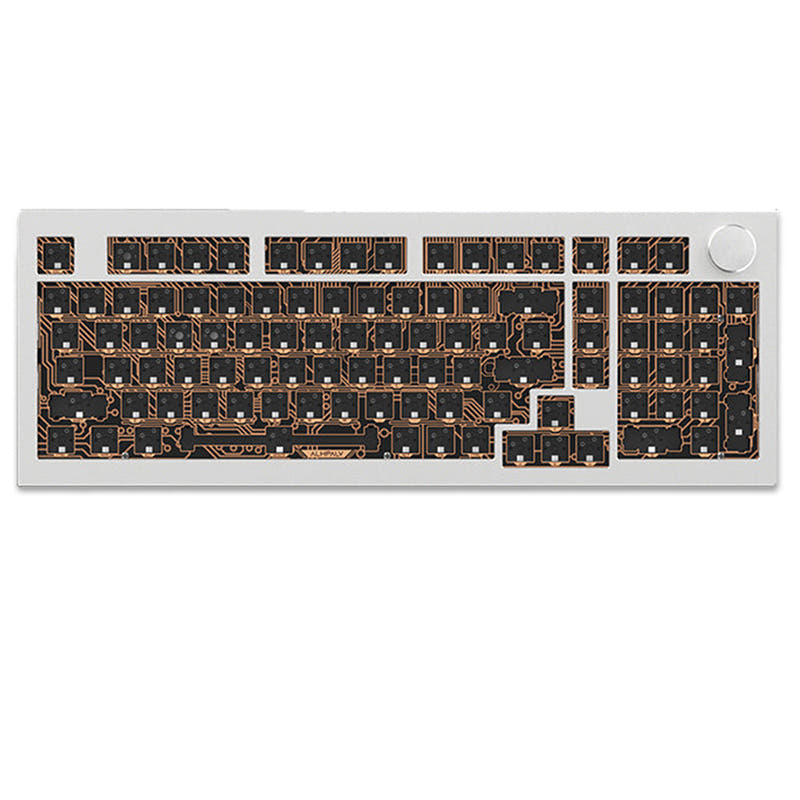
- Includes a customizable display screen for system information and settings.
- Features a multi-function metallic knob for media and volume control.
- Larger 6000mAh battery with a claimed five-week battery life.
- Heavier at 2205g for the fully assembled version.
- No specific low-latency claims are made in the provided vendor description.
- The screen and additional features may come at a slightly higher price point.
Your choice depends on which features you value more. The Jamesdonkey R2 Pro is the more feature-rich and versatile option, ideal for users who want a screen, knob, maximum battery life, and the option to build from a kit. The Jamesdonkey R2 V2 is the better pick if you prioritize the advertised gaming-oriented low latency and prefer a simpler, pre-built configuration. Both are solid aluminum gasket-mounted keyboards at their core.
The differences that matter
Skip the 40-row spec sheet. These are the specs that change how each board feels, sounds, and fits your desk.
Jamesdonkey R2 V2
Jamesdonkey R2 Pro
Layout size
96%
95%
Battery
4,000 mAh
6,000 mAh
Knob
No
Yes
Display
None
Yes
Weight
1,950 g
2,205 g
- Jamesdonkey R2 V2
- Jamesdonkey R2 Pro
- Performance
- 6452
- Build quality
- 6569
- Productivity
- 6373
- Customizability
- 7682
- Portability
- 5264
- Connection: Bluetooth, 2.4 GHz, Wired
- Hot-swappable
- Case material: Aluminum
- Mount style: Gasket Mount
- Keycaps: PBT
What will you mostly use it for?
The R2 Pro wins in most productivity and customization-focused categories due to its screen, knob, kit availability, and larger battery. The R2 V2 takes a narrow lead for gaming, based on its advertised low-latency performance. For travel, both are similarly bulky despite their wireless features, resulting in a tie. Modders and programmers will find more value in the Pro's barebones option and extra controls.
Pick the Jamesdonkey R2 V2
- The vendor description for the R2 V2 specifically mentions 'lag-free input' and a 'response time of just 1~2ms'.
- It features south-facing RGB LEDs, which are less likely to interfere with Cherry-profile keycaps commonly used by gamers.
Jamesdonkey R2 V2 vs R2 Pro specs
Every tracked spec, side by side. Rows marked with a dot differ between the boards.
9 of 21 specs differ
Jamesdonkey R2 V2
Jamesdonkey R2 Pro
Switch options
Hot-swappable
Mount style
Sound dampening
Layout size
Layout standard
Ergonomics
Knob
Display
Connection
Battery
Case material
Plate material
Keycaps
Weight
Dimensions
Backlight
QMK
N-key rollover
Mac & Windows
Released
Compare prices
Live prices from the stores we track, cheapest in-stock offer first.
Lowest price across stores, Amazon excluded.


Prices in USD are converted to your currency and can change at any time. KeebFinder may earn a commission when you buy through these links, at no extra cost to you.
Jamesdonkey R2 V2 vs R2 Pro: your questions
The most significant difference is the inclusion of a customizable display screen and a multi-function metallic knob on the R2 Pro. The R2 Pro also has a larger 6000mAh battery and is available as a DIY kit, while the R2 V2 is promoted with a focus on low-latency performance.
The Jamesdonkey R2 Pro has a larger 6000mAh battery compared to the R2 V2's 4000mAh battery. The vendor for the R2 Pro claims this provides up to five weeks of battery life, suggesting significantly longer wireless usage.
The vendor description for the R2 V2 specifically markets it for gaming, citing 'lag-free input' and a 'response time of just 1~2ms'. It also features south-facing RGB LEDs, which are preferred by gamers using Cherry-profile keycaps to avoid interference.
Yes. The product metadata for the R2 Pro lists 'Diy Kit/Barebones' as an extra feature, and the vendor description confirms it is 'Available in Kit Only or Fully-Assembled Options'.
The Jamesdonkey R2 V2 explicitly lists 'QMK Support' in its metadata and vendor description. There is no mention of QMK or VIA support for the R2 Pro in the provided information.
The fully assembled Jamesdonkey R2 Pro is heavier at 2205 grams. The Jamesdonkey R2 V2 weighs 1950 grams, making it the lighter of the two, though both are substantial aluminum boards.
Yes, both keyboards use a compact layout that includes a numpad. The R2 V2 is a 96% layout and the R2 Pro is a 95% layout, both integrating the numpad into a condensed form factor.
Both the Jamesdonkey R2 V2 and R2 Pro use a gasket mount design. The vendor descriptions detail a 'gasket-mounted internal structure' with multiple foam layers for a softer, more elastic typing feel.
Yes, both keyboards feature PBT keycaps according to their metadata. The R2 V2 uses dual-tone injection-molded PBT keycaps, while the R2 Pro uses dye-sublimed PBT keycaps.
The R2 Pro may have an edge for office use. Its vendor description specifically mentions a 'multi-layered silencing structure' with materials like IXPE and PORON foam. You can also install silent switches in its hot-swappable sockets or purchase the barebones kit with your preferred quiet switches.
Yes, both the Jamesdonkey R2 V2 and R2 Pro feature full-key hot-swappable sockets, allowing you to easily change mechanical switches without soldering. The R2 Pro's vendor notes it supports both 3-pin and 5-pin switches.
Not sold on either?


Still torn?
Answer a few quick questions and the keyboard finder ranks 2,000+ boards by how you will actually use yours.