Keychron K1 Pro vs K3 V3
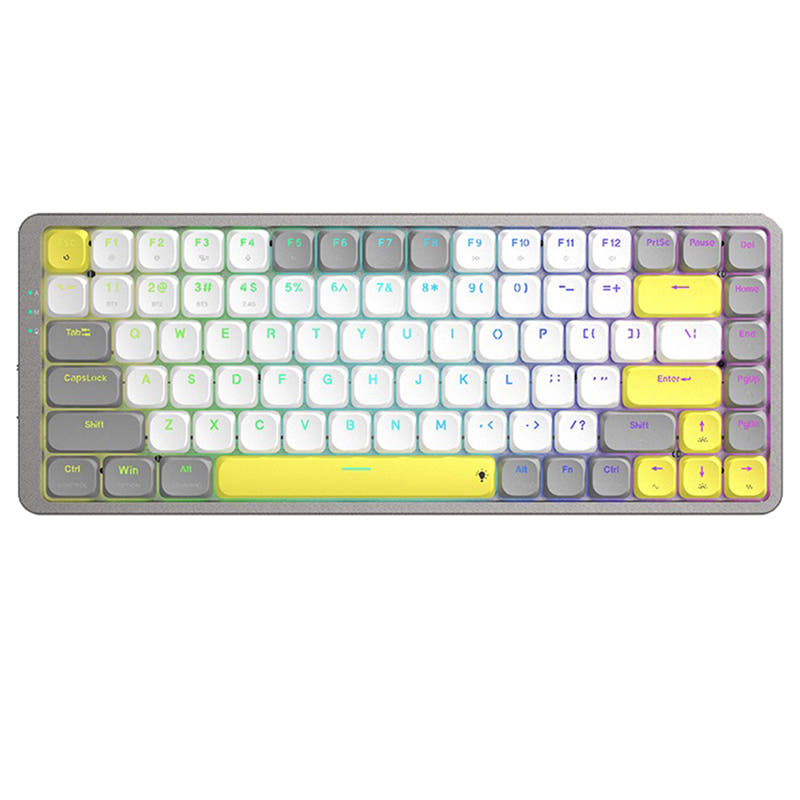
Choose the K1 Pro for a spacious TKL layout and a higher battery capacity, or the K3 V3 for a more compact frame with acoustic foam enhancements.
KeebFinder may earn a commission when you buy through these links, at no extra cost to you.

5.0 (5)5.0 · 5 reviews
from$67at Keychron

Which one should you get?
Get the
Keychron K1 Pro
Battery
Build quality in the top 15% of 80% boards under $100.
- 80% TKL layout includes dedicated navigation keys ideal for programming.
- Larger 2000mAh battery supports extended wireless use.
- Double-shot PBT keycaps resist oil and wear over time.
- Low-profile switches and keycaps only. Standard MX keycaps will not fit.
- North-facing LEDs. Cherry-profile keycaps can hit the switch housing.
- No numpad.
Get the
Keychron K3 V3
Build quality in the top 10% of 75% boards under $100.
- Enhanced with IXPE, EPDM, and latex acoustic foams for a quieter typing experience.
- Top mount and PCB mount design provides a different typing feel and modding potential.
- Lighter at 540g with a smaller footprint for better portability.
- Low-profile switches and keycaps only. Standard MX keycaps will not fit.
- North-facing LEDs. Cherry-profile keycaps can hit the switch housing.
- Missing ISO-FR, ISO-ES. The other board is sold in those layouts.
- No numpad.
If your priority is a full TKL layout with dedicated editing keys and longer battery life, the Keychron K1 Pro is the clear choice. If you prefer a more compact desk footprint and a quieter typing experience with acoustic foam layers, the Keychron K3 V3 is the better match. Both keyboards deliver solid low-profile performance, so your layout and acoustic preferences will ultimately decide the winner.
The differences that matter
Skip the 40-row spec sheet. These are the specs that change how each board feels, sounds, and fits your desk.
Keychron K1 Pro
Keychron K3 V3
Layout size
80%
75%
Battery
2,000 mAh
1,550 mAh
A larger battery means fewer cables during the day
Case material
ABS, Aluminum, Plastic
ABS, Aluminum
Mount style
Tray Mount
PCB Mount, Plate Mount, Top Mount
Weight
580 g
540 g
Heavier boards stay planted and lighter ones travel
- Keychron K1 Pro
- Keychron K3 V3
- Performance
- 8182
- Build quality
- 8083
- Productivity
- 8080
- Customizability
- 8889
- Portability
- 7377
- Connection: Bluetooth, Wired
- Hot-swappable
- Low profile
- Max polling rate: 1,000 Hz
- Switch options: Clicky, Linear, Tactile
- QMK
What will you mostly use it for?
The K1 Pro and K3 V3 tie directly in gaming and content creation due to identical wired polling rates and QMK programmability. The K3 V3 edges ahead for office and planning contexts thanks to its acoustic foam layers and lighter, more compact chassis. The K1 Pro wins clearly for programming roles thanks to its full TKL layout with dedicated editing keys. Modders will appreciate the K3 V3’s pre-installed foams and alternate mounting style.
It's a tie
- Both offer a 1000 Hz polling rate in wired mode for competitive play.
- Each supports N-Key Rollover over both wireless and wired connections.
- Both come with linear switch options suitable for rapid inputs.
Keychron K1 Pro vs K3 V3 specs
Every tracked spec, side by side. Rows marked with a dot differ between the boards.
8 of 25 specs differ
Keychron K1 Pro
Keychron K3 V3
Switch options
Hot-swappable
Mount style
Low profile
Layout size
Layout standard
Ergonomics
Display
Media keys
Connection
Max polling rate
Battery
USB-C
Case material
Plate material
Keycaps
Weight
Dimensions
Typing angle
Backlight
QMK
VIA
N-key rollover
Mac & Windows
Released
ISO layouts by store
Which stores sell ISO-DE, UK, and the other regional layouts.
Keychron K1 Pro
Keychron
ISO-DE, ISO-UK, ISO-Nordic, ISO-FR, ISO-ES, ISO-SW
In stockShips to you
Keychron (DE)
ISO-DE, ISO-UK, ISO-Nordic, ISO-FR, ISO-ES, ISO-SW
In stockDoes not ship to you
Keychron K3 V3
Keychron
ISO-DE, ISO-UK, ISO-Nordic, ISO-SW
In stockShips to you
Keychron (DE)
ISO-DE, ISO-UK, ISO-SW
In stockDoes not ship to you
Compare prices
Live prices from the stores we track, cheapest in-stock offer first.
Prices in USD are converted to your currency and can change at any time. KeebFinder may earn a commission when you buy through these links, at no extra cost to you.
Lowest price across stores, Amazon excluded.



Keychron K1 Pro vs K3 V3: your questions
The Keychron K1 Pro features a 2000mAh battery, while the K3 V3 has a smaller 1550mAh battery. Based on capacity alone, the K1 Pro should offer longer unplugged runtime between charges.
Yes, both the K1 Pro and K3 V3 offer hot-swappable versions. The K1 Pro is compatible with Gateron low-profile mechanical switches only, while the K3 V3 supports Keychron Milk POM switches as well as Gateron low-profile switches.
The K3 V3 is better suited for quiet typing, as it includes advanced acoustic foam layers such as IXPE, EPDM, and latex foam to dampen sound. The K1 Pro does not list similar foam enhancements.
Yes, both models support QMK firmware and VIA (via the Keychron Launcher web app) for remapping keys, creating macros, and adjusting backlight settings. They are compatible with Windows, macOS, and Linux.
The K3 V3 has 84 keys in a 75% layout, which includes a function row. The K1 Pro has 87 keys in an 80% TKL layout, which omits the number pad but retains dedicated navigation keys.
No. The K1 Pro comes with double-shot PBT keycaps that are oil-resistant and durable. The K3 V3 uses LSA profile shine-through ABS keycaps, which are more prone to wear over time but provide a brighter backlight effect.
The K3 V3 is lighter at 540g compared to the K1 Pro at 580g. Its smaller dimensions (306x116mm) also make it more compact for packing in a bag.
Yes. The K1 Pro offers three levels of adjustable typing angle, with the base set at 3 degrees. The K3 V3 also offers three levels, specifically 2.5, 4.2, and 6.5 degrees, for more ergonomic wrist support.
Yes, both keyboards are fully compatible with Mac and Windows. They include extra keycaps for both operating systems and support different keymaps for each platform through the Keychron Launcher.
The K3 V3 is more mod-friendly due to its top mount and PCB mount design, combined with pre-installed IXPE, EPDM, and latex foams. The K1 Pro uses a tray mount design, which offers less structural variation for modifications.
Both keyboards operate at a 90 Hz polling rate in wireless mode. In wired mode, both offer a 1000 Hz polling rate, as stated in their specifications.
The product page for the K3 V3 shows no customer reviews available at this time. The K1 Pro has positive reviews from users, with some noting improved keycap durability over earlier versions.
Not sold on either?




Still torn?
Answer a few quick questions and the keyboard finder ranks 2,000+ boards by how you will actually use yours.