Keychron V3 Max vs Nuphy Kick75Layout Flexibility vs Profile Choice
Choose the Keychron V3 Max for extensive layout and language support, or the Nuphy Kick75 for a unique convertible typing profile.

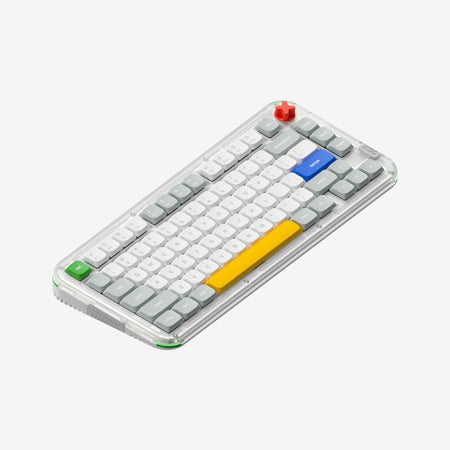
Which one should you get?
Get the
Keychron V3 Max
Layout Flexibility
- Extensive ISO layout support for UK, German, French, Spanish, Nordic, and Swiss languages.
- Larger 4000mAh battery capacity for extended wireless use.
- Available as a barebones DIY kit for custom builds.
- Heavier weight (895g) compared to the Kick75's low-profile option.
- Larger 80% (TKL) footprint is less desk-space efficient than a 75% layout.
- Case material is ABS plastic, while the Kick75 uses a polycarbonate case.
Get the
Nuphy Kick75
Profile Choice
- Unique convertible design allows switching between high and low typing profiles.
- More compact 75% layout saves desk space.
- Lighter in its low-profile configuration (877g).
- Smaller 2500mAh battery capacity.
- Only supports ANSI layout, lacking ISO options.
- Requires a separate purchase of a conversion kit to change profiles after the initial buy.
Your primary need dictates the choice. If you require specific ISO language layouts, want the longest battery life, or plan to mod extensively from a barebones kit, the Keychron V3 Max is the clear selection. If you value a smaller footprint, are intrigued by the ability to switch between high and low typing profiles, and use a standard ANSI layout, the Nuphy Kick75 offers a more unique and portable experience. Both deliver excellent core features like tri-mode connectivity and deep software customization.
The differences that matter
Skip the 40-row spec sheet. These are the specs that change how each board feels, sounds, and fits your desk.
Keychron V3 Max
Nuphy Kick75
Layout size
80%
75%
Case material
ABS, Plastic
Plastic
Switch options
Clicky, Linear, Tactile
Mechanical
Mount style
Gasket Mount, Plate Mount
Gasket Mount
Weight
895 g
1,009 g
- Keychron V3 Max
- Nuphy Kick75
- Performance
- 8482
- Build quality
- 8778
- Productivity
- 9893
- Customizability
- 9992
- Portability
- 7382
- Connection: Bluetooth, 2.4 GHz, Wired
- Hot-swappable
- Battery: 4,000 mAh
- Max polling rate: 1,000 Hz
- Knob
- QMK
What will you mostly use it for?
The V3 Max wins for office use and programming due to its superior international layout support and TKL navigation keys, and it is the stronger choice for modders with its barebones option and screw-in stabilizers. The Kick75 is better suited for travel thanks to its more compact 75% form and lighter low-profile configuration. For gaming and content creation, the keyboards are evenly matched on core performance and multimedia features.
It's a tie
- Both offer a 1000 Hz polling rate in 2.4 GHz and wired modes for low latency.
- Both feature N-key rollover for simultaneous key presses.
- Both have south-facing RGB to avoid interference with Cherry-profile keycaps.
What owners say
Ratings and quotes collected from verified store reviews, including the critical ones.
Keychron V3 Max
8 owner reviews
“This keyboard has been great. My first keyboard I've ever had. I had faulty switch, but you guys just gave me a whole new keyboard. Thanks a lot! -Mack”
“Stopped working in wired mode after a couple months. 2.4 connectivity spotty. I regret buying this keyboard”
Nuphy Kick75
No owner reviews collected yet.
Keychron V3 Max vs Nuphy Kick75 specs
Every tracked spec, side by side. Rows marked with a dot differ between the boards.
8 of 27 specs differ
Keychron V3 Max
Nuphy Kick75
Switch options
Hot-swappable
Mount style
Sound dampening
Screw-in stabilizers
Layout size
Layout standard
Ergonomics
Knob
Display
Media keys
Connection
Max polling rate
Battery
USB-C
Case material
Plate material
Keycaps
Weight
Dimensions
Typing angle
Backlight
QMK
VIA
N-key rollover
Mac & Windows
Released
Compare prices
Live prices from the stores we track, cheapest in-stock offer first.
Lowest price across stores, Amazon excluded.




Prices in USD are converted to your currency and can change at any time. KeebFinder may earn a commission when you buy through these links, at no extra cost to you.
Keychron V3 Max vs Nuphy Kick75: your questions
The Keychron V3 Max has a larger 4000mAh battery compared to the Nuphy Kick75's 2500mAh (for its NuPhyIO version). According to their specifications, this gives the V3 Max a potential advantage in wireless runtime, though actual usage will vary with settings like RGB lighting.
Yes, but only with the Keychron V3 Max. The V3 Max explicitly supports ISO layouts including UK, German, French, Spanish, Nordic, and Swiss. The Nuphy Kick75 only supports the ANSI layout standard.
The Nuphy Kick75 is designed to be convertible between high-profile and low-profile configurations. This changes the height and angle of the keyboard. However, switching requires purchasing a separate conversion kit; the keyboard comes pre-configured as one profile.
Yes, but they differ. The Keychron V3 Max uses screw-in PCB stabilizers, which are easier to remove and replace. The Nuphy Kick75 uses plate-mounted stabilizers. The V3 Max listing also states it supports third-party screw-in stabilizers.
The Nuphy Kick75 is generally more portable. It has a more compact 75% layout and is lighter in its low-profile configuration (877g) compared to the TKL V3 Max (895g). Its convertible design also allows for a slimmer profile.
Yes. Both the Keychron V3 Max and Nuphy Kick75 are listed as compatible with macOS and Windows. The V3 Max includes a physical system toggle and extra keycaps for both operating systems.
Only the Keychron V3 Max offers this option. It is available as a 'Barebone Knob' kit, which does not include switches or keycaps. The Nuphy Kick75 is only listed as a pre-built unit.
The Keychron V3 Max uses an ABS plastic case. The Nuphy Kick75 uses a polycarbonate case for both the top and bottom, which may offer a different aesthetic and feel.
For the 2.4 GHz wireless connection, yes. Both keyboards specify a 1000 Hz polling rate in 2.4 GHz mode. The V3 Max listing also notes a 90 Hz polling rate in Bluetooth mode.
The Nuphy Kick75 might be appealing for its straightforward pre-built nature and unique profile option. However, the Keychron V3 Max is also beginner-friendly in its fully assembled form and offers greater long-term flexibility for layout changes and modding.
Both support the open-source QMK and VIA firmware for deep key remapping and macro programming. The Nuphy Kick75 also offers a version with NuPhyIO software, and the Keychron V3 Max can be configured via the Keychron Launcher web app.
Not sold on either?





Still torn?
Answer a few quick questions and the keyboard finder ranks 2,000+ boards by how you will actually use yours.