Machenike AIR50 vs UGREEN KU101Hot-Swap vs Battery Life
Choose the Machenike AIR50 for switch customization and a 2.4GHz wireless dongle, or the UGREEN KU101 for significantly longer battery life and a tactile typing experience.


Which one should you get?
Get the
Machenike AIR50
Hot-Swap
- Hot-swappable sockets allow for easy switch replacement and customization.
- Includes 2.4GHz wireless connectivity alongside Bluetooth and wired modes.
- Uses PBT material keycaps for better long-term durability.
- Advertised battery life is shorter ('up to a week') compared to the KU101.
- The vendor description does not specify a built-in typing angle.
- Lacks the specific emoticon key and broader OS compatibility listed for the KU101.
Get the
UGREEN KU101
Battery Life
- Advertises a very long battery life of up to 180 hours with backlight off.
- Features a 6° ergonomic typing angle for comfort.
- Vendor lists compatibility with Windows, Mac OS, Android, and iOS.
- Lacks 2.4GHz wireless connectivity, offering only Bluetooth and wired modes.
- No mention of hot-swappable sockets, limiting future switch customization.
- Keycap material is not specified in the provided description.
Select the Machenike AIR50 if your priority is a versatile wireless connection for gaming or the ability to easily change switches later. Opt for the UGREEN KU101 if you need a keyboard that can last for weeks on a single charge and prefer a tactile typing experience with a defined ergonomic angle. Both are competent low-profile options at a similar price point.
The differences that matter
Skip the 40-row spec sheet. These are the specs that change how each board feels, sounds, and fits your desk.
Machenike AIR50
UGREEN KU101
Connection
Bluetooth, 2.4 GHz, Wired
Bluetooth, Wired
Hot-swappable
Yes
No
Switch options
Clicky, Linear
Clicky, Tactile
Backlight
RGB
White
USB-C
No
Yes
- Machenike AIR50
- UGREEN KU101
- Performance
- 4842
- Build quality
- 3938
- Productivity
- 5659
- Customizability
- 5945
- Portability
- 7475
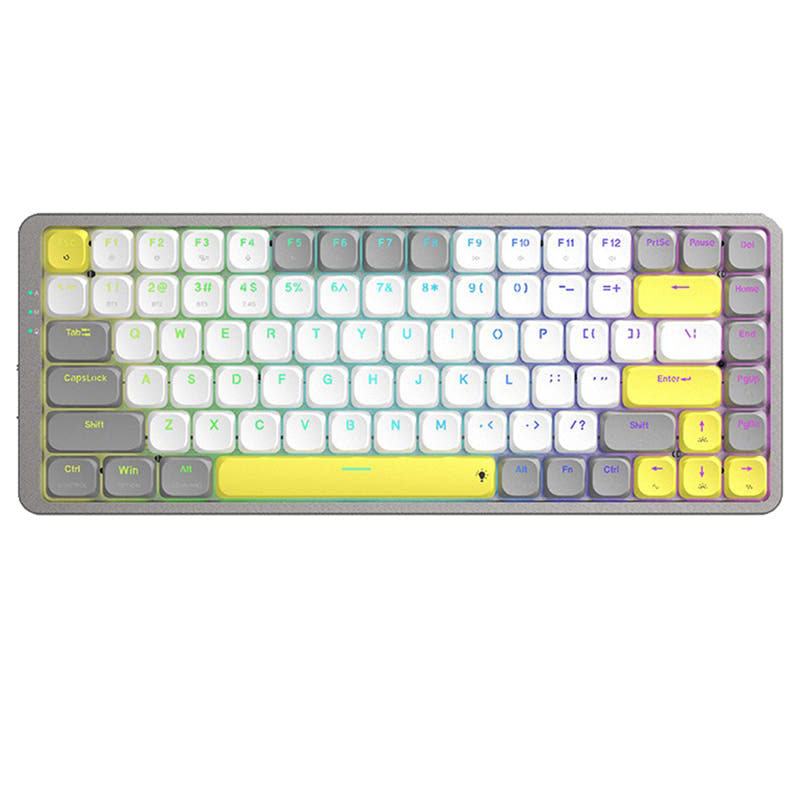
- Layout size: 75%
- Low profile
What will you mostly use it for?
The Machenike AIR50 is the clear choice for gamers and modders due to its 2.4GHz wireless and hot-swap capability. The UGREEN KU101 wins for office use and content creation, where its exceptional battery life and ergonomic angle are major advantages. For programming and travel, the keyboards are evenly matched, making the decision a matter of switch feel preference.
Pick the Machenike AIR50
- Includes a 2.4GHz wireless dongle for a potentially more stable, low-latency connection, which the UGREEN KU101 lacks.
- Offers linear switch options (Red) preferred by many gamers for smooth, rapid keystrokes.
Machenike AIR50 vs UGREEN KU101 specs
Every tracked spec, side by side. Rows marked with a dot differ between the boards.
5 of 18 specs differ
Machenike AIR50
UGREEN KU101
Switch options
Hot-swappable
Low profile
Layout size
Layout standard
Ergonomics
Display
Connection
Battery
USB-C
Case material
Keycaps
Weight
Dimensions
Typing angle
Backlight
Mac & Windows
Released
Compare prices
Live prices from the stores we track, cheapest in-stock offer first.


Prices in USD are converted to your currency and can change at any time. KeebFinder may earn a commission when you buy through these links, at no extra cost to you.
Machenike AIR50 vs UGREEN KU101: your questions
Only the Machenike AIR50 features full-key hot-swappable sockets, according to its vendor description. This allows you to change the mechanical switches without soldering. The UGREEN KU101's description does not mention hot-swap capability.
No. The UGREEN KU101 offers dual-mode connectivity with Bluetooth and wired USB Type-C only. The Machenike AIR50 is the one that includes a 2.4GHz wireless mode alongside Bluetooth and wired options.
The UGREEN KU101 advertises a battery life of up to 180 hours with the backlight off. The Machenike AIR50's vendor states its 1600mAh battery provides an extended life of up to a week. The KU101 claims a significantly longer runtime.
The Machenike AIR50 offers a choice between linear Red switches and clicky Blue switches. The UGREEN KU101 comes with tactile Brown switches and also lists a clicky option in its metadata.
The UGREEN KU101 has a specified 6° ergonomic typing angle, which may promote a more comfortable wrist position. The Machenike AIR50's description mentions adjustable feet but does not specify a built-in angle.
No. The Machenike AIR50 uses PBT material keycaps, which are generally more resistant to wear and shine. The UGREEN KU101's vendor description does not specify the keycap material.
Both keyboards support Mac systems. The UGREEN KU101's vendor also explicitly lists compatibility with Android and iOS devices, suggesting broader support for tablets and phones.
The Machenike AIR50 features RGB backlighting with 20 different lighting effects. The UGREEN KU101 has a white backlight with 15 different lighting effects and 4 brightness levels.
Yes, the UGREEN KU101 includes an exclusive emoticon key designed for quickly sharing funny emoticons, a feature not mentioned for the Machenike AIR50.
Yes, both are well-suited for travel. They share a compact 75% layout, low-profile design, and offer wireless Bluetooth connectivity to pair with laptops or mobile devices without cables.
The main reasons are its hot-swappable design for future customization and the inclusion of a 2.4GHz wireless connection for a more reliable, dongle-based wireless experience, which is beneficial for gaming.
Not sold on either?



Still torn?
Answer a few quick questions and the keyboard finder ranks 2,000+ boards by how you will actually use yours.