Nuphy Air75 V2 vs Mechboards MBUK Macro Pad KitFull Keyboard vs DIY Macro Pad
Choose the Nuphy Air75 V2 for a complete, high-performance typing experience, or the MBUK kit solely for a low-cost soldering practice project.

Which one should you get?
Get the
Nuphy Air75 V2
Full Keyboard
- Tri-mode wireless connectivity with a 1000Hz polling rate in 2.4GHz and wired modes.
- Hot-swappable sockets and full QMK/VIA support for extensive customization.
- Includes sound-dampening materials like plate poron foam and an IXPE sheet under the PCB.
- The low-profile design and switches may not be preferred by users seeking a traditional high-profile typing feel.
- Requires separate purchase for accessories like a carrying folio or wrist rest.
- At a higher price point, it represents a significant investment compared to basic keyboards.
Get the
Mechboards MBUK Macro Pad Kit
DIY Macro Pad
- Extremely low cost, making it an accessible entry point for soldering practice.
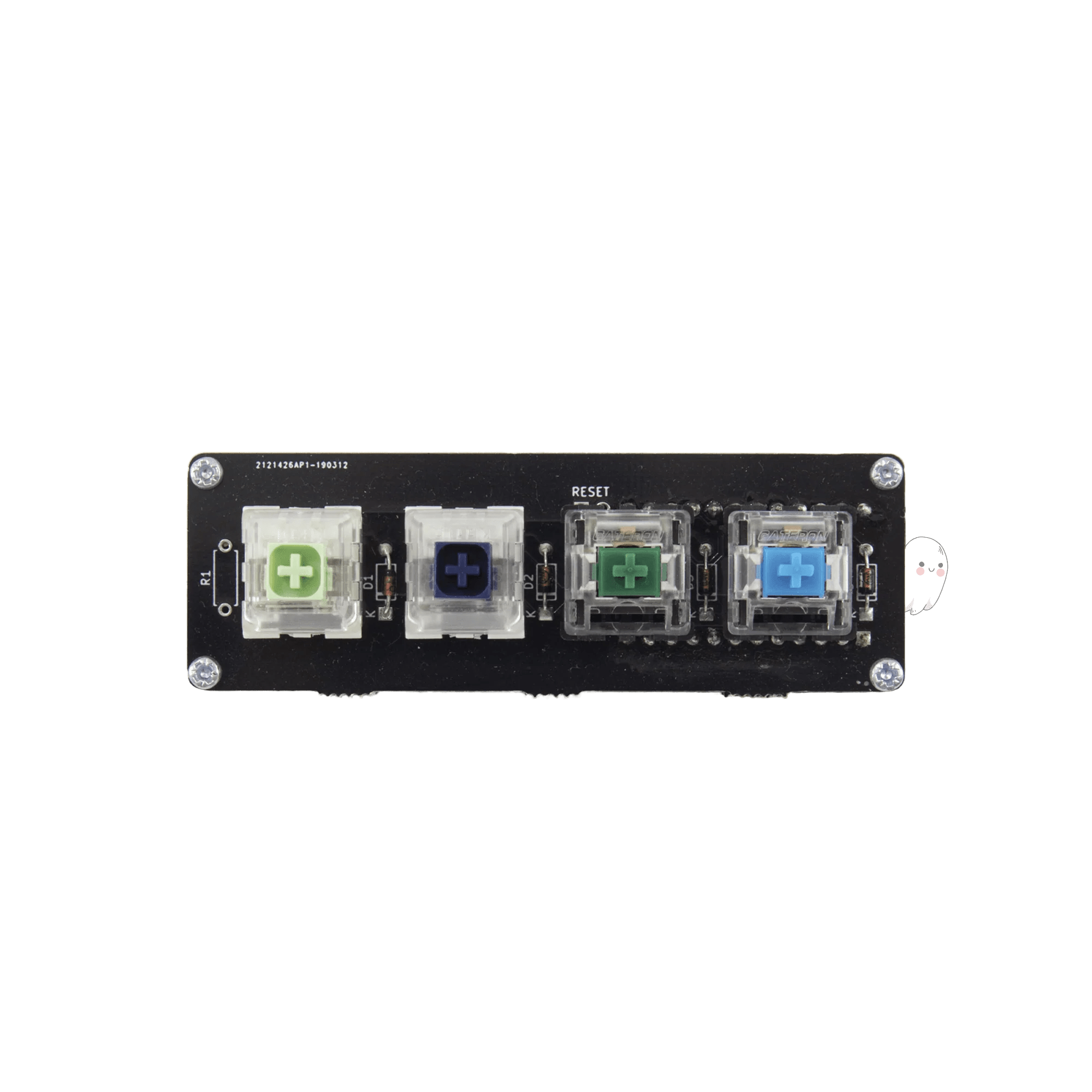
- The kit includes a PCB, diodes, and four random switches to complete a basic project.
- Supports QMK firmware, allowing for key mapping on the completed pad.
- Is not a functional keyboard on its own; it is a barebones DIY kit requiring a separate microcontroller, soldering skill, and a case.
- Only provides four keys, limiting its utility as a input device.
- Lacks any standard features like wireless connectivity, RGB lighting, or a pre-built enclosure.
Your choice hinges entirely on your goal. For a premium, ready-to-use wireless keyboard with extensive features, the Nuphy Air75 V2 is the only viable option. Only consider the Mechboards MBUK Macro Pad Kit if you explicitly want a cheap, simple project to practice soldering components onto a PCB, with no expectation of it serving as a primary input device.
The differences that matter
Skip the 40-row spec sheet. These are the specs that change how each board feels, sounds, and fits your desk.
Nuphy Air75 V2
Mechboards MBUK Macro Pad Kit
Layout size
75%
Macropad
Hot-swappable
Yes
No
Low profile
Yes
No
Ergonomics
Standard
Ortholinear
VIA
Yes
No
- Nuphy Air75 V2
- Mechboards MBUK Macro Pad Kit
- Performance
- 8145
- Build quality
- 8065
- Productivity
- 8950
- Customizability
- 9457
- Portability
- 7960
- QMK
What will you mostly use it for?
The Nuphy Air75 V2 is the clear choice for all standard computing use cases, from gaming to office work, due to its complete feature set, wireless connectivity, and customizable layout. The Mechboards MBUK kit wins only in the specific context of being a low-cost, introductory soldering project for hobbyists. For modding, they tie on the principle of supporting customization, but the Air75 V2 offers a far more advanced and accessible starting point for most users.
Pick the Nuphy Air75 V2
- The Air75 V2 offers a 1000Hz polling rate in its 2.4GHz and wired modes for low latency.
- It includes N-key rollover for simultaneous key presses.
- The Cowberry switch option has a shortened 1.2mm pre-travel for rapid actuation.
Nuphy Air75 V2 vs Mechboards MBUK Macro Pad Kit specs
Every tracked spec, side by side. Rows marked with a dot differ between the boards.
12 of 25 specs differ
Nuphy Air75 V2
Mechboards MBUK Macro Pad Kit
Switch options
Hot-swappable
Low profile
Sound dampening
Layout size
Layout standard
Ergonomics
Display
Media keys
Connection
Max polling rate
Battery
USB-C
Case material
Plate material
Keycaps
Weight
Dimensions
Typing angle
Backlight
QMK
VIA
N-key rollover
Mac & Windows
Released
Compare prices
Live prices from the stores we track, cheapest in-stock offer first.
Lowest price across stores, Amazon excluded.



Prices in USD are converted to your currency and can change at any time. KeebFinder may earn a commission when you buy through these links, at no extra cost to you.
Nuphy Air75 V2 vs Mechboards MBUK Macro Pad Kit: your questions
No, the MBUK is not a keyboard. It is a DIY kit containing a printed circuit board (PCB), diodes, and four random switches. According to the vendor, it is a "super simple kit" for learning to solder and requires you to source and attach your own microcontroller (like a Pro Micro) to become functional.
The Nuphy Air75 V2 has a 1000Hz polling rate when using its 2.4GHz wireless dongle or the wired USB-C connection. Its Bluetooth connection operates at a 125Hz polling rate.
Yes. The manufacturer states the Air75 V2 ships with QMK and VIA support. This allows for deep customization, including key remapping, macro creation, and lighting effects directly through the VIA configuration software.
Based on the vendor description, the kit includes a PCB, the necessary diodes, and four random switches. It does not include a microcontroller, keycaps, a case, or any tools required for assembly like a soldering iron.
Yes. The manufacturer lists compatibility with macOS, Windows, and Linux. The product page also notes dedicated shortcuts for macOS features like Spotlight and Launchpad, and includes Mac-specific replacement keycaps.
The Air75 V2 comes with double-shot PBT keycaps. The vendor also sells optional shine-through keycaps and various themed dye-sublimated PBT keycap sets separately.
No. The Nuphy Air75 V2 features hot-swappable sockets. This means you can change the switches without any soldering, using the included switch puller tool.
The Air75 V2 has a 4000mAh battery. Manufacturer lab tests indicate up to 220 hours of use with all lighting turned off, and between 35 to 57 hours with all RGB lights active.
Potentially, but only after it is fully assembled with a microcontroller and programmed via QMK. Even then, its four-key limit means it can only hold a very small set of dedicated macros, unlike a full keyboard where macros can be layered on existing keys.
The keyboard features an aluminum top frame and an ABS plastic bottom case. The keycaps are made from PBT plastic.
It is designed for a quiet, refined typing experience. The manufacturer incorporates plate poron foam, an IXPE sound-dampening sheet, and silicone in the spacebar to improve sound consistency. It also offers a variety of low-profile linear and tactile switch options.
The vendor explicitly describes its purpose as a tool to "Learn how to solder." It is a low-cost, low-risk practice project for beginners in the keyboard hobby, with the vendor offering to send extra parts if mistakes are made during assembly.
Not sold on either?


Still torn?
Answer a few quick questions and the keyboard finder ranks 2,000+ boards by how you will actually use yours.